TL;DR: Bubble and Bolt are AI app builders that generate functional apps from text prompts, but Bubble offers a visual no-code editor that lets non-developers maintain full control and customize their apps without touching code, while Bolt generates code-based outputs better suited for developers who need to manually edit when AI reaches its limits. Bubble provides an all-in-one platform with built-in hosting, security, databases, and enterprise-grade features, making it ideal for launching production-ready apps, whereas Bolt excels as an AI coding assistant for experienced developers building prototypes quickly.
The traditional software development process was measured in months or years.
Then no-code came on the scene, and that changed to weeks or even days.
Add AI to no-code and the timeline is now days, or even minutes.
So we knew it was time to test the biggest AI app builders to see which performs best for different use cases.
Bubble is the only fully visual AI app builder that allows anyone to build and launch fully functional web and native mobile apps without code. Bubble lets you vibe code without the code: chat with AI when you want speed, edit directly when you want control. Escape the curse of the blank page with AI generation, then seamlessly switch to Bubble's visual editor to customize every aspect of your app without writing (or reading) code. Anyone can build, launch, and grow an app while remaining in control the whole time.
Bolt, a product of StackBlitz, is an AI-powered app builder that generates and iterates on code for your app alongside a coding environment for manual changes. It gives you a visual preview of your app alongside an AI chat to make iterations. Bolt can be used by non-developers without coding knowledge, though the platform is also designed to give developers speed, flexibility, and full control with the ability to edit code directly.
What are AI app builders?
An AI app builder is a tool that turns your ideas into a working application using artificial intelligence. Instead of writing code from scratch, you describe what you want in plain English.
The AI then generates the app's key components for you in minutes, including:
- The user interface (UI) design and layout
- A functional database to store your app's data
- The underlying logic and workflows that make the app work
This process, most often called "vibe coding," is designed to get you a functional starting point incredibly fast. The main goal is to help you go from an idea to a real app you can test and see, without the traditional delays of manual design and coding.
The challenge with most AI app builders is that they leave you stuck with code you can't read or edit when AI hits its limits. What separates the best AI app builders is whether you can take control when needed. Bubble lets you switch seamlessly between AI prompting and visual editing, so you're never stuck — whether AI hits its limits or you want precise control.
Bubble vs. Bolt: Key factors
When choosing an AI app builder — whether it’s Bubble, Bolt, or something else — the critical question is what happens when AI can't deliver exactly what you want.
In comparing Bubble and Bolt, we focused not only on initial AI generation but also on what happens when you need to iterate — whether through continued AI assistance or direct editing.
Key factors to consider include:
- Customization: How easy does the platform make it to iterate on and customize your app?
- Technical knowledge: Do you ever have to deal with code, or can those without coding knowledge understand their app at every point?
- Control: Does the AI cause builders to get “stuck,” or do you have full control through the whole process?
- Scale: Is scaling or building an app on this tool cost-prohibitive due to hidden fees related to AI usage?
Both Bubble and Bolt provide fast AI generation, but Bubble lets you continue building in two ways: keep using AI through the Bubble AI Agent, or switch to visual editing whenever you want precise control — whether it's over the design, backend database, privacy rules, or logic workflows that make your app run. Bubble never leaves you stuck with code you can't read.
| Feature | Bubble | Bolt |
|---|---|---|
| Initial output quality | ⭐⭐⭐⭐ | ⭐⭐⭐ |
| Design capabilities | ⭐⭐⭐⭐ Responsive design and drag-and-drop visual editor to make pixel-perfect UI. Bubble AI Agent provides AI-powered iteration — generate and edit elements, troubleshoot workflows, or switch to visual editing for precision. |
⭐⭐⭐ No visual editor, though an Inspector tool helps identify elements. AI chatbot iteration available, but limited by rate limits and code-based output. |
| Native mobie app support | ⭐⭐⭐⭐ Build truly native mobile apps and deploy to the Apple App Store and Google Play. (Currently in beta.) |
⭐⭐⭐⭐ Build native mobile apps with AI chat and Expo integration. (More technical setup required for app store deployment.) |
| Collaboration | ⭐⭐⭐⭐⭐ Real-time team editing with granular role-based permissions and built-in version control—all without complex setup or third-party integrations. |
⭐⭐⭐⭐ Team plans with real-time editing, role-based permissions, and admin controls. |
| Backend and database support | ⭐⭐⭐⭐⭐ Native backend and database that doesn’t require technical expertise or extra costs to set up. |
⭐⭐⭐⭐ Built-in databases through Bolt Cloud (via Supabase integration) for new projects. Users can also integrate external database services. |
| Security and compliance | ⭐⭐⭐⭐ Bubble offers enterprise-grade security features, including SOC 2 and GDPR compliance, advanced encryption and monitoring, and custom privacy rules. |
⭐⭐ Bolt relies on underlying providers like Netlify and Supabase for security; it doesn't offer built-in SOC 2 compliance at the platform level. |
| Deployment/hosting | ⭐⭐⭐⭐⭐ One-click deployment and native hosting. |
⭐⭐⭐⭐ One-click deployment with built-in Bolt hosting (via Netlify). Users can also choose to deploy to their own Netlify account. |
| Technical expertise | ⭐⭐⭐⭐⭐ Visual editor with no code barriers. AI Agent teaches you Bubble while building. Best for developers and non-developers alike. |
⭐⭐⭐ Best suited for users with at least moderate technical expertise. |
Bolt is super flexible — it provides full access to the code and supports popular programming languages. It gives you a full coding environment in your browser (using StackBlitz WebContainers) and builds functional UI based on your prompts. You can add features through AI iteration, making it well-suited for users with technical knowledge.
However, Bolt has limitations for scaling:
- AI inconsistency: While Bolt claims to reduce errors by 98% through automatic testing and refactoring, some users report that AI-generated code can contain bugs and preview failures may occur, requiring manual code fixes.
- Backend complexity: Setting up databases and hosting requires technical expertise when using external services
For non-developer builders serious about building and scaling an app, Bubble is a more fitting choice. It provides a visual editor that ensures no-code stays codeless, while giving you full control and customization. You get an all-in-one environment where you can generate with AI, customize visually, and launch (and scale) without switching tools.
Bubble's advantages include:
- Multiple editing options: Visual editor plus optional custom code for any experience level
- Production-ready tools: Built-in privacy settings, enterprise security, databases, and hosting
- Free until launch: No payment required until you're ready to deploy
App development workflow
What's the step-by-step process of creating an app with Bubble AI vs. Bolt? That's what we're looking at in this section.
How to create an app with AI on Bubble
Creating an app on Bubble with AI is simple regardless of your technical experience. Start with AI generation in three steps, then continue building with the AI Agent or switch to visual editing:
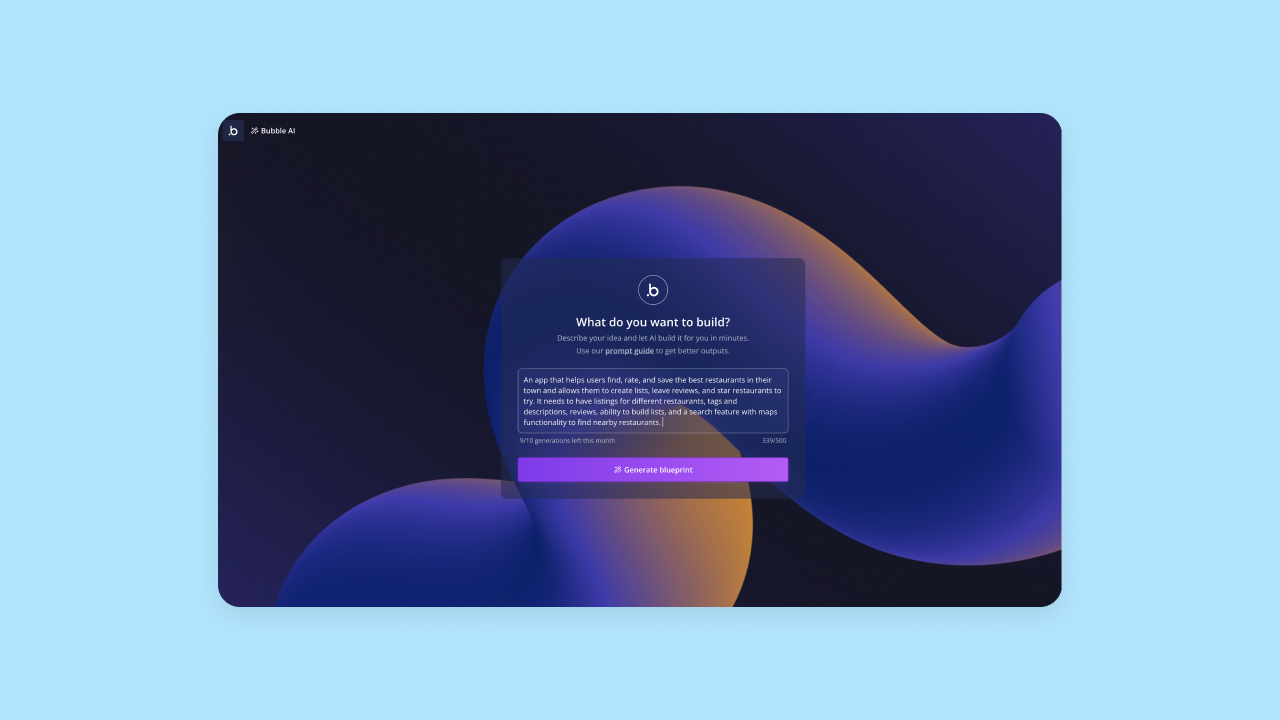
Step 1: From the AI app generator, input a prompt that provides a concise description of your app along with key features.
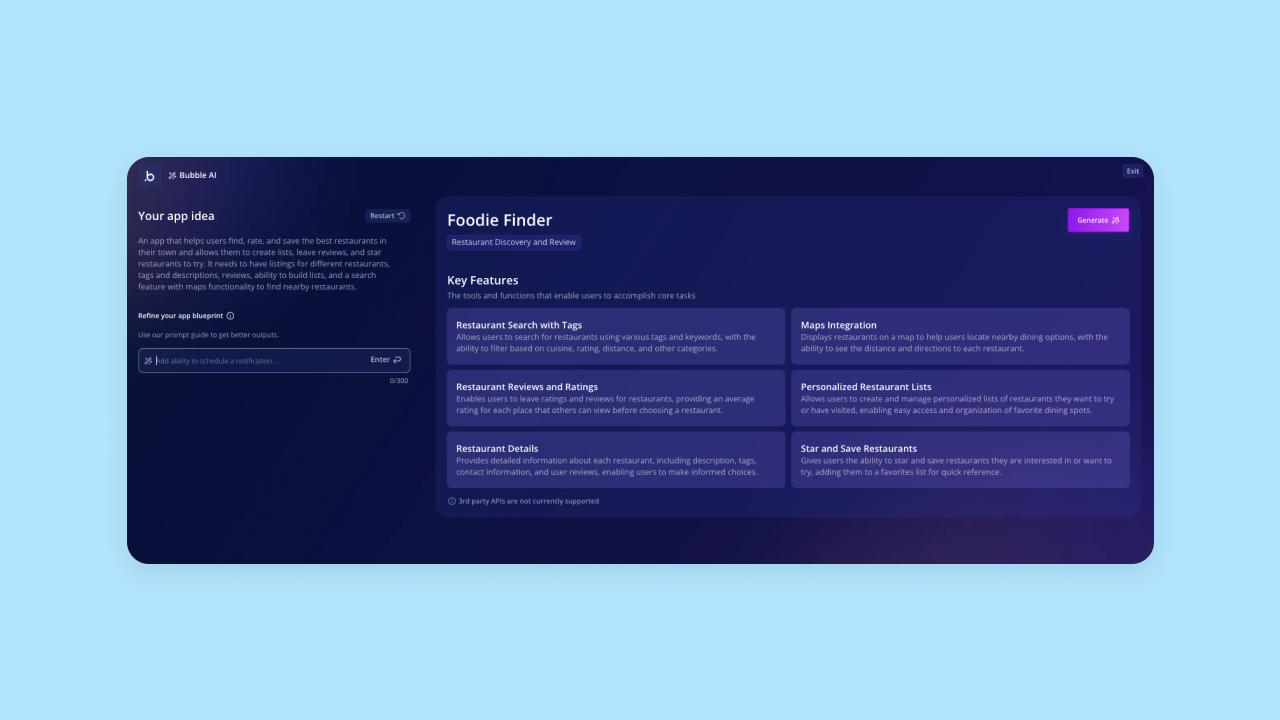
Step 2: Bubble AI will interpret your prompt and double-check with you by giving you an outline of key features. If it didn't quite capture your vision, you can edit this or add additional features at this stage. When the outline looks good, click Generate to generate your actual app.
Step 3: It takes Bubble AI about five minutes to create the first draft of your app. You'll get a functional app that includes frontend UI, backend databases with sample data, workflows that make everything run, and privacy rules to secure your data. The features and functionality of your app should already work and be ready for more data and iteration.
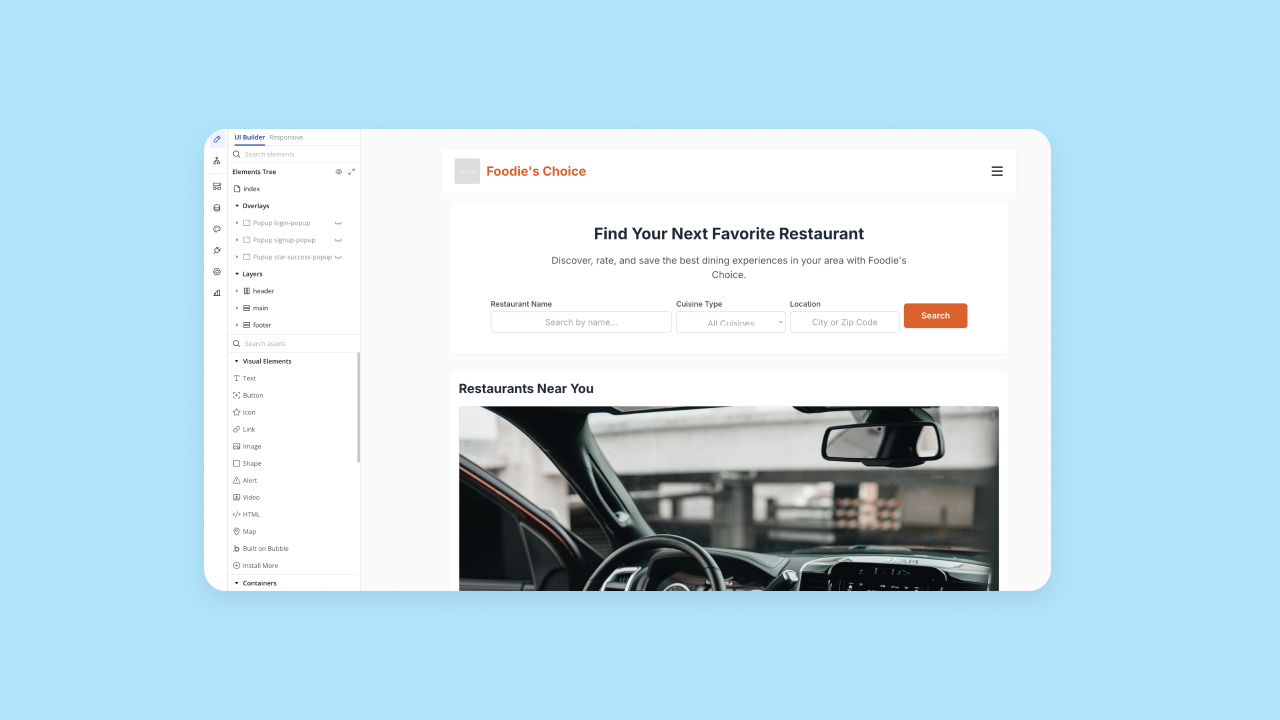
Once your app is generated, you can continue building two ways: chat with the Bubble AI Agent to add features and troubleshoot, or use the visual editor to edit directly. Toggle between AI and visual editing anytime. Everything is managed visually (never code), giving you full control.
How to create an app with AI in Bolt
Creating an app in Bolt follows a similar process, with the main difference being that Bolt is code-based rather than visually-based.
First, you'll prompt Bolt's AI agent with your prompt, similar to Bubble.
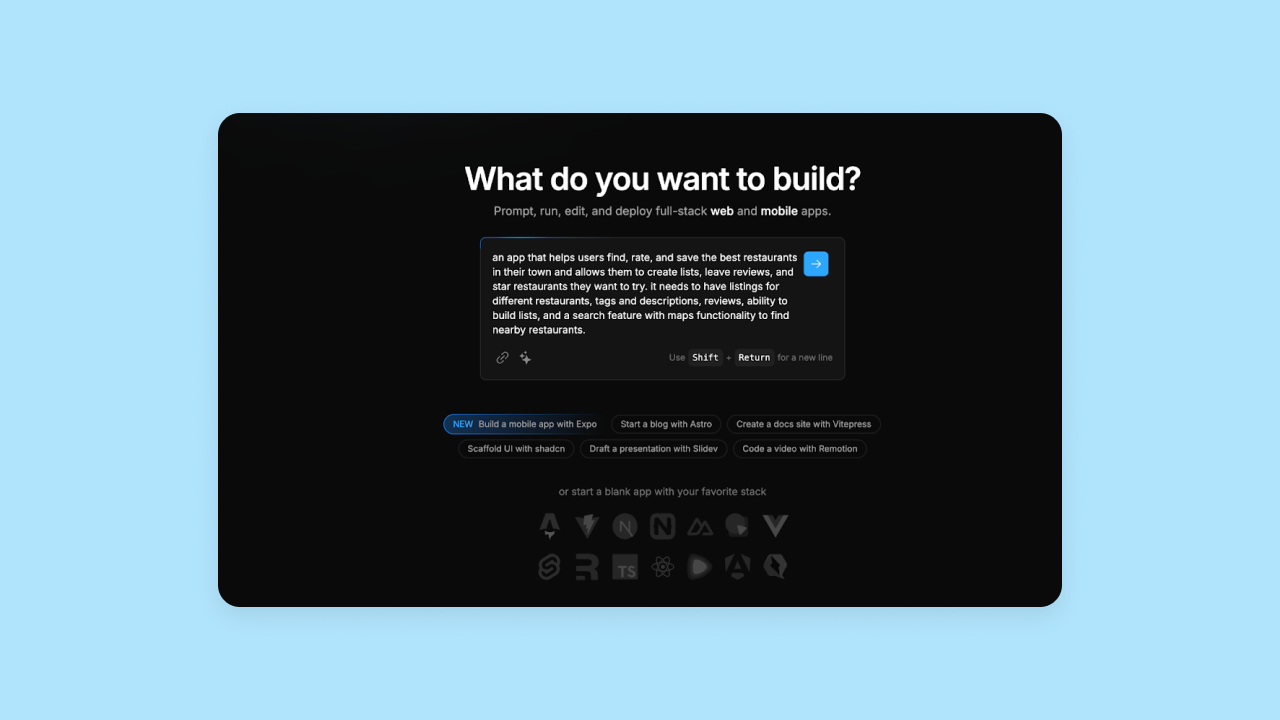
Bolt's AI will immediately start generating code for your app. You'll see the code in the right-hand view, while Bolt's AI keeps you updated on what it's building in the left-hand chat. Visually, Bolt's platform looks very similar to Replit's code-based IDE .
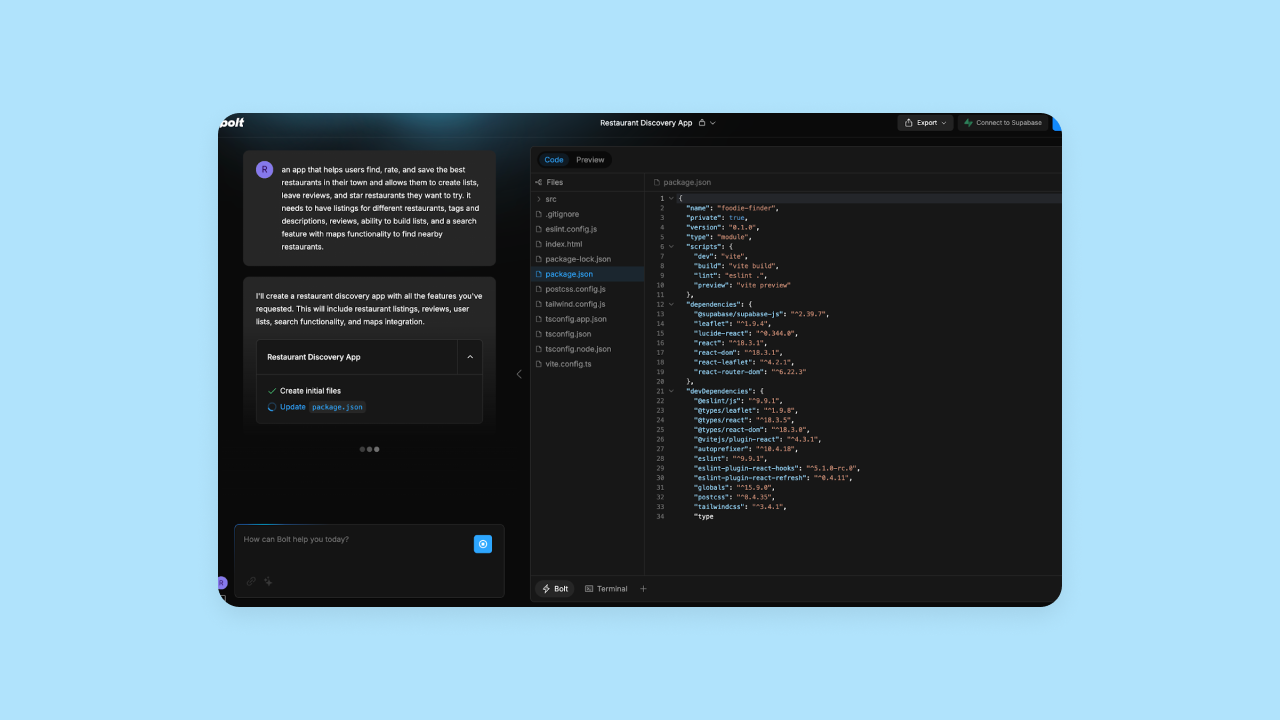
Bolt typically generates apps in minutes, though generation time varies based on project complexity. The code is all available under the "code" tab, and you can also see a visual (and semi-functional) preview.
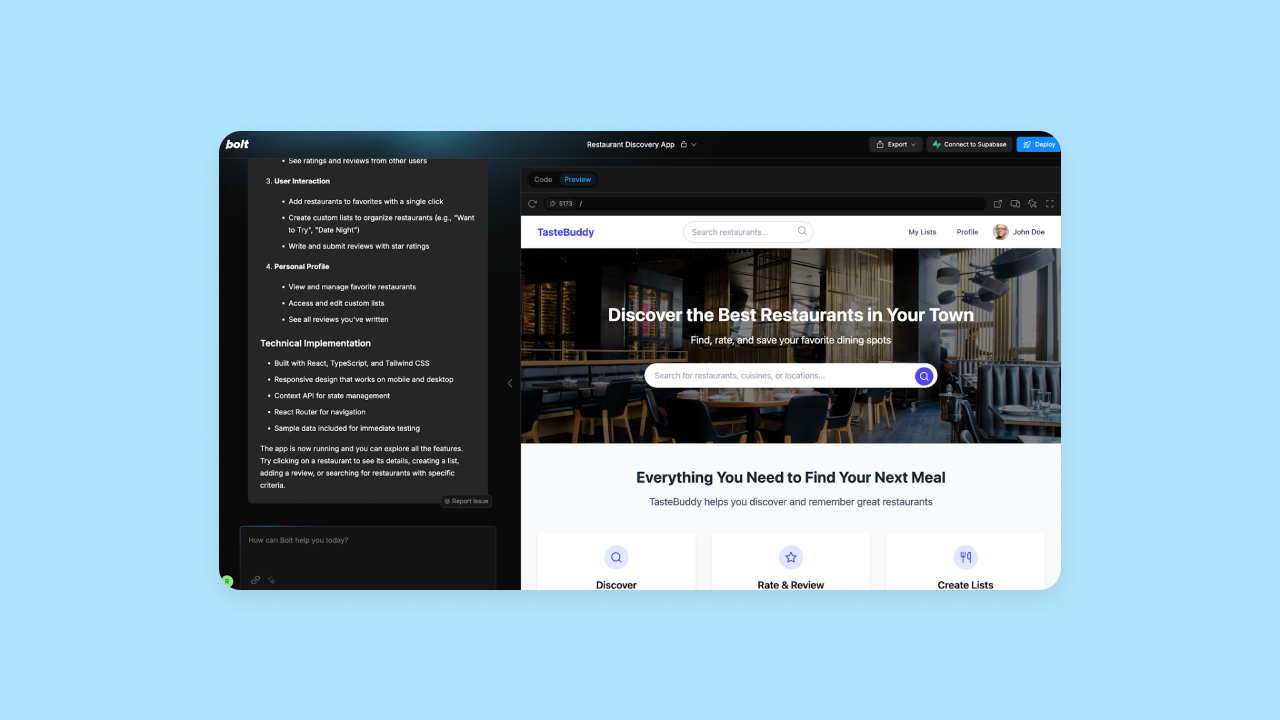
As mentioned above, Bolt's UI generation was quite good, and it created one of the more complete apps from the tools we tested. Once your app is created, you can edit the code manually and see the updates in the preview. You can also use the AI chat to prompt for iterations (though we hit the rate limits really quickly on the AI chat).
On one of our tests, Bolt's platform didn't even finish generating the code and app preview before we hit the rate limit. Bolt's Free plan includes approximately 1 million tokens per month, but with a daily cap of 300,000 tokens, intensive sessions can be cut short.

Which is the better app development workflow?
Bottom line: Bubble offers a simpler app development workflow, with a visual editor that allows even non-coders to edit their app directly. Bubble's AI output was also faster than Bolt's in our testing and didn't lock iterations or output behind paywalled rate limits.
Required technical expertise
The idea with an AI app builder — or no-code in general — is to make software development more accessible to anyone, not just those with a technical background.
However, some AI app builders are more or less suited to those without a lot of technical expertise. Even if an AI agent is generating the app's code for you, it's important to understand how much technical expertise is needed to use the platform, iterate on the code, and manage your app long-term.
In this section, we compare how technical each platform is beyond the initial code generation.
Bubble technical approachability
Bubble is made for developers and non-developers alike. WIth a visual development platform that's truly visual but with the option to add custom code if you want, you get the best of both worlds, and the platform is accessible for any skill level.
As a result, everyone from developers to product managers, founders, individual hobbyists, and more build on Bubble because it's the best choice for non-developers who want to launch real apps, not just prototypes. While other AI builders generate code you can't maintain, Bubble's visual editor makes every part of the development process accessible—from initial generation to ongoing iteration to production deployment.
Starting with Bubble AI gives you a massive head start. But Bubble makes it uniquely accessible to continue building beyond initial generation — through the AI Agent for continued AI assistance or through visual editing for precise control. You're never stuck. Though a technical background can make it easier and faster to build on Bubble, someone without a technical background can generate a working app in minutes and launch in days or weeks — not months.
Bolt's technical approachability
Bolt isn't really designed for those without technical experience. It runs on StackBlitz's WebContainers technology, which creates a full Node.js environment directly in your browser. If you don't have coding knowledge, you can definitely use the Bolt app — and it's pretty easy to get started — but you will run into some learning curve issues pretty quickly. For example:
- The Supabase integration is more complicated than it needs to be, and can be an unnecessary hurdle to setting up databases. For full-stack apps, it can be tough to set this up purely through AI prompting on Bolt.
- Without a visual editor for making changes to your app, your only options for revisions are prompting the AI (see limitations above) or directly editing the code.
Bolt's platform and technical documentation are geared toward developers. While Bolt's official documentation states that no coding knowledge is required to use the platform, the code-based output means users without technical expertise may struggle when AI can't deliver exactly what they need.
In addition, many early users and tutorials show Bolt as an assistant to speed up familiar tasks, provide a UI clone of common apps, or build prototypes quickly using a familiar framework that can be customized or built upon later. Bolt can be used by non-developers, but it's better as an AI assistant to save time for experienced devs.
How do Bolt and Bubble stack up in required technical expertise?
Bottom line: Bolt is not designed for beginners. Although builders without technical expertise can use it, you'll have to develop some to make your app fully functional.
Initial output quality
Obviously, one of the biggest and most obvious factors to consider when comparing AI builders is app output quality. There’s always room for improvement on the initial output, but the quality varies widely.
In this section, we compare how well the AI interprets prompts and the overall quality of the original output in terms of UI, functionality, and feature completeness.
Bubble AI-generated apps
We asked eight different users who were building AI-generated apps with Bubble to analyze output quality in seven core areas.
Here’s how Bubble scored (Bubble now uses GPT 5.1 for the Bubble AI Agent and Anthropic Opus 4.5 for app generation, delivering even better results):
- Color, branding, and consistency: 3 / 5
- Spacing and layout: 4.5 / 5
- Copy, content, and context: 4 / 5
- Navigation and orientation: 4 / 5
- Readability and typography: 4.5 / 5
- Feature completeness: 3.5 / 5
- Feature functionality: 3 / 5
Bubble consistently delivered strong UI, with high rankings across the board for elements like spacing and layout, navigating, readability, and copy. Users agreed their app’s frontend looked great on the first result and that Bubble AI accurately interpreted their prompts — both frontend and backend — without too much effort.
The backend was where Bubble really stood out compared to other AI builders like Bolt.
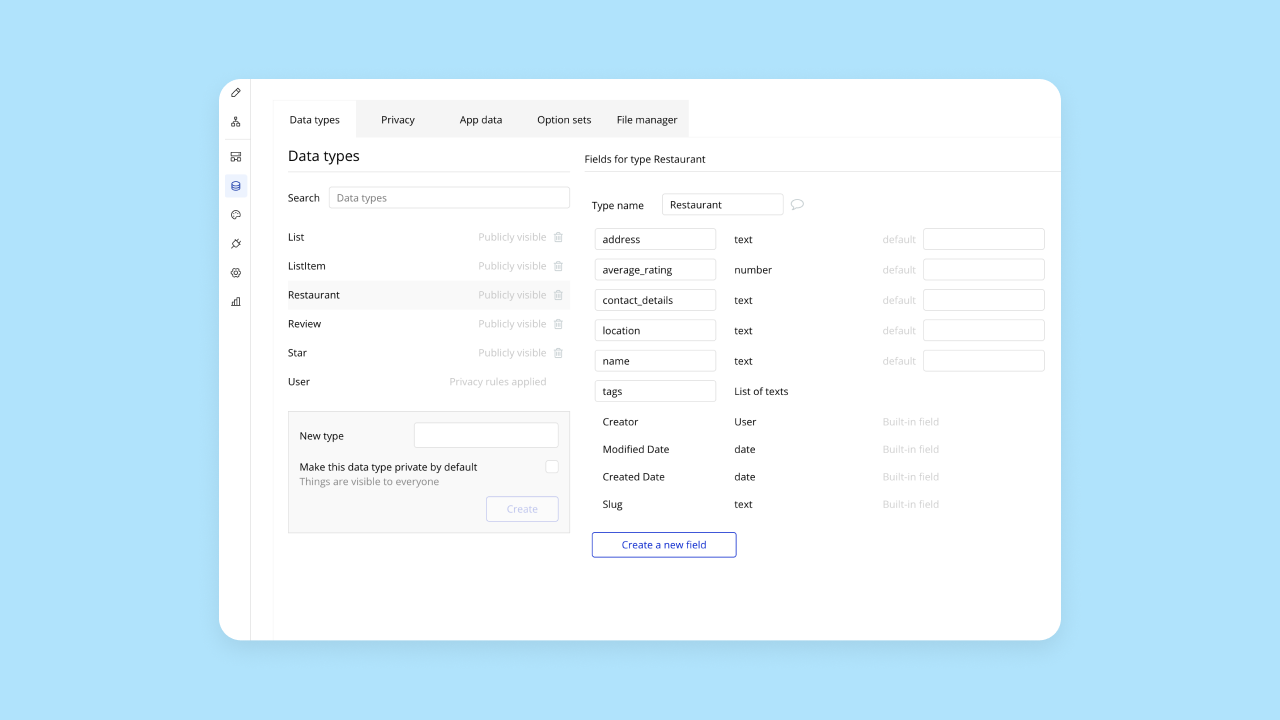
Although Bubble consistently generates all of this, our testers were mixed on its completeness. Some gave Bubble top scores in these areas, saying that Bubble’s AI generated all the expected features and they worked perfectly. Others said their app needed more iteration for full functionality.
Overall, this makes sense, since more complex ideas will always need more iteration regardless of platform. Bubble AI can generate a functional starting point for both frontend and backend in under 10 minutes, then you can continue iterating with the Bubble AI Agent or visual editor.
Bolt AI-generated app quality
First things first, the frontend. In our testing, Bolt generated a really beautiful frontend UI that aligned with our prompts and expectations. The design iteration was great as well — one of our testers said that it only took one prompt to entirely change the look and feel of the app.
The backend generated by Bolt’s AI was less polished and consistent. In one of our tests, Bolt generated one of the most complete apps from the other AI builders we tested, including more features than we asked for, robust and working functionality, and great sample data that made the app look and feel production-ready from the initial output.

However, in other tests, feature and functionality completeness was more limited.
The quality of your output likely depends on the complexity of your app and your prompt. Simpler apps are more easily generated by the AI with good results, while more complex ideas are harder for the AI to parse and generate.
Another major downside is that Bolt’s rate and token limits are very, well ... limited. Bolt's Free plan has a 300K daily token limit and 1M tokens per month. The Pro plan ($25/month) removes the daily limit and provides 10M tokens per month. In one of our tests, Bolt didn’t even finish generating an initial output of our app before we ran into the daily rate limit. These limits may restrict intensive AI usage on the free tier.
Also, anything involving a backend and an API connection was a real headache. Bolt uses Supabase for a database connection, and our testers mentioned that Bolt’s process for connecting that backend database was complicated at times. Our non-developer testers couldn’t figure it out.
Which has better initial app output quality?
Bottom line: Both Bubble and Bolt had strong initial outputs. Their AIs interpreted the prompts clearly, delivered a clean and consistently impressive frontend, and backend features and functionality as well. Since Bubble has a built-in database, Bubble’s workflows and database functionality were more complete than Bolt’s.
Bolt's rate limits also blocked our initial outputs on several tries, or limited how much we were able to create for free. Bubble’s platform allows users to use, edit, and iterate on their apps for free until they’re ready to deploy.
Design functionality
Being able to control the design of your app is critical, but different platforms provide very different design capabilities. In this section, we look at what each platform offers, as well as whether the design experience is truly no-code or whether you need technical expertise to finalize your app’s design.
Bubble design features
Bubble offers strong design features via the visual editor for a truly no-code experience. Compared to other AI builders, Bubble really shines in its design capabilities. For example, Bubble offers:
- Responsive design: Easily design for web, mobile, and other screen sizes with automatic responsive design. Plus, manual breakpoints and layouts so you can adjust exactly how your app displays on different screen sizes.
- Drag-and-drop visual design: An intuitive visual editor allows you to build and edit your design and make customizations without coding.
- Customization options: Bubble’s visual editor is extremely flexible and gives you complete control over every pixel. You can design your app to look exactly how you imagined it without having to write code or endlessly prompt an AI tool.
- Design imports: If you’re used to designing wireframes, mockups, or app screens in another design tool like Figma, you can import those designs directly into Bubble. Bubble will convert them seamlessly into a functional app so you’re not re-doing work your design team already did!
Unlike AI coding tools that generate code you can't read, Bubble's visual approach lets you see exactly how your app works through visual workflows in natural language. And of course, you can always ask the Bubble AI Agent to make these changes for you, too.
Bolt design features
Bolt handles responsive design well, but other design features are a mixed bag. For example, Bolt does not offer a traditional drag-and-drop visual editor like Bubble; instead, it provides a code-based environment with AI chat for iterations and a visual preview of the app. It does include an "Inspector" tool that lets you point the agent at specific UI elements to request changes, but this is still a prompt-based workflow rather than direct manipulation.
You can prompt Bolt’s AI chatbot to make changes to the design, and it generally works well. In our testing, one or two prompts were generally enough to change the entire look and feel of the app. The downside is that without a visual editor, if the AI gets stuck (which it does, often) or you max out your rate limits (which happens quickly), you’re blocked from making further changes unless you can edit the code yourself manually or upgrade to a higher-tier plan.
Bolt recently developed a Figma integration as well, allowing you to integrate a Figma frame into Bolt to create functional apps and prototypes directly from your design files. Bolt’s AI also works from images and screenshots. You can share a screenshot with the AI for reference (with mixed results).
As with other iterations on Bolt, rate limits remain a major roadblock. We reached them quickly in our test projects, and if you don’t have coding expertise, you’re blocked from iterating on your design or app further unless you upgrade.
Which has better design features?
Bottom line: Bubble offers a much more design-focused experience, with more design options and control. Ultimately, Bolt only offers design through their AI (which has strict rate limits) or manual coding, while Bubble offers a visual, drag-and-drop editor that gives you full design control and customization without code.
Customizability
Customization is a must, and yet, different AI builders offer different levels (and difficulty) of customization. Another factor: How much customization is “locked” behind manual coding, and how much can be done visually or via AI?
Customization on Bubble
Bubble gives you nearly unlimited customizability through the combination of AI speed and visual control. Both developers and non-developers have built almost every kind of app — from landing pages and e-commerce to SaaS apps, enterprise tools, and AI tools.
Bubble’s visual editor gives you full control over UI design, workflows, triggers, actions, data types, database structure, conditionals, and more. Plus, you can add reusable styles and elements to further speed up your design and development.
In short: Bubble gives you full control and customization options in every part of your app’s frontend and backend and supports all of it visually — no code needed.
Customization in Bolt
Bolt also offers a high level of customization. In the company’s video tutorials, you’ll see Bolt being used to clone popular apps, build portfolio sites, or create small web tools. No matter what you’re building, you do get full access to the code generated for your app, so you can make any changes you like directly to the code — giving you the same amount of customization available when writing code from scratch, but faster.
Bolt also allows users to customize iteratively via the AI chat, which users have mixed reviews on. Bolt offers a "Plan Mode" for structured planning and a "Build Mode" for execution, which helps manage complex changes. On the upside, Bolt’s AI is pretty good at understanding the prompt and building the features you’re asking for. On the other hand, rate limits are a big blocker with Bolt, since it’s unclear when you’ll hit them (and we tended to hit them pretty fast).
Which has better customization?
Bottom line: Bubble is designed for everyone to build just about anything you can imagine. Of course, AI can massively speed up the process, but customization via the visual editor means you have full control the entire time.
Mobile app development
While creating web apps with responsive design can capture some mobile traffic, being able to offer native mobile apps is a much better solution for most brands. We looked at which platforms support mobile app development and what capabilities are available.
Mobile app development on Bubble
Native mobile app development is currently in beta. That means you can use Bubble’s familiar visual no-code editor to build both web and native mobile apps, eliminating platform sprawl and reducing the learning curve needed to build for both web and mobile.
Bubble’s mobile app editor includes the ability to create React Native apps without code, adding native mobile elements, gestures, and functionality, all with the visual, drag-and-drop editor. For example, you can:
- Build from mobile-specific building blocks, rather than working from web pages and designing responsively.
- Use common mobile navigation patterns, like stack navigation (swiping or tapping), modal screens (pop-up screens over the main view), and bottom sheets (elements that slide up from the bottom of the screen).
- Add mobile-friendly interactions like swipe, long-press, and tap.
- Incorporate native device features, such as access to the camera, microphone, photo library, push notifications, and more.
Plus, you can preview and test everything using BubbleGo, our app for mobile testing. Then, publish your app directly to the Apple App Store and Google Play Store right from the Bubble editor.
Mobile app development on Bolt
Bolt also offers the ability to create native mobile apps (for iOS or Android) via Expo. The pros: You can use Bolt’s AI chat interface and visual preview to create UI, features, and functionality for a mobile app, with native mobile gestures and functionality. The cons: You need a bit more technical expertise to comfortably use Bolt and Expo together, plus deploy your app to native app stores, compared to Bubble’s all-in-one-place visual editor.
Which is better for mobile app development?
Both Bubble and Bolt let you build native mobile apps, but, as with other features, Bubble makes it easier for those without technical expertise, and Bolt’s platform is catered toward developers.
Collaboration
With AI, building apps as a team of one is easier than ever.
But if you’re looking to build, launch, and scale a customer-facing product or enterprise tool for your internal team, you’ll likely want more than one person to be able to work on it, iterate, and help you improve the app. This section compares how each of these tools supports collaboration.
Collaborating on Bubble
Collaborating on Bubble is simple. Bubble is designed for professional and enterprise use, so you’ll find all the tools you need to bring your whole team in and work together as you scale. For instance, depending on your plan, you can:
- Add as many users as you’d like to collaborate on an app with you, depending on your plan.
- Invite users to just one or all of the apps you own.
- Set access permissions for each user, including edit access for different spaces (like UI vs. databases).
- Collaborate together on Bubble in real time.
Collaborating in Bolt
Bolt also makes collaboration possible on its team plan. You can add as many people as you’d like to your team. Bolt's Free plan includes both public and private projects. The Teams plan ($30 per month per member) provides collaboration features including shared workspaces, team-level roles and admin controls, real-time editing, and GitHub integration.
Which is better for collaboration?
Both Bolt and Bubble provide collaboration tools — a big win over other AI platforms built for solo work.
Framework support
Framework support considers how flexible your tech stack will be and what programming languages will be supported by a given platform.
Some platforms generate code in one specific programming language, while others are compatible with a number of languages and frameworks.
Framework support with Bubble
Bubble uses a visual programming language unique to the Bubble platform. For non-developers, this is great news: You don’t have to know any coding languages to build, test, iterate, debug, or scale your app. Instead, everything is managed visually via Bubble’s drag-and-drop editor, including workflows and logic.
For technical builders, adding custom code is always an option, though it’s not required.
Since Bubble apps are built and hosted all on Bubble, it’s not necessary to convert your Bubble apps into specific programming languages — you get a one-stop shop with Bubble and a visual programming language that can stand on its own.
Bolt framework support
Bolt supports a number of popular frameworks, including React, Angular, Next.js, and Tailwind CSS frameworks. Note that Bolt does not support non-web languages like Python, C#, or C++. For developers who are used to working within JavaScript or CSS frameworks, Bolt can probably support your project.
Which has better framework support?
Bottom line: Bolt supports more popular frameworks than Bubble, but it’s still limited and may cause some issues if you use tech outside of those frameworks. Bubble offers an all-in-one framework unique to the Bubble ecosystem.
Integrations
Framework support is one element of ensuring your app builder integrates well with your existing tech stack. Integrations are another.
A solid set of integrations can significantly expand the possibilities and capabilities of your platform and the app you create, not to mention ensure that your app development connects easily to other tools you’re already using. And existing integrations are created and maintained by an expert, giving you built-in updates and stability.
Bubble integrations
Bubble has thousands of plugins and integrations you can use to build and expand the capacities of your app, including:
- OpenAI and Chat-GPT 4
- Anthropic Claude AI
- DALL-E
- Github
- Figma
- Stripe
- Paypal
- Google Suite products
- and thousands more
But best of all, you aren’t limited only by what Bubble or our community has created and used in the past — you can connect any service or platform to your Bubble app via our API connector. Input the API token on your Bubble backend and create your own integrations to whatever tools you need.
Bolt integrations
Bolt offers integrations including:
- Netlify (for hosting)
- GitHub (for version control)
- Supabase (for databases)
- Figma (for design)
- Expo (for mobile app development)
- Stripe (for payments)
- Google SSO (for authentication)
Bolt also features "Pica," an integration that allows natural-language connectivity to over 170 SaaS APIs like HubSpot, Shopify, and QuickBooks.
With options for databases, hosting, payments, and mobile development, you have what you need to build a full-stack app. However, Bolt's integrations are more limited compared to other AI app builders, and if you want to connect to other tools, you’ll have to build out most integrations manually.
Which has better integrations?
Without a doubt, Bubble has a significantly more extensive library of integrations and plugins that are ready-made — just “plug and play” to connect to thousands of other apps and tools. With Bolt, you’ll mostly have to code your own integrations with the exception of a few basic add-ons.
Iteration and optimization
For this section, we considered two types of performance improvements for your app: code optimization and code iteration.
Code optimization — also known as code refactoring — means adjusting code that’s already working to make it run faster or more efficiently. This is especially important when building with AI, as AI code tends to be bloated and buggy, making refactoring more essential. Code iteration is changing or adding to the code to include new features or functionality in your app.
Bubble iteration and optimization
Bubble uses a visual programming language, so with Bubble, code optimization (or refactoring) isn’t necessary at all. Sometimes, as businesses grow and scale on Bubble, they want to find ways to make their app run more efficiently to optimize costs — this could be considered a kind of refactoring. If and when you reach this point, though, it’s a good problem to have — and you’ll find plenty of resources for how to do this in our guides and our community. However, it’s not something you’ll need to do continuously from day one, as with traditional refactoring.
What you will want to do from the beginning is iteration. No matter how carefully you prompt or build, you’ll always need to do some adjusting and iterating as you go to get exactly the features and functionality you need.
On Bubble, you can either ask the AI Agent to make changes for you or take control yourself with the drag-and-drop editor. You can adjust and add functionality, UI / UX features, workflows, complex logic, and everything else you’ll need, all without interacting with code.
Bolt code iteration and optimization
Bolt offers AI-driven code refactoring and iteration. According to Bolt, the platform "automatically tests, refactors, and iterates reducing errors," though users may still need to manually optimize code in some cases.
Bolt does offer AI-driven code iteration. If you want to make a change to the UX, logic, features, or functionality of your app, simply describe the changes you want in the Bolt AI chat, and the AI will generate or change your existing code to reflect the new updates.
While Bolt’s AI does a pretty good job understanding and actioning prompts, there are still some downsides to keep in mind:
- While Bolt claims to reduce errors by 98% through automatic testing and refactoring, some users report that AI-generated code can contain bugs and preview failures may occur, requiring manual code fixes.
- Rate limits are prohibitive. Bolt's Free plan has a 300K daily token limit and 1M tokens per month. These limits may restrict intensive AI usage on the free tier. Upgrading to the Pro plan ($25/month) provides 10M tokens per month, but heavy users may still find themselves constrained.
- Complex workflows still trip it up. Bolt doesn’t have a sophisticated AI planning agent, so complex logic or multi-step functionality can still trip up the AI. You have to prompt it carefully and generally do one step at a time.
That said, Bolt’s AI still makes it a lot faster (compared to traditional development) to get out mostly functional code with modern UI.
Which is better for iterations?
Bottom line: Bubble has the lead on AI-driven improvements by offering both AI-powered iterative chat and a visual editor for iterations, keeping you in the driver’s seat the entire time, regardless of your technical expertise.
Security
Security and privacy features make a huge difference depending on what you’re using an AI app generator for. A platform without many security features may be fine for prototyping, but it will be difficult to launch a production-grade app ready for end-users — and their personal data.
For this section, we compared how well each platform protects your app data and customer data, what security certifications and features are built into the platform, and how easy it is to set them up, even without technical experience.
Bubble security features
Bubble offers strong security “out-of-the-box” with built-in, enterprise-grade security features that protect both your app data and your end-users’ data. Bubble is SOC 2 Type II compliant, meets GDPR standards, and provides enterprise-grade infrastructure (AWS) and data encryption (HTTPS with SSL encryption and encrypted at rest with AES-256 via AWS RDS). In plain English: Your data is automatically encrypted both when it’s stored and when it’s being sent between users and your app.
Bubble also allows you to use the visual editor to set up app-level privacy rules and restrictions, so you get full control over your app’s privacy settings without having to code. Privacy rules aren’t set up automatically, but Bubble will guide you through it to make sure you have a secure app.
To make things even easier for you, Bubble’s security dashboard gives you the option of running automated security checks that scan your app for potential vulnerabilities and alert you before they become problems.
Other built-in security features include:
- Built-in user authentication with options for 2FA, SSO, and more.
- Vulnerability testing
- DDoS protection and Cloudflare blocking to prevent attacks
- Monitoring to identify vulnerabilities and get proactive alerts
Plus, Bubble has a strong, established track record of hosting and maintaining apps with thousands of users around the world — a testament to Bubble’s security, stability, and production-grade environment.
Bolt security features
Bolt now provides built-in hosting through Bolt Cloud and database management. Security for apps depends on how you configure your app's privacy settings and which external services you integrate (such as Supabase for databases or Netlify for hosting).
Bolt integrates with external databases like Supabase, so your app-level security will be determined by a) how you build the app, which requires you to have some level of familiarity with app privacy settings, and b) your database security. (Supabase, for example, has strong security features.)
The same goes for deployment and hosting — your app will only be as secure as the servers you host it on. Netlify is an available hosting provider for Bolt, which provides strong infrastructure security and compliance standards, but it puts the responsibility for app-level security and compliance on the builders.
All that to say: It’s very possible to build a secure app with Bolt and their partner platforms, but it requires more expertise and an understanding of what needs to be done (and how!) to fully secure your app and app data.
Which has stronger security?
Bottom line: Bubble offers significantly more robust security features and makes it easier to set them up, even without technical expertise. Bubble’s security-grade features and compliance certifications keep your app and end-user data stored and sent securely and help your app comply with necessary security standards. Visual tools for privacy settings also allow non-programmers to set up custom privacy rules for your app with just a few clicks, no code needed.
Bolt doesn’t provide built-in security or privacy settings, but it does integrate with platforms that offer strong security. However, it’s up to the developer to set up and customize those settings accurately.
Deployment and hosting
Easy deployment and hosting of your app makes it simple to get your app live and shared with customers, stakeholders, or anyone else who you want to use your app. In this section, we compare how each of these platforms manages launching and hosting for your app.
Deploying and hosting Bubble apps
Bubble makes deploying and hosting your app super easy — it’s all done within the Bubble ecosystem. When you’re ready to publish your app, just click the “Deploy” button in the header nav bar.
Bubble also offers built-in hosting, which means that when you’re ready to push your site or app live, it will live on Bubble servers. All-in-one hosting makes updates and iterations faster while giving you fewer platforms to juggle (and pay for!).
Deploying and hosting Bolt
Bolt now includes built-in hosting and custom domain management. All new projects are published using Bolt hosting by default, which provides a free .bolt.host subdomain. Users can also choose to publish to Netlify instead if they prefer.
Bolt now offers one-click deployment with built-in hosting. Users can also choose to deploy to Netlify through an integration, which requires connecting your Netlify account to Bolt. Bolt also allows you to export the code for self-hosting.
Which makes deployment and hosting easier?
Bottom line: Bolt and Bubble both offer simple deployment and hosting.
Education
Sure, AI makes software development a lot easier and faster. But no matter how easy it gets, there’s always going to be some need for education about the platform you’re using, the features available, how to troubleshoot when you (or the AI) get stuck, or if you want to build something more customized.
In this section, we evaluated the level and quality of education each platform provided.
Bubble education materials
Bubble has a huge library of resources: everything from YouTube videos to step-by-step guides, detailed courses , one-on-one coaching , bootcamps , our community forums , our technical manual , and more.
Since we’ve always been a platform for all kinds of builders, we’ve worked hard to create resources for all levels and learning styles. Whether you’re brand new to building or an experienced developer, there are resources for you to upskill and learn to use Bubble.
If you’re new to building with AI, start with our course for Bubble beginners — we will walk you through the basics of the Bubble platform, our visual programming language, and our AI tools. Our YouTube channel is also a great place to find tips on building with AI or learn how apps work on Bubble as you start to build your own!
Bolt education materials
Bolt offers some technical documentation and a few video tutorials, but nothing comprehensive or really geared toward beginners. They do have some video walkthroughs, which are helpful (found either on their YouTube channel or via their technical docs).
They do have a how-to-get-started guide, but it’s pretty sparse as well. Bolt is a newer platform, so it makes sense that they’re still building this out, but it can be hard to follow or find the information you need, especially if you’re a beginner.
Which has stronger education?
Bottom line: Bubble takes the cake on education, by far. Bubble has a significant library of educational resources for all skill levels, a detailed manual for technical documentation, and tons of tutorials, walkthroughs, and build guides in various formats. Bolt offers some technical documentation and a few walkthroughs, but their resources are currently pretty sparse.
Which AI app builder should you choose?
Bubble and Bolt both offer AI-powered app generation that delivers a functional frontend and backend. However, the tools are both pretty different in how they work and the level of technical expertise required.
Bolt is essentially an AI assistant for traditional developers, allowing experienced coders to spin up new apps and prototypes quickly by riffing off of common apps to quickly create core features and providing code in familiar frameworks for the developer to iterate on. It can also be a useful tool for beginner developers who are looking for a tutor or a coach to help them develop code or learn a new framework.
Bubble is an AI-powered visual development platform that combines the speed of AI with the ease of visual development to give everyone the ability to create production-grade apps and enterprise software. Even non-coders get full control and customization through the visual editor, combined with the speed of AI generation to eliminate the blank page dilemma and introduce you to the platform.
Plus, you get built-in hosting, strong integrations, a huge community with tons of resources, and a platform you can understand without a technical background, which makes managing and scaling all aspects of your app accessible for anyone.
Curious how other no-code AI builders stack up? Check out our other comparisons:
Of course, the best way to get a feel for a platform is to test it out for yourself. See how Bubble AI works and start building in our visual editor for free .
Frequently asked questions about AI app builders
Which AI app builder is better for complete beginners?
Bubble is much better for beginners. While both platforms can generate apps from prompts, Bubble lets you continue in a visual editor instead of getting stuck with code when AI can't deliver.
Can I switch from one AI app builder to another?
Switching between platforms is very difficult. Most AI app builders, including Bubble, are all-in-one platforms, meaning the app you build runs on their specific technology. While a platform like Bolt lets you export the code, you would still need a developer to take that code and rebuild it on a different hosting service. It's best to choose the platform you plan to scale with from the start.
What happens if I hit rate limits on these platforms?
On platforms like Bolt, strict AI rate limits can completely halt your progress—you have to stop working, wait until the next day, or upgrade. With Bubble, you can always switch to the visual editor and continue building without interruption. Plus, Bubble offers generous AI generation capabilities without the restrictive rate limits that plague other tools.
Do I own the apps I create with these tools?
Yes, you own your application, its intellectual property, and all of the data within it. However, the app itself is built to run on the platform's infrastructure. You have full ownership and control over what you build and the data it collects.
Build for as long as you want on the Free plan. Only upgrade when you're ready to launch.
Join Bubble