TL;DR: Bubble is for anyone who wants to build and launch production-ready apps without code — chat with AI when you want speed, edit visually when you want control, and never get stuck. Lovable is for builders who need quick prototypes with polished UI — they're less concerned about getting trapped in prompt loops when AI hits its limits.
AI makes going from idea to app incredibly fast — but speed isn't the challenge. The challenge is what comes after: customizing, fixing edge cases, securing data, and shipping something you can scale.
Bubble and Lovable are both popular tools for AI app building, but their approach is fundamentally different. In this guide, we’ll compare them across the full journey from AI-generated prototype to production-ready app, with a special focus on how each platform helps you get your app across the finish line.
Bubble is the only fully visual AI app builder that enables anyone to build without code, seamlessly switching between AI generation and visual editing. Design, backend database, privacy rules, workflow logic — it's all controlled without writing or managing a single line of code.
Lovable is an AI app-building platform founded in 2023 that allows users to build and iterate on an app idea by interacting with a chat-based AI model. You generate and iterate on the underlying code (React, Supabase, and Tailwind CSS) that runs the app by prompting the chatbot, while previewing your app in real-time via a visual preview window.
Bubble vs. Lovable: Key factors
Bubble is better for building production-ready apps you can launch and scale, while Lovable excels at rapid prototyping. The key difference comes down to what happens when AI generation isn’t enough — Bubble gives you visual control to finish what AI can’t, while Lovable leaves you stuck prompting or editing code.
Key factors to consider:
- Customization: How easy is it to customize the finer details?
- Iteration and debugging: Can you add features without breaking existing functionality? Do I ever have to deal with code, or will you be able to understand and troubleshoot your app’s functionality at every step?
- Prompt looping: Will you get stuck re-prompting AI or do you have direct control?
- Ongoing maintenance: How strong are the tools for ongoing maintenance and iteration?
- Hidden costs: Are there usage-based fees that make scaling expensive?
These concerns are especially critical for newer builders. AI provides a strong starting point, but builders without coding experience often get stuck in prompt loops when trying to launch publicly and gain users and revenue.
So how do Bubble and Lovable stack up? That’s what we’re diving into below, but let’s take a quick look at some key factors and comparisons:
| Feature | Bubble | Lovable |
|---|---|---|
| Initial output quality | ⭐⭐⭐⭐ | ⭐⭐⭐⭐ |
| Design capabilities | ⭐⭐⭐⭐ Drag-and-drop visual editor for pixel-perfect UI Flexible: Use the Bubble AI Agent for iterative editing or take full visual control |
⭐⭐⭐💫 AI-powered iterative editing using Tailwind CSS Limited: Visual editing restricted to basic properties (text, colors, margins) |
| Native mobile app support | ⭐⭐⭐⭐ Build truly native mobile apps and deploy to the Apple App Store and Google Play. (Currently in beta.) | ⭐ No native mobile app support — requires a wrapper to approximate the native experience. |
| Collaboration | ⭐⭐⭐⭐⭐ Real-time team editing with granular role-based permissions and built-in version control—all without complex setup or third-party integrations. | ⭐⭐⭐⭐ Real-time collaboration with GitHub sync for code-based version control. |
| Backend and database support | ⭐⭐⭐⭐⭐ Native backend and database that doesn’t require technical expertise or extra costs to set up. | ⭐⭐⭐ Built-in Supabase integration via Lovable Cloud, or optional external connections. |
| Security and compliance | ⭐⭐⭐⭐ Bubble offers enterprise-grade security features, including SOC 2 Type II and GDPR compliance, advanced encryption and monitoring, and visual privacy rules (automatically generated by the Agent when creating data types). | ⭐⭐⭐⭐ Lovable is SOC 2 Type II and ISO 27001 certified. App-level privacy/security still depends on how you implement data access (RLS) in your app. |
| Deployment/hosting | ⭐⭐⭐⭐⭐ One-click deployment and native hosting. | ⭐⭐⭐ One-click deployment to Lovable Cloud, with optional export to Vercel or Netlify. |
| Technical expertise | ⭐⭐⭐⭐⭐ Best-in-class for developers and non-developers alike. | ⭐⭐⭐⭐ Less technical than many AI builders, but knowledge of React/SQL is helpful when AI gets stuck. |
And here's a summary of their strengths and limitations:
| Platform | Strengths | Limitations |
|---|---|---|
| Lovable | Quick prototyping and MVPs, polished UI generation, fast stakeholder demos | Limited visual editor, prompt loops for complex features, complex backend requires manual coding |
| Bubble | Production-ready apps with full visual control, built-in databases, hosting, and security, visual backend and workflow logic you can understand, scales from prototype to millions of users | Learning curve to understand visual workflows (but the Agent guides you, and understanding is the advantage when you need to customize) |
When AI generation isn't enough: Control vs getting stuck
AI has changed the starting line for app development, but not the finish line. Getting a prototype is faster than ever, but the real challenge is what comes next: customizing features, fixing bugs, and scaling to real users. This is where AI coding tools often trap builders.
With Lovable, when AI can't build what you want, you're stuck re-prompting or diving into code you didn't write — a dead end for non-technical builders.
Bubble's approach is different. Understanding what you build is a feature, not a limitation. You see exactly how your app works and fix it yourself, without code.
App development workflow
How to create an app with AI on Bubble
Creating an app with Bubble's AI has three basic steps:
Step 1: From the AI app generator, input a prompt that provides a concise description of your app along with key features. Here's our guide to great prompts.
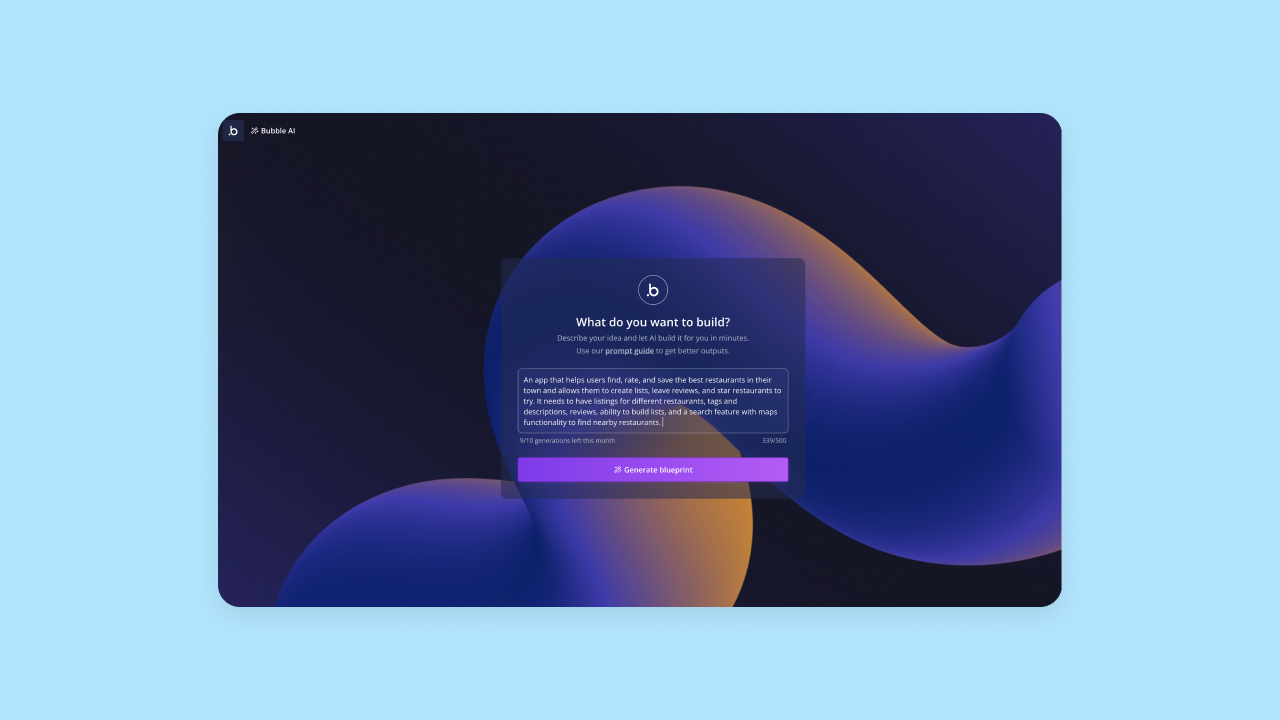
Step 2: Bubble AI will give you a blueprint outlining key tasks users will be able to do and relevant features based on your prompt. You can modify this by adding or removing features to align with your vision. When your blueprint looks good, you can click Generate to create your actual app.
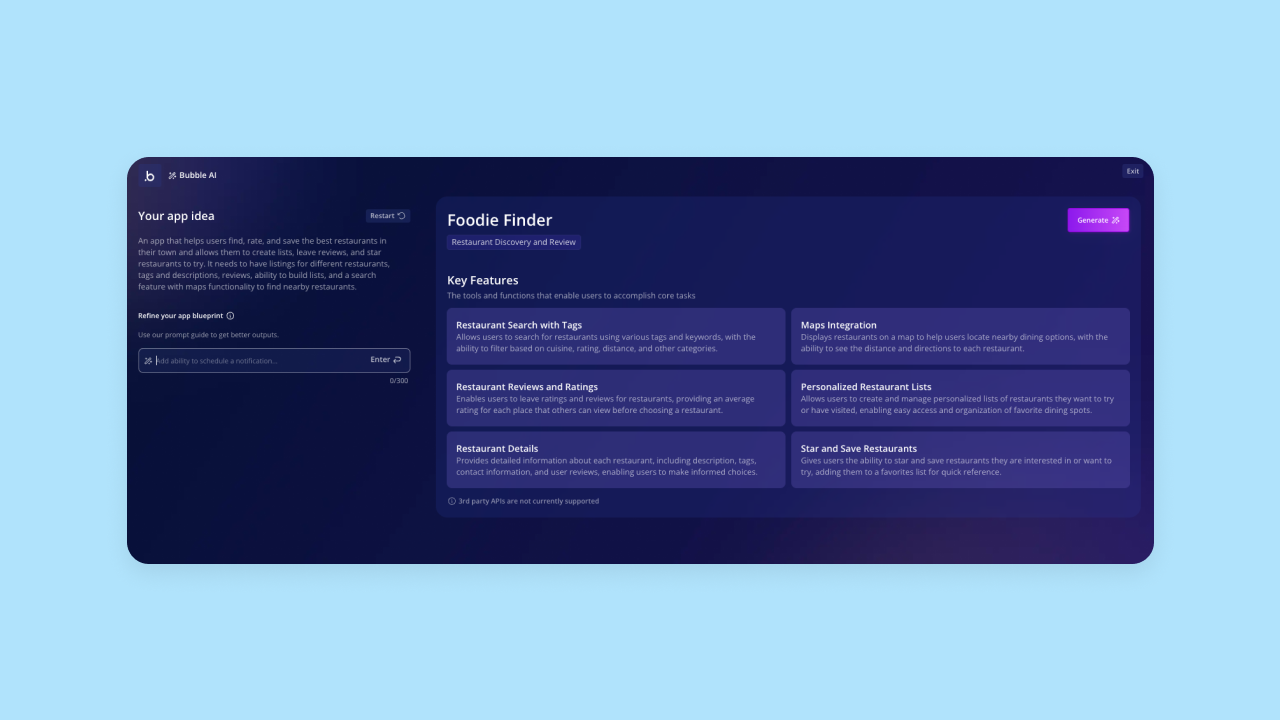
Step 3: It takes Bubble AI around 5–7 minutes to generate the first draft of your app. You'll get a functional app that includes frontend UI, backend databases with sample data, and workflows. The features and functionality on your app should already work and be ready for more data and iteration.
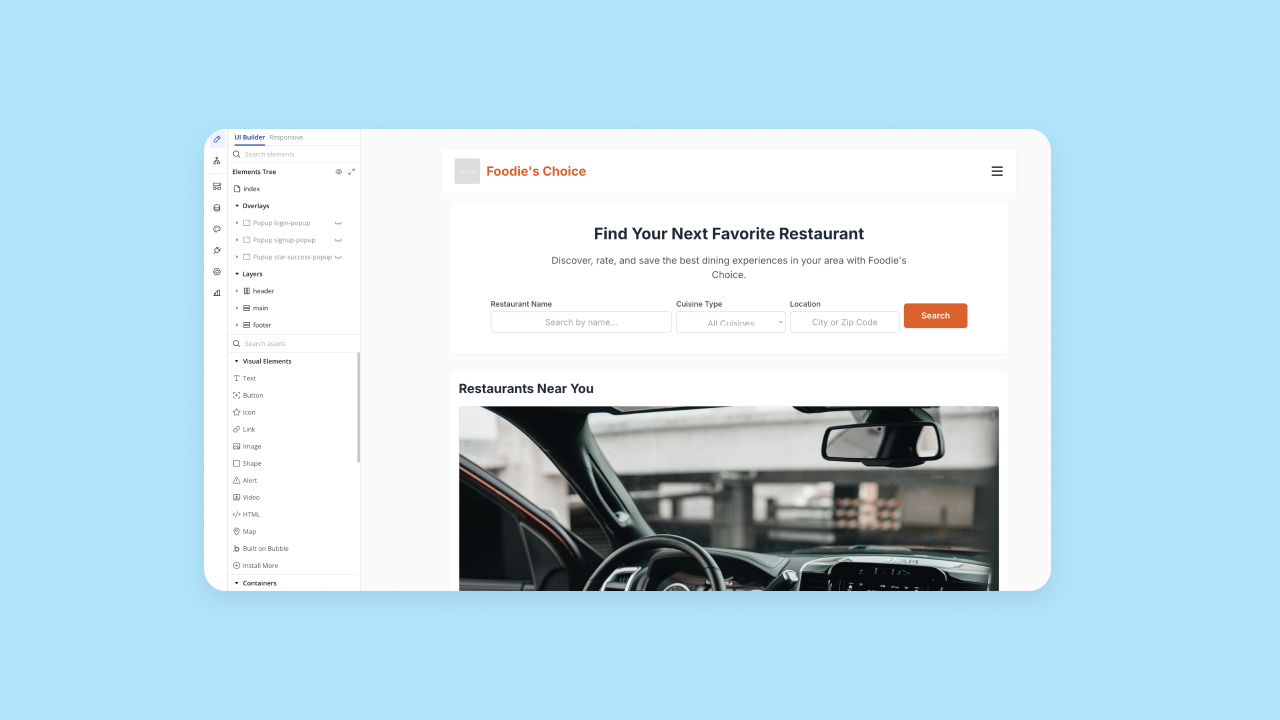
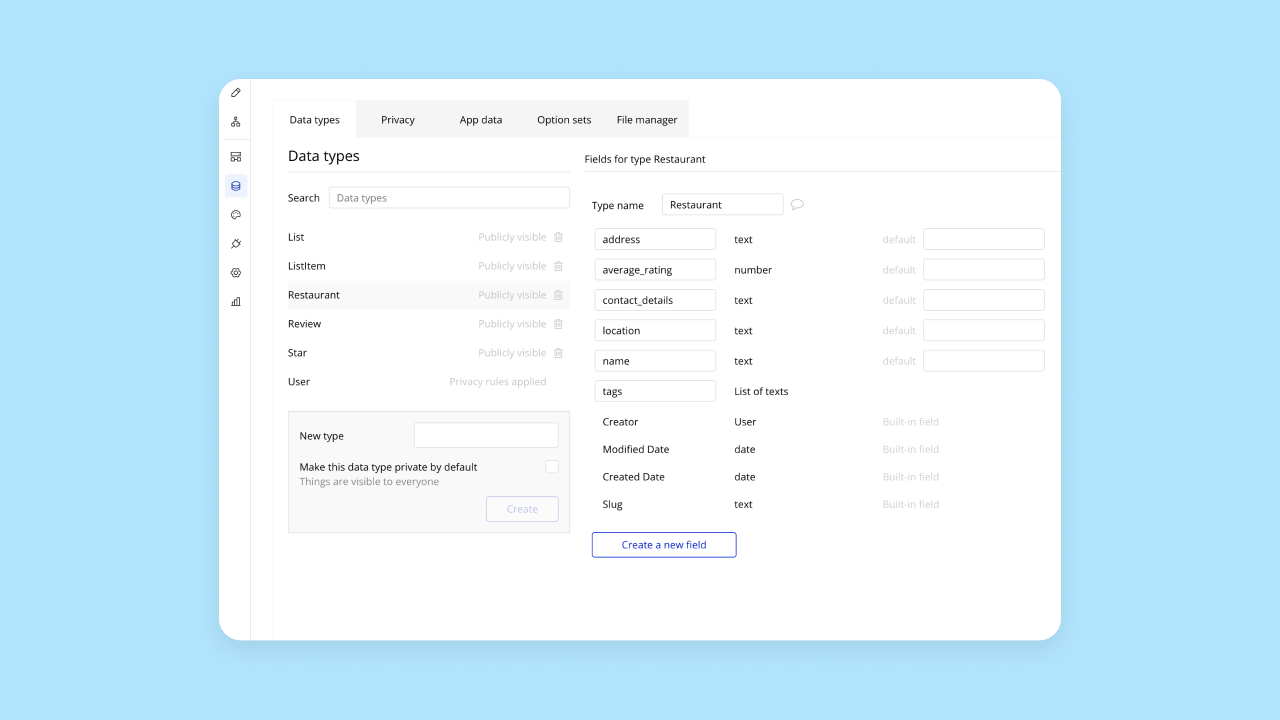
Once your app is generated, you can toggle between editor tabs to see individual pages, workflows, and databases. This is the core advantage: understanding what you build through visual workflows, not code.
How to create an app with AI in Lovable
Creating apps in Lovable is also pretty simple. Start by entering a prompt into Lovable's AI builder.
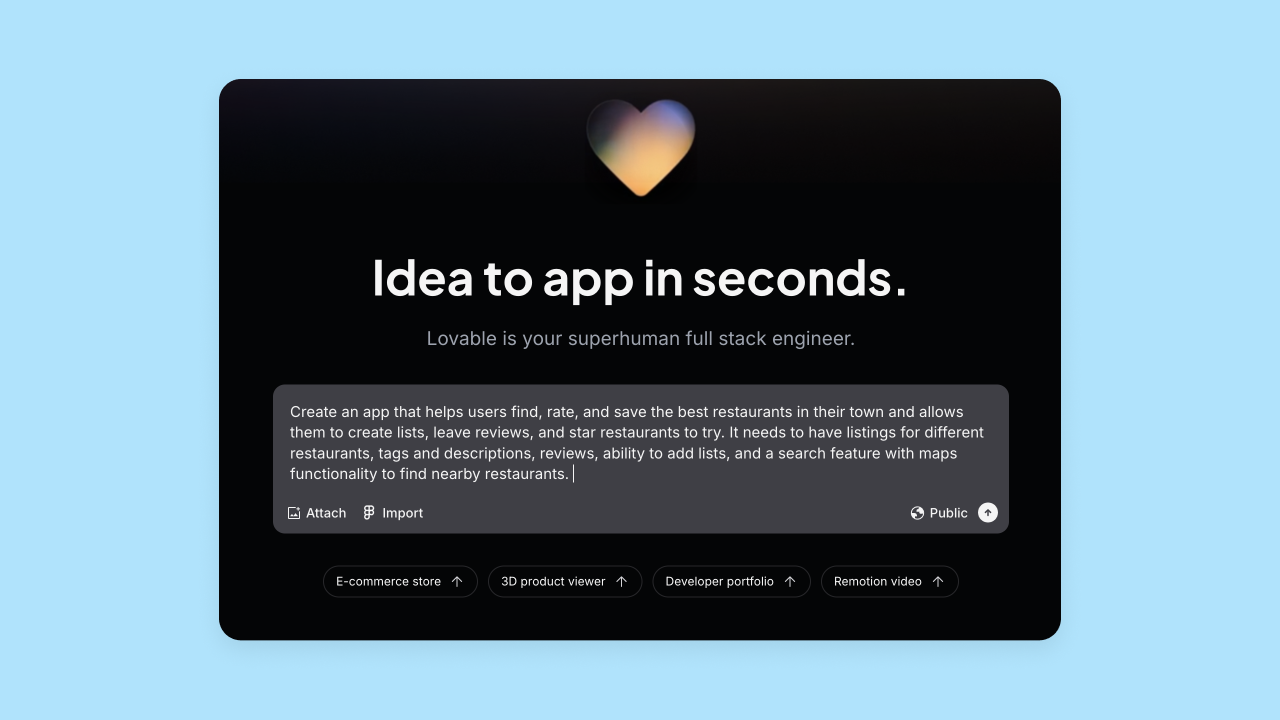
Within a few minutes, Lovable will generate the app for you using a standard stack of React, Supabase, and Tailwind CSS. You can preview the app on the right-hand side of the screen, while Lovable's AI describes what it's done on the left-hand side. You can make edits and add more features via the AI chat.
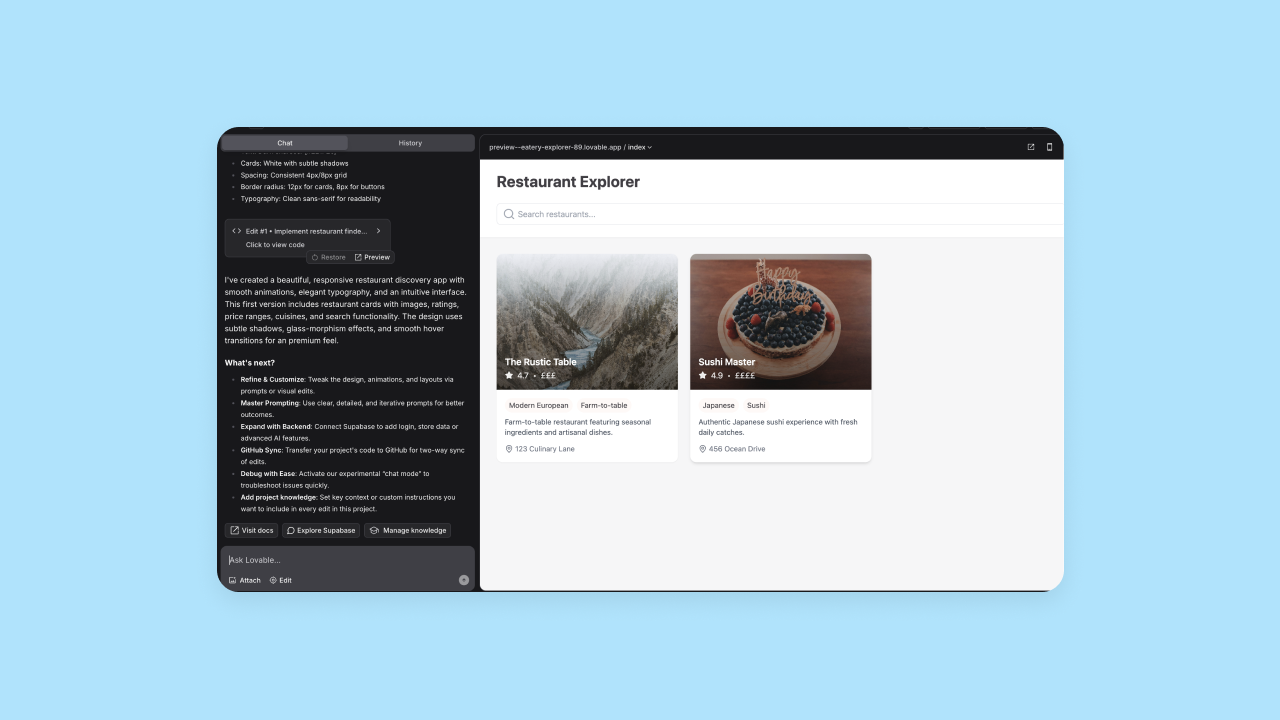
Notably, although Lovable's UI looks very clean, the functionality can still be limited out of the box. Lovable supports backend capabilities via Supabase, but for more flexibility, users can optionally connect external services.
Overall, Lovable's chat provided a lot of hand-holding, which felt helpful for our non-developer testers. The layout and UI was super clean, but there were a lot of 404s and missing functionality and features, such as search bars that didn't search, or buttons that "clicked" but didn't go anywhere or take an action.
Which is the better app development workflow?
Bottom line: Bubble provides a more thorough app development process with stronger initial output and complete functionality. Lovable's chat-based process is simple initially but limits visual editing and control for specific needs.
Initial output quality
When choosing between AI app builders, consider: Does the initial output get you most of the way there, or does it need significant iteration and refactoring? How well does the AI interpret prompts? What’s the overall quality of the original output?
That’s the first factor we’ve considered in our comparison.
Bubble AI-generated apps
We talked to eight different users who were building AI-generated apps with Bubble to get a more objective analysis of Bubble’s output quality. Obviously, we’re big fans of our own platform. But what would real users say?
We analyzed output quality in seven core areas. Here’s how Bubble scored in initial testing (note: since this testing, Bubble AI has been upgraded to newer LLMs, added automatic image generation, and now auto-generates style variables for consistent design):
- Color, branding and consistency: 3 / 5
- Spacing and layout: 4.5 / 5
- Copy, content, and context: 4 / 5
- Navigation and orientation: 4/ 5
- Readability and typography: 4.5 / 5
- Feature completeness: 3.5 / 5
- Feature functionality: 3 / 5
Bubble had strong UI generation, with high rankings for elements like spacing and layout, navigation, readability, and copy. That is: The app’s frontend looked great right from the prompt, and the prompt is being accurately interpreted.
Bubble AI generates frontend UI and UX as well as workflows and databases to create a fully-functional app. Our testers were split on feature completeness and functionality. Some gave Bubble top scores in these areas, saying that Bubble’s AI generated all the features their app needed and they worked perfectly, while others said that their app needed more iteration for feature functionality after prompting.
Overall, Bubble's AI gives you a solid foundation in less than 10 minutes — then you can continue with the AI Agent for more iterations, switch to the visual editor for precision control, or seamlessly move between both as needed.
Lovable AI-generated apps
Lovable shines with UI and layouts, but still struggles to produce a production-ready app.
Of the platforms we tested, Lovable’s output had the best AI-generated aesthetics. It gave us really polished layouts with very minimal prompting effort, leveraging Tailwind CSS for consistent styling. The branding was clean and minimalistic, and it nailed the layout, readability, and spacing every time.
Where Lovable struggled was creating features and production-ready functionality.
With Lovable, changing and adding features is managed only via the AI chat, and our testers found that Lovable never nailed feature generation on the first try. We always had to re-prompt to get the functionality we needed and expected. Even then, the AI didn’t always build the right features or they didn’t always work in the way we expected.
During this process, we found that re-prompting sometimes broke pages or navigation, and we occasionally got stuck in prompting loops without achieving desired results. This mirrors feedback from G2 reviews, where users noted that the AI can get stuck in loops—fixing one bug only to introduce another—especially when dealing with complex backend logic.
Overall, Lovable provided excellent UI generation, with less production-grade apps and features more broadly.
Which is better for initial output quality?
Lovable generated high-quality, visually pleasing UI. However, it struggled with production-ready features and functionality, and re-prompting often led to broken pages or features.
Bubble’s AI output was more solid across the board, with good UI and reasonable features and functionality completeness. Like all AI generators, there’s still some iteration needed, but with Bubble’s visual editor, that iteration is much easier — and you can see exactly what’s happening as you adjust design, logic, and data.
What’s the actual process of creating an app with Bubble AI vs. Lovable? That’s what we look at in this section.
Customizability
No matter how good your prompt is, AI apps aren't ready to ship on the first try. Customization is key to making the app exactly what you have in mind.
Customization on Bubble
Bubble gives you three powerful ways to customize: chat with the AI Agent for speed; use the visual editor for full drag-and-drop control of responsive layouts, workflows, and databases; or, if you want, add custom code to any part of your app (although it's never required). All offer unlimited customization.
For example, you can customize things like:
- UI design and responsive layouts
- Reusable styles for colors, fonts, and UI elements
- Pixel-level placement for true drag-and-drop control
- Conditionals (built visually, not with code)
- Workflows, triggers, and actions (also built visually)
- Data types and database structure
In short: Bubble gives you full control in every part of your app’s frontend and backend — and lets you see exactly how your app works as you make changes.
Customization in Lovable
Lovable has a couple of options for customization, with the level of customization varying depending on your experience level with software development.
The most basic way to make changes to UI, workflows, or logic is to use the AI chat, though it's unpredictable. Odds are high that you’ll end up in prompt purgatory, going around in circles prompting the AI for specific changes without getting exactly what you want.
Alternatively, Lovable offers visual editing capabilities for direct UI changes, but these are limited to specific properties like text, colors, fonts, margins, padding, layout controls, and replacing images — without needing to prompt the AI.
However, many changes — such as changes to page elements and features — are met with an error message that it can’t be changed manually, only via the chat.
Lovable also offers "Code Mode" on paid plans, allowing users to view and edit their project's source code directly within the Lovable editor. This makes it a lot easier to customize your app directly, but it does require you to have coding expertise to make use of it. Unfortunately, code editing is still the most direct way to customize deeper logic and behavior, so non-coders need to be really comfortable with AI prompting and iteration to make major customizations.
Which is better for customization?
Bottom line: Bubble offers far greater flexibility and customization than Lovable, with full control via the visual editor for design, logic, and data, plus optional custom code.
With Lovable, logic and workflows are buried in the code, and many iterations and customizations must happen via the chat (with visual editing only available for a specific set of direct UI changes).
Design functionality
When it comes to the design of your app — and design features — how do different AI generators stack up? Are you able to create responsive designs? Is there a drag-and-drop visual editor? Is the experience truly no-code or do you need some technical expertise to finalize the design of your app?
Bubble design features
Bubble gives you comprehensive visual control over design (and workflows and data, but we'll get to those later). Design features include:
- Responsive design: You can design for web, mobile, and other screen sizes.
- Drag-and-drop visual design: A simple visual editor lets you make design choices and customizations without using code.
- Customization options: Bubble has an extremely flexible editor that lets you achieve pixel-by-pixel customization and control. Match your brand guidelines exactly and create exactly what you’re dreaming of.
- Design imports: If you already have a high-fidelity design in Figma, you can import designs directly into Bubble and convert them automatically to Bubble app pages and screens, speeding up the design process significantly.
Lovable design features
Lovable's AI-generated designs are typically quite good with automatic responsive design, but the platform offers limited design functionality for builders.
However, Lovable doesn’t have true drag-and-drop design functionality — their visual editing functionality only allows direct editing of certain elements: text, colors, fonts, margins, padding, layout controls, and image replacement. Everything else has to go through the chat, so you don’t have full control over your design.
It is possible to import Figma designs into Lovable, but you have to use a third-party plugin. You can also share screenshots and images in the chat to help prompt the AI with the design choices and layouts you’re looking for.
Which is better for design functionality?
| Bubble | Lovable |
|---|---|
| Full drag-and-drop visual editor | Visual editing for certain direct UI changes (not full drag-and-drop building) |
| Pixel-level customization | AI chat for many changes, with visual editing for some design controls |
| Direct Figma imports | Third-party plugin required |
| Visual control without any code | Often requires code editing |
Bottom line: Bubble is the only AI app builder with full drag-and-drop visual support built on a production-ready platform.
Lovable offers strong initial UI design but limited design functionality and control beyond that.
Mobile app development
While creating web apps with responsive design can capture some mobile traffic, being able to offer native mobile apps is a much better solution for most brands. We looked at which platforms support mobile app development, and what capabilities are available.
Mobile app development on Bubble
Native mobile app development is currently in beta and available to all Bubble users. Use Bubble’s familiar visual no-code editor to build both web and mobile apps, eliminating platform sprawl and reducing the learning curve needed to build for both web and mobile.
Bubble’s mobile app editor includes the ability to create React Native apps without code, adding native mobile elements, gestures, and functionality all from the Bubble editor. For example, you can:
- Build from mobile-specific building blocks, rather than working from web pages and designing responsively.
- Develop common mobile navigation patterns, like stack navigation (swiping or tapping), modal screens (pop-up screens over the main view), and bottom sheets (elements that slide up from the bottom of the screen).
- Add mobile-friendly interactions like swipe, long-press, and tap.
- Incorporate native device features, such as access to the camera, microphone, photo library, push notifications, and more.
Plus, you can preview and test everything using BubbleGo, our app for mobile testing. Then, publish your app directly to the Apple App Store and Google Play Store right from the Bubble editor.
Mobile app development on Lovable
Lovable doesn’t currently offer native mobile app development, instead focusing on web apps. Although you can build responsive web apps on Lovable that adjust for various screen sizes (including mobile web), you won’t be able to create native apps.
This means users can’t download your app from app stores, access native device features, or use app features offline. If you’re looking to build true mobile apps with Lovable, you’ll need to export your Lovable code and iterate on the code manually to create a native mobile app based on the existing functionality.
Which is better for mobile app development?
Bubble has the clear advantage for mobile app development with AI, given the upcoming native mobile app builder. While both platforms support responsive design for mobile web, Lovable doesn’t offer true native app development.
Collaboration
With AI, building apps as a team of one is easier than ever, but larger projects benefit from collaboration. This section compares how each of these tools support collaboration.
Collaborating on Bubble
Bubble is designed for professional use, so collaborating on Bubble is built into the platform at every level.
On Bubble, you can add as many users as you need to collaborate on an app, depending on your plan. Invite team members to relevant apps, set granular access permissions for different users, and collaborate in real-time with everyone seeing changes as they happen.
Bubble also includes built-in version control with rollback capabilities, so teams can experiment safely, compare versions visually, and revert changes if needed. For larger organizations, enterprise plans include SSO integration and admin controls for managing members across multiple apps.
Collaborating in Lovable
Lovable supports collaboration too. The platform supports workspace collaboration with others and real-time multi-user editing where everyone sees changes as they happen. Paid plans (Pro and Business) introduce role-based permissions (Viewer, Editor, Admin, Owner) to better manage team access.
For teams, collaboration happens inside a code-generating environment, so you need clear processes for reviewing AI changes and debugging. Lovable also offers two-way sync with GitHub, which is a major plus for technical teams who want to manage version control using standard developer workflows.
Which is better for collaboration?
Bubble collaboration features:
- Real-time multi-user editing
- Granular permissions for each user
- Built-in version control with visual comparison and rollback
- Team and enterprise plans with SSO integration
- Visual workflows that any team member can understand and maintain
Lovable collaboration features:
- Real-time multi-user editing
- Unlimited members per workspace (free on all plans)
- Workspace collaboration with role-based permissions (paid plans)
- GitHub sync for code-based version control
Bottom line: Bubble is built for teams — and visual workflows mean new team members can quickly understand, debug, and improve the app without reading code. Lovable supports real-time collaboration, but teams are working inside a code-generating environment where understanding changes requires reviewing the underlying code.
Framework support
Frameworks provide pre-built bits of code that can do basic tasks for common components, like reusable UI components or pre-built workflows. Each framework is unique to a certain programming language — for example, Angular is the framework for TypeScript/JavaScript.
Considering framework support is especially important for more technical users. If you need your website to run on certain programming languages or frameworks for other parts of your tech stack — or based on your knowledge or your team’s knowledge — you want an AI builder that can support those frameworks.
Some platforms generate code in one or more programming languages, while others use an internal programming language. The programming language(s) your chosen platform uses will determine your tech stack flexibility.
Bubble framework support
Bubble uses a visual programming language unique to the platform, where workflows, logic, and data are visual rather than code-based. You don't need coding knowledge to build, test, iterate, debug, or scale your app.
And for more technical users who want to use code, you can add custom code via the Bubble editor (although it's never required).
Lovable framework support
Lovable generates code using standard web frameworks: React for the frontend, Tailwind CSS for styling, and Supabase for the backend. If that’s already a familiar part of your tech stack, Lovable could be a good option.
Lovable also doesn’t offer visual programming at anywhere near Bubble’s level. “Visual” programming happens through text-based chat, which is also limited.
Integrations
A solid ecosystem of plugins and integrations can quickly expand the possibilities and capabilities of the platform you’re using — and the app you create. We analyzed what kinds and how robust the integrations available were for each platform.
Bubble integrations
Bubble has thousands of expert-built plugins and integrations that you can use to build and expand the capacities of your app, including:
- OpenAI and ChatGPT 4
- Anthropic Claude AI
- DALL-E
- Github
- Figma
- Stripe
- Paypal
- Google Suite products
- and thousands more
Bubble’s plugins are built and maintained by expert developers, who know how to create custom functionality and maintain it. You can access the functionality you need on-demand and without building it yourself, while also getting the support of a developer to fix any issues that may pop up with that plugin.
If you’re an experienced developer yourself, you can also build your own plugins. Connect any service or platform to your Bubble app via our API connector. Input the API token on your Bubble backend and create your own integrations to whatever tools you need.
Lovable integrations
Lovable integrates with GitHub and offers built-in backend capabilities via Supabase. It also supports various other services via connectors, including shared connectors for popular tools like Stripe, Shopify, and ElevenLabs, as well as personal connectors via MCP (Model Context Protocol) for tools like Notion, Linear, and Jira.
Which is better for integrations?
Bottom line: Bubble offers thousands of integrations that require minimal setup, while Lovable supports a growing connector ecosystem alongside GitHub.
Iteration and optimization
Code optimization refers to code refactoring — that is, optimizing code that’s already working to make it run faster or more efficiently. You’re not changing what the code does, but you’re making it easier to manage.
Iteration refers to expanding or changing how your app works to include new features or functionality. Some AI app builders allow you to iterate on your code and add new features with AI, some require you to do this manually, and some offer multiple options for iterating.
Bubble optimization and iteration
A major benefit to Bubble is that you don’t have to refactor code. As your app scales, you may eventually want to find ways to make it run more efficiently and start optimizing costs. If and when you reach that point, you’ll find plenty of resources on our forums and throughout the community for how people have done that. But it’s not something you’ll need to consider from day 1 or 2 — it’s a “good problem” to have that you’ll only run into on Bubble once you’re scaling considerably.
Bubble offers AI-enabled iteration through the Bubble AI Agent, which can generate and modify elements, workflows, data types, and expressions, or use the visual editor for precise control.
If you don’t have a technical background, opting for a platform with a visual builder is going to make it a lot easier to iterate and manage your app long-term compared to code or AI-based iterations that you won’t be able to fully control or manage.
Lovable AI code optimization and iteration
Lovable offers both AI-driven code optimization and ongoing iteration. Both have pros and cons.
Lovable offers AI-driven optimization that works well for simple tasks through the AI chat. The AI chat in Lovable can refine UI, logic, and integrations. The downside is that AI chat is often the only way to iterate (unless you pay for code editing or export to GitHub), which can lead to the prompt purgatory described earlier.
Users have reported that the AI can sometimes get stuck in a loop — fixing one bug only to introduce another—which consumes credits without resolving the issue, especially when dealing with complex backend logic. Since Lovable operates on a credit-based system for AI usage, these loops can become costly.
Which has the better AI-driven improvements?
Bottom line: Bubble gives you two ways to iterate: chat with the Agent for AI-driven speed or use the visual editor for precise control, switching seamlessly between them. Lovable only offers AI chat — when AI gets stuck, you're stuck. Bubble also never requires refactoring because visual workflows are inherently maintainable.
Security
Solid security is essential for production-grade apps. We compared data protection, security certifications, and ease of setup for non-technical users.
Bubble security features
Bubble offers strong security “out-of-the-box,” with built-in, enterprise-grade security features that protect both your app data and your end-users’ data. Bubble is SOC 2 Type II compliant, meets GDPR standards, and provides enterprise-grade infrastructure (AWS) and data encryption (HTTPS with SSL encryption and encrypted at rest with AES-256 via AWS RDS). In plain English, your data is *automatically encrypted* both when it’s stored and when it’s being sent between users and your app.
Bubble also makes it simple to set up app-level privacy rules and restrictions, again using the visual editor — so you don’t have to code. You can create and define privacy rules to make sure that end users are never exposed to app data they shouldn’t have. Bubble makes it easy to set up these rules exactly as needed with the visual editor.
Plus, Bubble's security dashboard allows you to run automated security checks that scan your app for potential vulnerabilities and alert you before they become problems.
Other built-in security features include:
- Built-in user authentication with options for 2FA, SSO, and more.
- Vulnerability testing
- DDoS protection and Cloudflare blocking to prevent attacks
- Security dashboard monitoring to identify vulnerabilities and get proactive alerts
Not to mention that Bubble has a strong, established track record of hosting and maintaining apps — with 6 million builders, 7 million apps, and Bubble apps transacting more than $1 billion per year. This is a testament to Bubble’s security, stability, and production-grade environment at scale.
Lovable security features
Lovable offers security and compliance features, including SOC 2 Type II and ISO 27001:2022 certifications, as well as GDPR compliance. It includes a "Security Checker 2.0" that scans for secrets and provides notifications.
Lovable also supports account-level security features. Through its backend capabilities (powered by Supabase), Lovable provides user authentication options.
As with any app builder, compliance and security is still partly on the builder: you’ll need to implement appropriate data access and privacy patterns inside your app to ensure end users can only access what they should. Lovable's AI can help scan for Row-Level Security (RLS) policies, but implementing them correctly often requires understanding the underlying database logic.
Which has stronger security?
Bottom line: Bubble offers robust, enterprise-grade security with visual privacy tools that make setup accessible to non-programmers and a security dashboard for vulnerability monitoring and alerts.
Lovable also offers security features, but because it’s a code-generating environment, builders may need more technical knowledge to achieve the same level of app-level control and clarity over privacy and data access patterns.
Deployment and hosting
Easy deployment and hosting of your app makes it simple to get your app live and shared with customers, stakeholders, or anyone else who you want to use your app. In this section, we compare how each of these platforms manage launching and hosting for your app.
Deploying and hosting Bubble apps
Bubble offers one-click deployment and built-in hosting. In plain English: when you’re ready to publish your app, just click the *Deploy* button in the header nav bar. You’ll see a popup where you can add a description of changes made for version control, then click *Confirm*.

The latest version of your app will then go live for your end users.
Bubble also offers hosting, which means that when you’re ready to push your site or app live, it will live on Bubble servers. All-in-one hosting makes updates and iterations faster, while giving you less platforms to juggle.
And with Bubble's native mobile capabilities, you can publish directly to the Apple App Store and Google Play Store right from the editor — no Xcode, Android Studio, or mobile development expertise required. Bubble handles the packaging, configures your app settings (like icons and splash screens), and validates everything before you submit.
Need to push a quick fix after launch? Over-the-air updates let you ship changes instantly without waiting for app store resubmission. Early adopters have gone from idea to live app store listing in just one to two weeks, building web and native mobile apps from a single platform with a shared backend.
Deploying and hosting Lovable apps
Lovable offers one-click deployment in line with most other AI-powered app builders. Click the “Share” button, then click “Publish” to send the latest version of your app live.
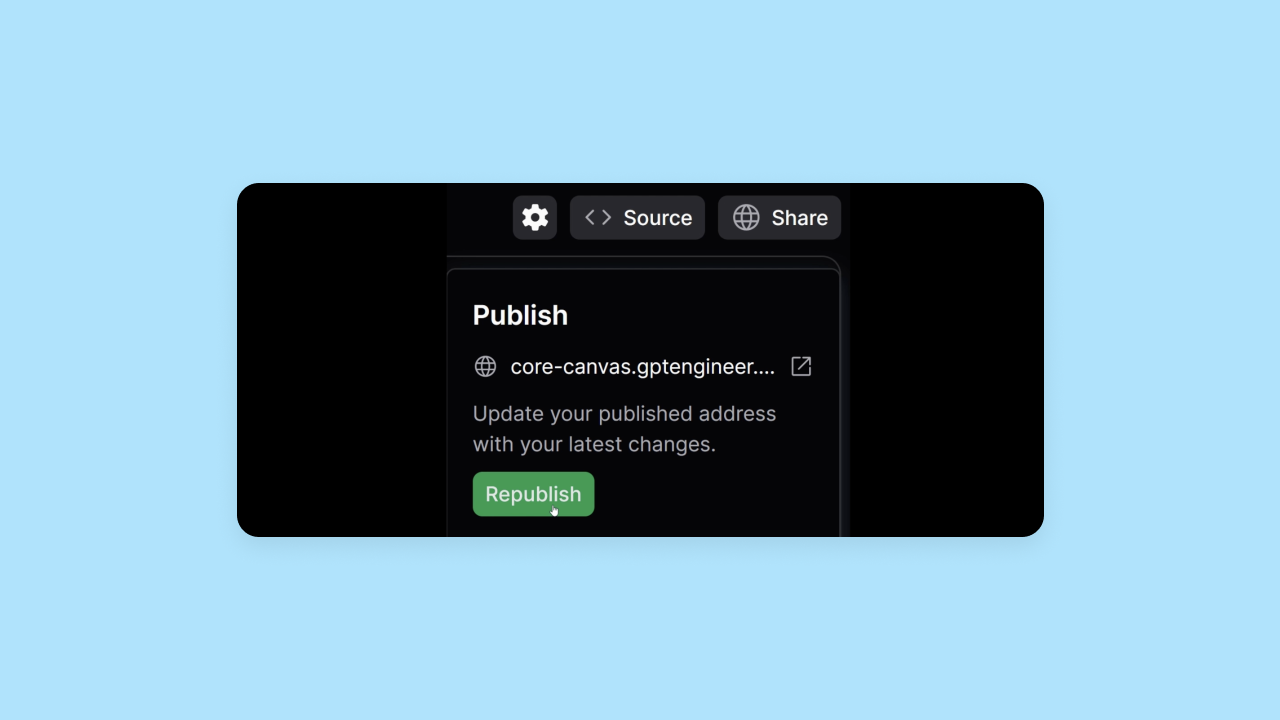
Lovable offers native hosting through its backend capabilities via Lovable Cloud. Users can also optionally export their projects and deploy to third-party hosting providers like Vercel or Netlify, thanks to the standard React stack.
Which is better for deployment and hosting?
Bottom line: The deployment experience across most AI-powered app-generation platforms, including Lovable and Bubble, is pretty standard.
However, Bubble also offers fully managed hosting with auto-scaling and enterprise-grade security and privacy features, while Lovable’s hosting depends on whether you use their native hosting or export and manage a third-party hosting provider.
Education
As AI builders get better and better, education and technical documentation may feel less crucial. However, even as building software becomes more accessible, there’s always going to be some level of education needed for understanding different platforms and AI models.
In this section, we evaluated the level and quality of education each platform provided.
Bubble education materials
Since Bubble is designed for builders of all skill levels and backgrounds, over the years we’ve built out a huge library of educational materials. If you’re new to building with AI, start with our course for Bubble beginners — it walks you through the basics of the Bubble platform, our visual programming language, and our AI tools.
If you're new to Bubble, start with Bubble Academy — we recently redesigned it to make it easier to browse, evaluate, and start learning. Each course now has its own landing page where you can see what you'll learn, how long it takes, and what skill level it's designed for before you dive in.
Once you start a course, you'll see the full lesson list from the beginning, so you can plan your time and understand how everything fits together. You'll also find interactive tutorials that walk you through every step, one by one, plus step-by-step written guides, one-on-one coaching, and bootcamps.
For more in-depth documentation, check out the Bubble Manual. If you get stuck at any point, you can always reach out to our active and engaged community in the Bubble Forum for help!
Lovable education materials
Lovable offers some education materials — namely, a YouTube channel, some tutorials, and basic technical documentation — but the materials aren’t comprehensive.
In some ways, this is to be expected. The platform is still quite new, and the UX is so simple that a lot of documentation doesn’t feel immediately necessary. However, if you’re looking to build a fully-functioning app beyond an MVP or a mockup, you’ll likely need more support and guidance than what Lovable provides.
The tutorials and YouTube videos are helpful for getting started. But when you get stuck, run into errors, or need to do something that’s not immediately obvious, Lovable’s documentation and troubleshooting guides are sparse. If you don’t already have the technical knowledge of how to debug, test, iterate on, and fix code directly, you’ll find yourself getting stuck quickly.
Which is better for resources and education?
Bottom line: Bubble offers far more and far superior education and documentation compared to Lovable. Even though Lovable’s platform is pretty intuitive and simple at first, users may find themselves getting stuck without having the resources they need to troubleshoot.
Required technical expertise
How much technical expertise is required to build a fully-functional app using this platform? That’s what we’ve analyzed in this section. Even though AI is generating the initial app for you, different platforms require very different levels of technical expertise to take the app from Day 1 to public launch.
Bubble technical approachability
Bubble is designed for developers as well as builders who don’t have software or engineering experience — and both groups have had success building on Bubble. You’ll find apps built on Bubble by developers, entrepreneurs, consultants, product managers, founders, hobbyists, and everyone in between.
Of the AI-powered app builders we tested, though, Bubble is the best choice for builders who don’t have a technical background. On Bubble, every part of the software development process is accessible for those without a technical background — not just the initial design mockups and MVPs. Because Bubble is built entirely on a visual programming language, you can control your workflows, data, logic, and functionality all visually — no code needed.
When you start with AI, you get a massive head start and speed up development time exponentially. But Bubble makes it easier and more accessible to go beyond the Day 1 output that AI provides — because understanding is a feature, not a limitation.
Lovable technical approachability
Lovable is designed for a broad audience, and it is generally perceived as being easy to use by users — at least, up until you hit that last 20%.
However, Lovable isn’t a great choice for projects with a high degree of complexity, as you’ll still end up having to deal with code at some point, especially if you want more control over how your app looks, feels, and works. Because Lovable generates standard React and Supabase code, making deep customizations often requires understanding these specific technologies.
By default, Lovable doesn’t give you much control over your code or editing your app. This is a feature of the platform to abstract away the code to make it easier to use — but it reduces your control. As a result, anyone may be able to get started and make progress more quickly, but you might find yourself blocked or stuck when working on more complex features or functions.
Which is better in terms of required technical expertise?
Bottom line: Both Bubble and Lovable are good options for builders who don’t have a technical background. However, they provide different solutions for that audience.
Lovable provides an easy-to-use platform that offers less control and a higher likelihood you’ll find yourself stuck or venturing into the code at some point. Bubble equips everyone to build, manage, and scale an app long-term with a visual programming language that takes a bit more time to learn, but offers more control — without code — in the long run.
Bubble also has a much more established community and resources if you run into any difficulties or want to create a production-grade app to scale or grow your business.
Lovable doesn’t have a good solution to the 80% problem. Bubble offers a visual platform that’s accessible for everyone to take you through production, launch, and beyond.
Pricing and costs
Bubble pricing structure
Bubble uses a tiered subscription model with five options: Free, Starter ($32/month), Growth ($134/month), Team ($398/month), and Enterprise (custom pricing). You can build for as long as you want on the Free plan and only need to upgrade when you're ready to launch.
Paid plans are based on the features you need and your app's usage, offering predictable costs as you grow. This includes everything—hosting, database management, security, deployment, and automatic scaling—so there are no surprise infrastructure bills or third-party services to configure. As your app grows from first users to millions, you upgrade tiers rather than managing separate hosting costs.
For teams building both web and mobile apps, Bubble offers combined plans (like Growth Web & Mobile) that let you manage everything from a single platform with shared backend infrastructure.
Lovable pricing structure
Lovable offers a subscription-based model with multiple tiers. The Free plan includes a limited number of daily credits (up to 30/month). Paid plans start with the Pro tier at $25/month (100 monthly credits) and the Business tier at $50/month, which unlocks features like SSO, personal projects, and internal publishing controls.
Crucially, Lovable operates on a credit system for AI usage. Both "Chat mode" and "Agent mode" consume credits, and users have reported that complex debugging loops can burn through these credits quickly. While Lovable offers built-in hosting via Lovable Cloud, users can optionally connect external services or deploy to third-party hosting providers, which may incur additional costs.
Which offers better value for money?
For builders who want predictable costs, Bubble's all-inclusive model is straightforward — your subscription covers hosting, database, security, and scaling with no separate infrastructure to manage or surprise bills as usage grows.
Which is right for you?
Bubble and Lovable both offer AI-powered app generation that takes just minutes. But there's a fundamental difference: Lovable generates code you can't read, while Bubble is the only fully visual AI app builder — you vibe code without the code. For builders without coding experience, this difference is critical: with Lovable, you'll get stuck when AI can't deliver. With Bubble, you can always edit directly in the visual editor.
Lovable is a good option for anyone trying to quickly spin up an MVP or a semi-functional prototype. It's quick, the UX is intuitive, and the AI-powered iterations make drafting up an MVP super fast and easy for almost anyone.
However, Bubble is the only fully visual AI app builder that lets you vibe code without the code to launch real apps, not prototypes. Chat with AI when you want speed, edit directly when you want control. It offers the ability to create production-grade apps and enterprise software tools with speed and scalability alongside full control and customization — without code.
Plus, you get built-in hosting, a huge community with tons of resources, and a platform you can understand without a technical background to make managing and scaling your app long-term accessible.
Many AI builders make building an MVP fast, but Bubble makes building a business fast. Where AI hits a wall or leaves you stuck in prompt purgatory, Bubble gives you full control.
Of course, the best way to see if Bubble will work for your project is to test it out for yourself. Try our AI app generator today for free and see how fast you can get your ideas into a real-life product.
Frequently asked questions about Bubble vs. Lovable
What happens when I get stuck with AI generation on these platforms?
With Lovable, you keep prompting or edit code directly — a barrier for non-technical builders. With Bubble, you switch to the visual editor for direct control without code.
Can I export my app from Bubble or Lovable if I want to switch platforms?
Lovable allows you to export the code for your project, which you can then host and manage elsewhere. Bubble is an all-in-one platform, so you don't export code. Instead, you build, host, and scale your app within the Bubble ecosystem, which handles all the infrastructure for you.
Which platform is better for complete beginners with no technical background?
Both platforms are designed to be approachable. Lovable's chat-based interface is very simple to start with. However, Bubble is often a better choice for beginners who want to launch a real business because its visual editor ensures you can understand, manage, and iterate on every part of your app long-term, without hitting a wall that requires coding knowledge.
How do the ongoing costs compare as my app scales and grows?
Bubble's tiered plans are designed to provide predictable costs as you scale, with all infrastructure included. With Lovable, you need to account for the cost of the Lovable subscription plus any additional hosting or usage costs, which can be less predictable as your user base grows.
Build for as long as you want on the Free plan. Only upgrade when you're ready to launch.
Join Bubble