TL;DR: Bubble and Replit are AI-powered app builders that generate functional applications in minutes, but Bubble stands out for non-technical users with its visual drag-and-drop editor that allows customization without coding, while Replit is better suited for more technical users who have the required programming knowledge to edit the generated code.
AI app builders are platforms that use artificial intelligence to help you create web and mobile applications. Instead of writing code, you describe what you want in plain English, and the AI generates the user interface, database structure, and underlying logic in minutes. For founders and business owners, this means you can test ideas and get user feedback, and you don't need a technical co-founder or hiring engineers.
Given the rise in AI tools for building software, we knew it was time to test out the most popular options. Bubble and Replit are popular tools among developers and non-developers alike for building apps with AI, so we put them up against one another to see which would perform best for different use cases. In this comparison, we'll cover everything from initial output quality and design capabilities to security, pricing, and how each platform handles the full journey from generation to production.
Bubble is the only fully visual AI app builder that lets you vibe code without the code to launch real web and mobile apps to real users. Bubble's AI generates complete web and mobile apps instantly, then the AI Agent helps you add features, troubleshoot, and iterate — or switch to the visual editor for precise control.
Replit is an all-in-one programming environment with integrated AI capabilities that allows you to code (or generate code via AI), iterate, collaborate, and host your app. It supports 30+ programming languages and Replit Agent with multiple modes (including Fast mode for quick iterations and Full Build mode for comprehensive development) to take you from generation to iteration and beyond.
Bubble vs. Replit: Key factors
The key factor when choosing between Bubble and Replit is what happens when you need precise control or when AI can't deliver. If you don't know how to code, Replit leaves you stuck with code you can't read. With Bubble, you edit visually — see exactly how your app works and fix issues yourself.
We evaluated both platforms on four crucial factors:
- Customization control: Can you customize through AI, visual editing, or both? Do you stay in control no matter which method you choose?
- Technical expertise required: Can non-coders understand and control their app at every stage?
- Builder autonomy: Do you get stuck in frustrating prompt loops, or can you step in and fix things when AI hits its limits?
- Scaling costs: Are there hidden AI usage fees that make growth cost-prohibitive?
| Feature | Bubble | Replit |
|---|---|---|
| Initial output quality | ⭐⭐⭐⭐ | ⭐⭐⭐💫 |
| Design capabilities | ⭐⭐⭐⭐⭐ Responsive design, drag-and-drop visual editor for pixel-perfect UI, AND the Bubble AI Agent to generate and edit elements, expressions, workflows, and data types through chat. Switch seamlessly between AI and visual editing. |
⭐⭐ Responsive design but no visual editor. Supports multi-modal prompting (upload a screenshot to generate code). |
| Native mobile app support | ⭐⭐⭐⭐ Build native mobile apps visually and deploy to the Apple App Store and Google Play. Plus, web and mobile apps have a shared backend. (Currently in beta.) |
⭐⭐⭐⭐ Generate React Native mobile apps with AI and deploy via Expo. (Code editing required for complex logic.) |
| Collaboration | ⭐⭐⭐⭐⭐ Real-time team editing with granular role-based permissions and built-in version control—all without complex setup or third-party integrations. |
⭐⭐⭐⭐⭐ Full IDE with Github integration and "Multiplayer" mode for real-time co-editing. |
| Backend and database support | ⭐⭐⭐⭐ Native backend and database that doesn't require technical expertise or extra costs to set up. |
⭐⭐⭐ Built-in Replit Database (SQL) and managed Postgres; setup can be confusing for non-technical users. |
| Security and compliance | ⭐⭐⭐⭐ Bubble offers enterprise-grade security features, including SOC-II and GDPR compliance, advanced encryption and monitoring, a security dashboard to monitor and address vulnerabilities proactively, and custom privacy rules. |
⭐⭐⭐ Replit is SOC 2 Type II compliant and provides Replit Auth for integrated end-user authentication. Teams/Enterprise users have access to role-based access control and private deployments. However, implementing custom privacy rules and app-specific security logic beyond authentication requires manual coding. |
| Deployment/hosting | ⭐⭐⭐⭐⭐ One-click deployment and native hosting. |
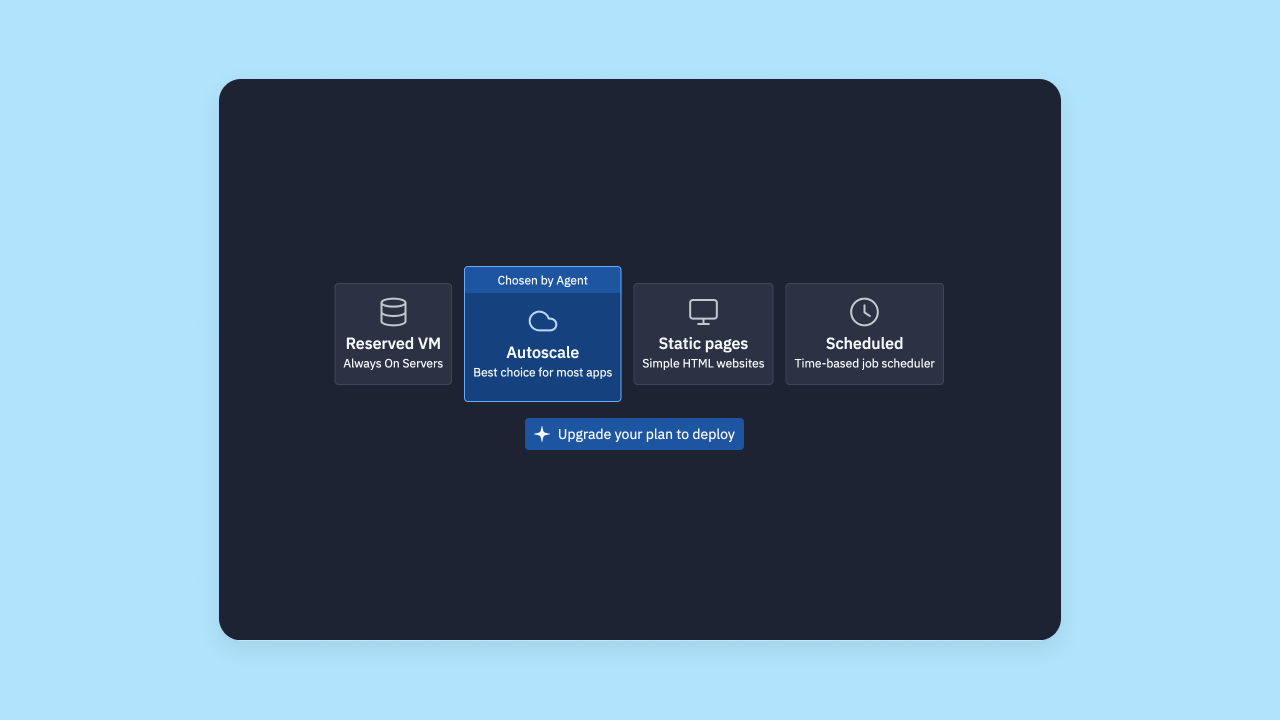
⭐⭐⭐⭐⭐ One-click deployment with options for Autoscale or Reserved VMs. |
| Technical expertise | ⭐⭐⭐⭐⭐ Best-in-class for developers and non-developers alike. |
⭐⭐⭐ OK for non-technical and moderately technical users (technical background very helpful). |
Replit is a flexible full-stack development platform (it supports 30+ programming languages) that gives developers full control over their code. Replit provides AI support for both generating code and iterating on it. The integrated development environment (IDE) will be familiar to technical users, which can decrease the learning curve and make it easier to feel comfortable in the platform.
However, Replit is geared more toward experienced developers. Without any kind of visual builder or editor, you're required to have some level of coding knowledge to debug and refine your code due to AI's inconsistent and often buggy output. Many of our testers also noted that Replit has a bit of a "jack of all trades" problem. Although "doing it all" is certainly a strength for Replit, it also means that it's not as specialized in individual tasks like UI generation, debugging, or visual editing as other tools. Finally, cost and privacy concerns can both be barriers for startups thinking about using Replit.
If you're serious about building and scaling your app but don't have a lot of technical experience, Bubble is the best choice for you.
Bubble also offers production-grade tools like privacy tooling, enterprise-grade scaling and security, and built-in databases and hosting. Even better, you don't have to pay for anything until you're ready for launch.
Required technical expertise
While AI generates most of your app, every platform requires some work to go from initial output to production launch. Here's how Bubble and Replit compare on technical requirements.
Bubble technical approachability
Anyone can build successfully on Bubble, regardless of your technical expertise. In part, that's due to Bubble's combination of AI agent and a visual development platform, plus the option to add custom code if you want. It's the best of both worlds, and supports a wide range of skill levels.
As a result, you'll find apps built on Bubble by developers, product managers, founders, individual hobbyists, and everyone in between.
Of the AI-powered app builders we tested, Bubble is the best choice for non-technical builders. You're never stuck, even if AI hits its limits. When AI generates something, you can understand it, modify it, and maintain it yourself. Though a technical background can make it faster to build on Bubble (or any platform), someone without a technical background at all can make a production-ready app in just days on their own with Bubble.
Replit technical approachability
Replit is built more toward developers and learners who want an integrated, AI-assisted development environment. It's also good for users who feel they're "outgrowing" simpler AI builders like Lovable, which focuses on generating React and Supabase apps but can struggle with complex backend logic.
This creates some pros and also some cons. On the plus side, Replit gives you a lot of control throughout the whole process, and a familiar IDE with AI-assist for exponentially faster development time. Its zero-setup, browser-based environment is highly praised for removing the headache of local configuration.
On the flip side, there's more technical expertise needed and it's less intuitive to use from step 1. For users who are fine with relying on AI for all changes and iterations, Replit does provide a pretty good AI-assisted iterative process. However, it's a risky move as AI can be unpredictable at this point, and it can be easy to get stuck.
Which is better for required technical expertise?
Bottom line: Bubble is more accessible for non-programmers.
Bubble's established community and extensive educational resources also give beginners the support needed to solve problems, troubleshoot, and manage their apps long-term.
Security
Strong security is an absolute must if you want to launch and scale an app that's ready for end-users or enterprise-level internal use. For this section, we compared how well each platform protects your app data and customer data, what security certifications and features are built in to the platform, and how easy it is to set them up — even without technical experience.
Bubble security features
Bubble offers strong security "out-of-the-box," with built-in, enterprise-grade security features. Bubble is SOC 2 Type II compliant, meets GDPR standards, and provides enterprise-grade infrastructure (AWS) and data encryption (HTTPS with SSL encryption and encrypted at rest with AES-256 via AWS RDS).
Bubble also makes it simple to set up custom privacy rules and restrictions specific to your app and data types. You can do this through the visual editor, so you don't have to code. Although these rules aren't set up automatically, Bubble will help guide you through it and makes it easy to set up exactly how you need it.
Plus: Bubble's security dashboard gives you the option of running automated security checks that scan your app for potential vulnerabilities and alert you before they become problems.
Other built-in security features include:
- Built-in user authentication with options for 2FA, SSO, and more.
- Vulnerability testing
- DDoS protection and Cloudflare blocking to prevent attacks
- Monitoring to identify vulnerabilities and get proactive alerts
Not to mention, Bubble has a strong, established track record of hosting and maintaining apps with thousands of users around the world — a testament to Bubble's security, stability, and production-grade environment.
Replit security features
At the platform-level, Replit provides strong security, offering end-to-end data encryption to make sure your data is always secure. Replit is also SOC 2 Type II compliant and compliant with GDPR standards, leveraging Google Cloud infrastructure and Google Cloud Armor for protection. They also support 2FA and SSO for Replit accounts, so it provides a secure platform to build on.
Where security becomes more structured for Teams users is at the app level. Replit provides Replit Auth for integrated end-user authentication (a fully managed solution with enterprise-grade infrastructure), and Teams/Enterprise users have access to role-based access control and private deployments with access management. However, implementing custom privacy rules and app-specific security logic beyond authentication requires manual coding by developers.
Replit does give you full control over your code, so building secure apps is definitely possible — but you need to have the expertise to do so yourself. Experienced developers can follow general best practices for web development, but non-programmers will likely find this very challenging. It's easy to accidentally build an insecure app since there aren't any visual security guardrails or guidance.
Which has stronger security?
Bottom line: Both platforms have strong security, but Bubble gives you production-ready security without requiring you to know how to code.
App development workflow
What's the actual process of creating an app with Bubble AI vs. Replit? That's what we look at in this section.
How to create an app with AI on Bubble
Creating an app with Bubble AI has three basic steps:
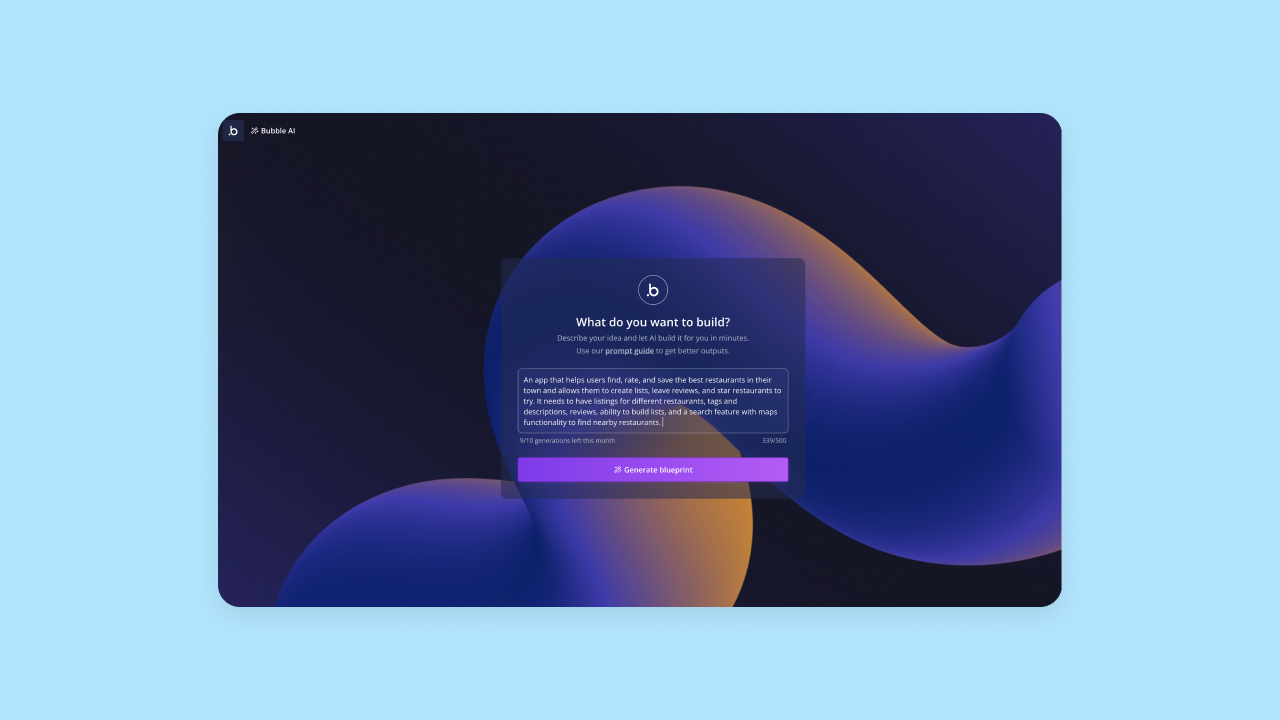
1. From the AI app generator, input a prompt that provides a concise description of your app along with key features.
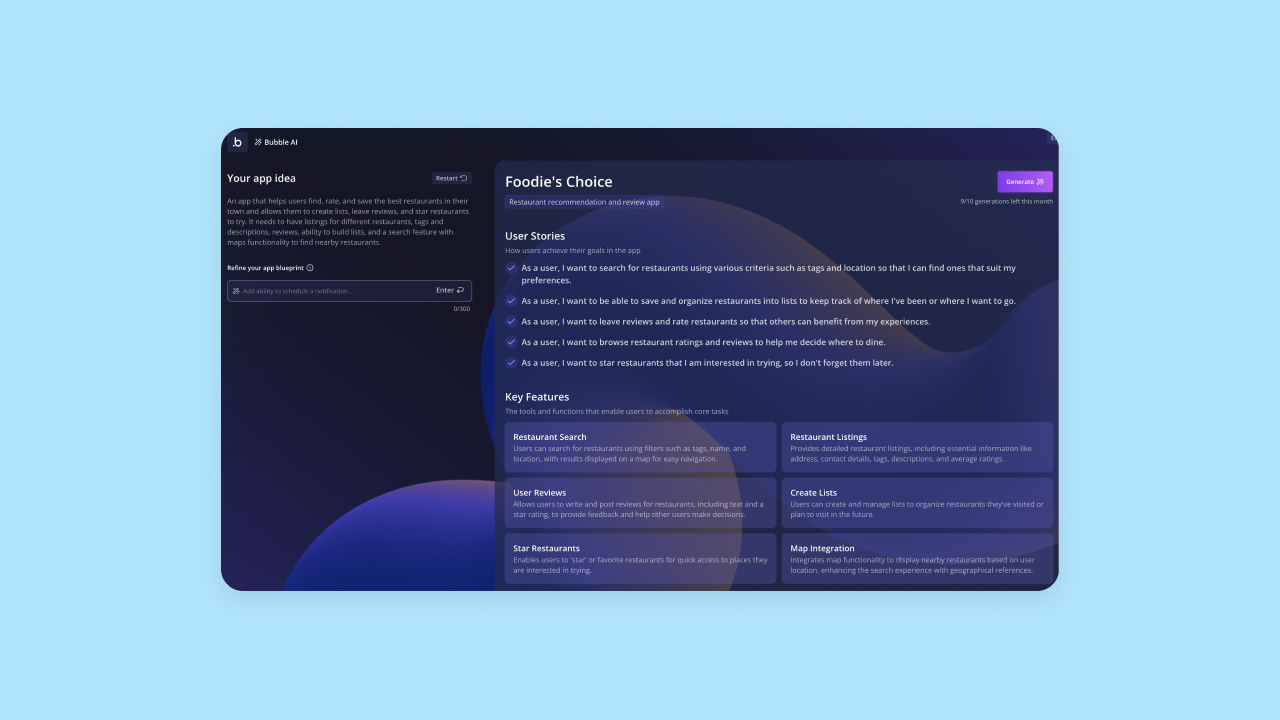
2. Bubble AI will interpret your prompt and double-check with you by giving you an outline of key features and tasks your end-users might do. If it didn't quite capture your vision, you can edit this or add additional features at this stage. When the outline looks good, click Generate and AI will build v1 of your app.
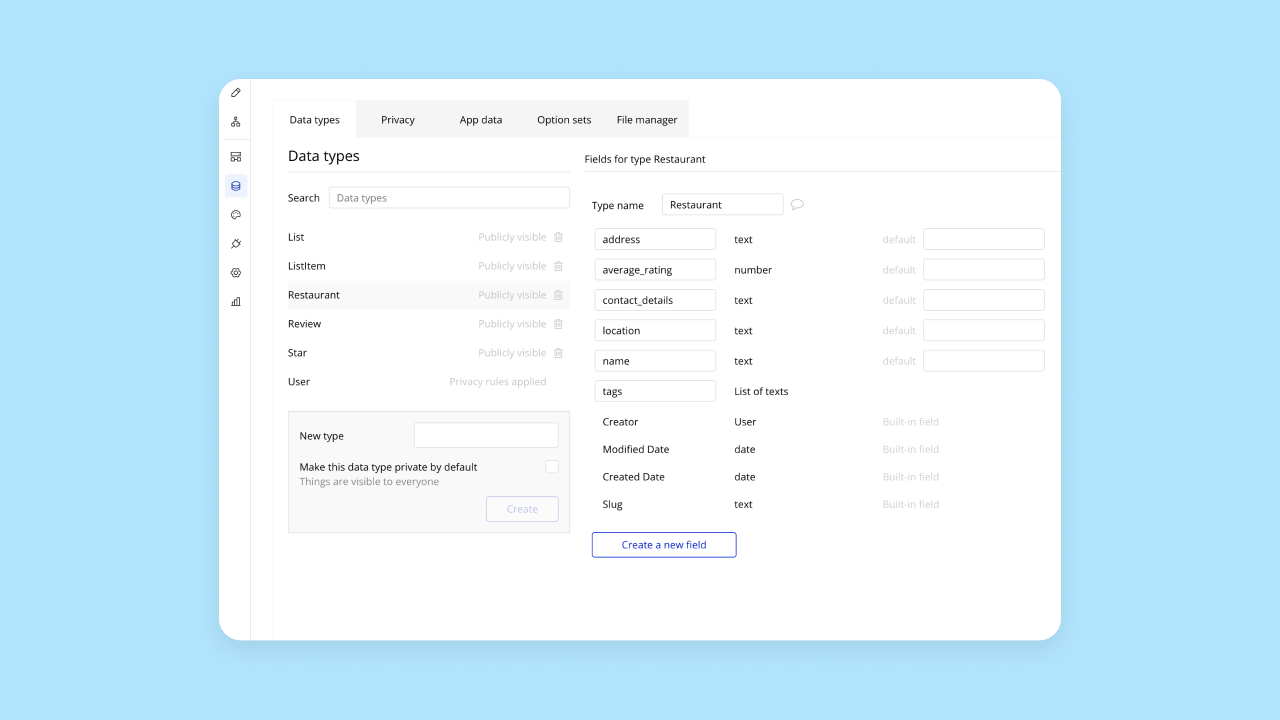
3. It takes Bubble AI around 5–7 minutes to create the first draft of your app. You'll get a functional app that includes frontend UI, backend databases with sample data, and workflows. The features and functionality on your app should already work and be ready for more data and iteration.

Once your app is generated, you'll be taken to Bubble's visual editor. You can see individual pages, workflows, and databases by toggling between editor sections on the left-hand toolbar — or chat with the AI Agent to add features, troubleshoot, and iterate. Everything is edited and managed visually, so you have full visibility and control of every piece of your app, without having to dig into code.
How to create an app with AI in Replit
Replit provides a similar process for app development. The main difference is that Bubble uses a visual-based programming environment, while Replit uses an IDE that juggles an AI chat, a text-based code editor, and a visual preview.
Here's how it works:
First, prompt the AI with your app idea. Similar to Bubble, the AI will provide a quick outline of what it interprets from your prompt, and will also suggest additional features you may want. Replit's Agent offers a "Plan mode" where you can brainstorm and refine the plan without modifying code, which helps lower the risk for beginners.
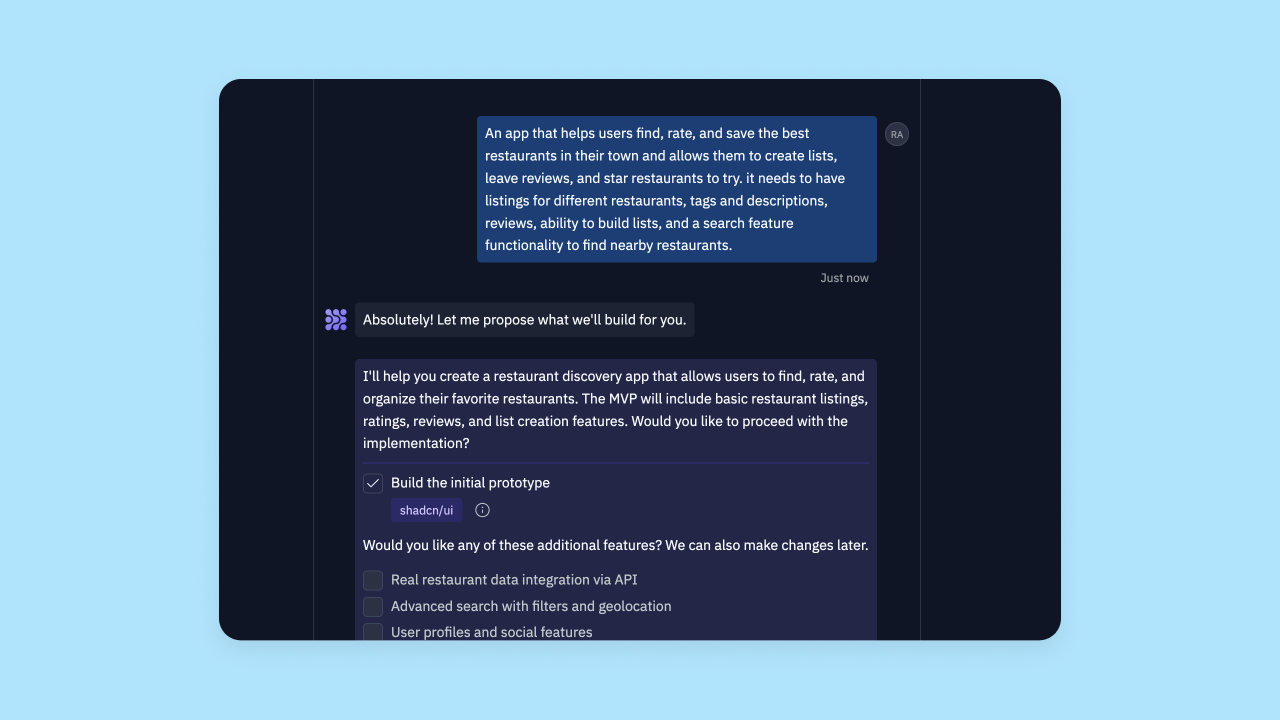
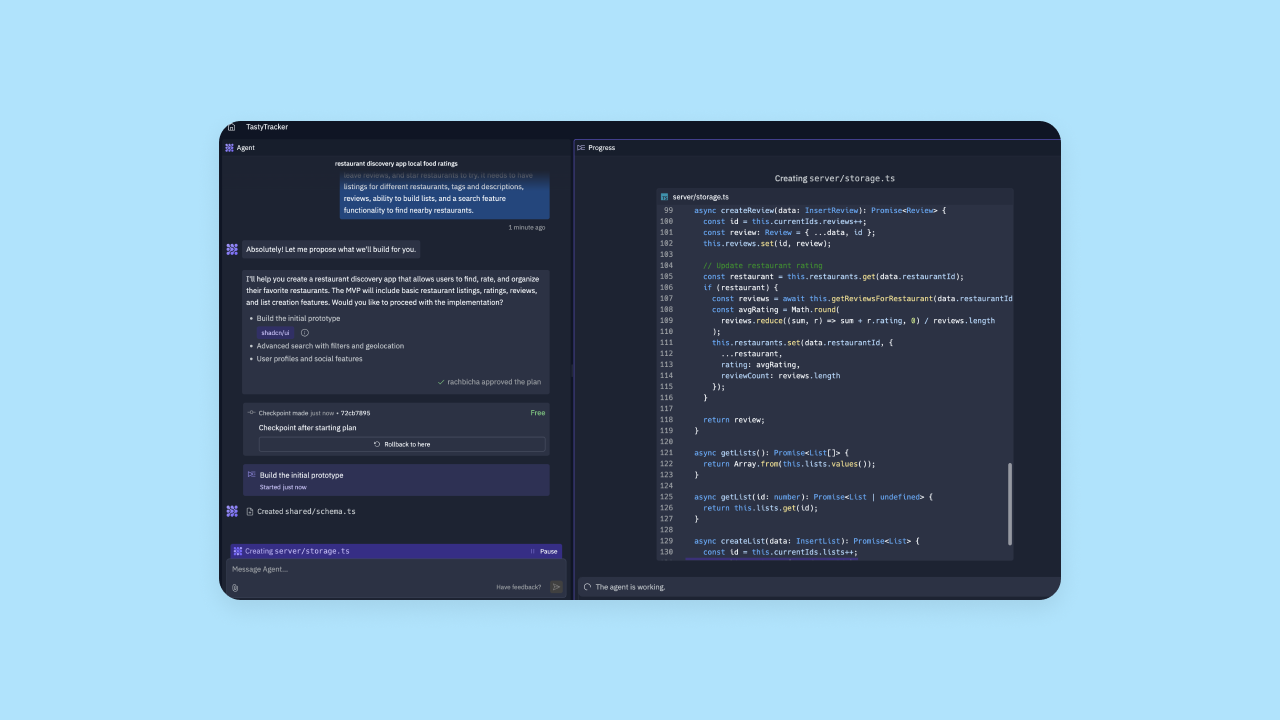
Once you approve the plan, the AI will start generating code. This took between 5–10 minutes from our testing. While the AI is working, you'll be able to see the code generating in the right-hand view, while the AI chat keeps track of what's been asked and completed.
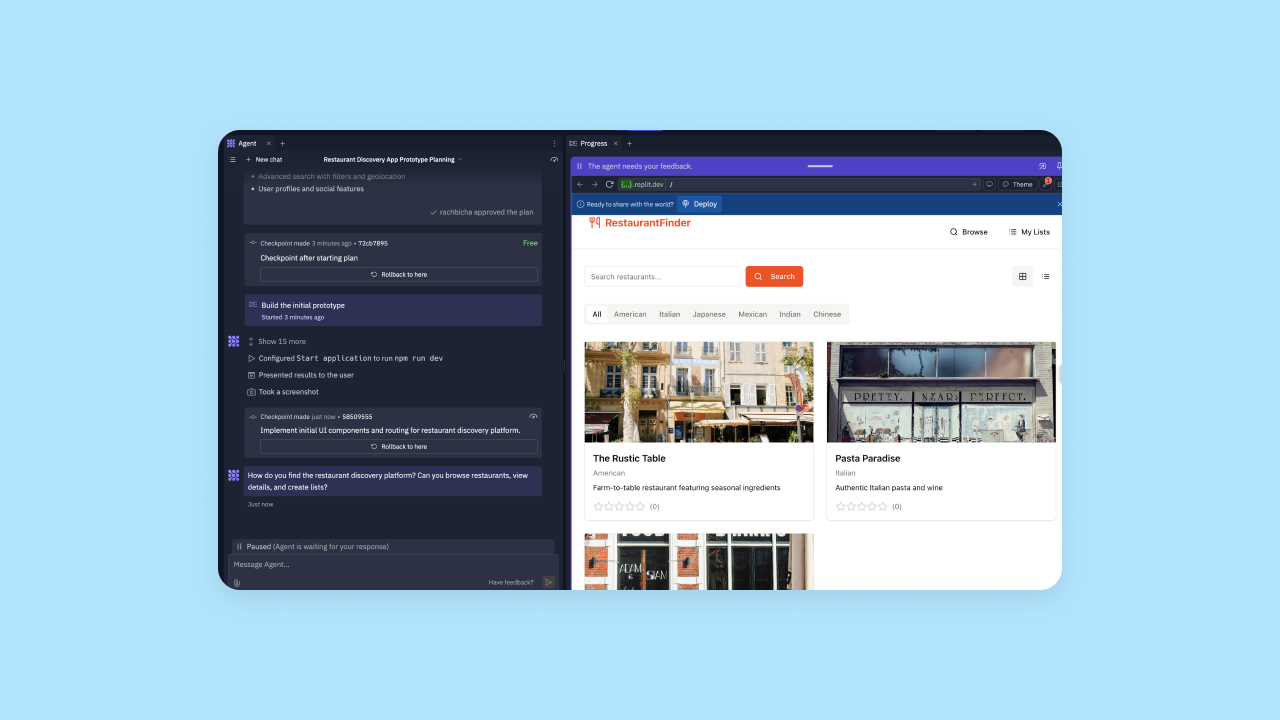
When the code has been generated, Replit will load an interactive web preview of your app in the right-hand view. On the left, you can continue to interact with the AI to make changes or iterate on what's been created. You can also access the code directly on the right-hand view to edit the code manually.
Overall, Replit provides a really nice IDE combined with AI tools. For more experienced developers looking for seamless AI integration to their development environment, Replit's building experience can help check that box. However, Replit's app development workflow can feel overwhelming for non-developers and has no visual development options.
Which is the better app development workflow?
Bottom line: Beginners will likely feel more comfortable and confident in Bubble's environment, while technical users will likely appreciate the familiarity of Replit's IDE.
Initial output quality
When you're choosing between AI app builders, the quality of the app output is a major factor. Does the initial output get you most of the way there, or does it need lots of iteration and refactoring? How well does the AI interpret prompts? What's the overall quality of the original output?
That's the next factor we've considered in our comparison.
Bubble AI-generated apps
Obviously, we're big fans of our own platform. But what are real users experiencing? To find out, we talked to eight different users who were building AI-generated apps with Bubble and had them analyze output quality in seven core areas.
Here's how Bubble scored. (Note: Several key improvements have shipped since these scores were given by our testers.)
- Color, branding and consistency: 3 / 5
- Spacing and layout: 4.5 / 5
- Copy, content and context: 4 / 5
- Navigation and orientation: 4 / 5
- Readability and typography: 4.5 / 5
- Feature completeness: 3.5 / 5
- Feature functionality: 3 / 5
Bubble delivers excellent UI, with high rankings across the board for elements like spacing and layout, navigating, readability, and copy. Users agreed their app's frontend looked great from the first try, and found Bubble's AI accurately interpreted their prompt without too much effort.
This is the tricky part, and our testers were split on how Bubble's AI performed with feature completeness and functionality. Some gave Bubble top scores in these areas, saying that Bubble's AI generated all the features their app needed and they worked perfectly. Others said that their app needed more iteration for feature functionality after prompting.
In general, this makes sense, as more complex app ideas are almost certain to need more iteration no matter what platform you use. That said, Bubble's AI generates a working foundation in about five minutes, then you can continue with the AI Agent to add features or switch to visual editing for precise control.
Replit AI-generated apps
Replit's output generally had mixed reactions. In our testing, the UI and frontend generated was on par or slightly below other AI builders we tested. In short: it was just fine. Replit isn't a design-focused platform, so it makes sense that some of our test apps came out very bare-bones from a design perspective and almost looked more like wireframes.
Features and functionality were also a mixed bag. Feature comprehensiveness was better on simpler app ideas, but once we tested more complex ideas, Replit struggled to add the necessary or expected features from the first output.
In general, user sentiment online notes that this is a common problem. Many reviews ask for more reliability and obedience to instructions, saying that Replit's AI doesn't always follow directions, even when prompted specifically. In addition, lots of users state that the AI Agent's code is "bloated" or buggy, requiring extensive debugging. Some users on G2 specifically noted that the AI can get stuck in loops—fixing one bug only to create another—which can quickly burn through usage credits.
Despite the unpredictability, on the whole, Replit is capable of producing a very functional MVP with multiple features and accessible code. In addition, AI-driven iteration (which we'll get into more later) proved to be a strength for Replit.
Which has better initial output quality?
Bottom line: Bubble delivers excellent UI and basic features and functionality, which you can then iterate on visually. Replit provides a more moderate output across the board — not excelling in any one area, but providing a generally good output. Initial outputs from Replit can be iterated on manually or via AI chat.
Design functionality
When it comes to the design of your app — and the design features of the platform — how do Bubble and Replit's AI app builders stack up? Are you able to create responsive designs? How easy is it to get things pixel-perfect?
Bubble design features
Bubble offers strong design features to control every aspect of how your app looks via the visual editor to make for a truly code-free experience. For example, you get:
- Responsive design capabilities: Easily design for web, mobile, and other screen sizes with automatic responsive design as well as manual breakpoints and layouts.
- Drag-and-drop visual design: An intuitive visual editor allows you to build and edit your design and make changes without coding.
- Customization options: Bubble has an extremely flexible editor that gives you complete control over every pixel. Enterprise users love the ability to match your brand guidelines and website exactly, pixel by pixel. Founders and startups appreciate the ability to design their app exactly as they imagined it.
- Design imports: Already have a high-fidelity design in Figma or another design tool? Import it directly into Bubble and convert them seamlessly into a functional app.
Replit design features
Replit offers a very different approach to design and editing. It doesn't offer drag-and-drop visual design functionality, or a visual design environment at all. Think of it more as an AI-enabled coding environment rather than a visual builder or a tool with extensive design features. However, Replit does offer some design features, including:
- Responsive design allows you to design for a variety of screen sizes, though Replit doesn't have an easy way to create and deploy mobile apps.
- Multi-modal AI approaches mean you can prompt Replit's AI agent with an image or a screenshot and the AI will attempt to build that interface in code.
It's not a design-heavy platform, and it doesn't leverage a more beginner-friendly, intuitive UX design like Bubble or Lovable do.
Which is better for design?
Bottom line: Bubble comes out ahead in terms of design capabilities and ease of use. Bubble offers full drag-and-drop visual editing and extremely flexible design customizations without code. Replit is more focused on providing a traditional IDE that requires coding or AI prompting to make design-focused changes.
Customizability
No app — whether human-made or AI-generated — is going to be ready to ship on the first try. Customization is key to making the app exactly what you have in mind.
Customization on Bubble
Customization is one of Bubble's core strengths, and our AI capabilities build on this foundation of flexibility and control to give you even more tools. Bubble's AI tools never lock you in to a single direction — they only give you more ways to speed up your workflow and overcome the blank-page dilemma, so you get exactly what you're imagining in less time.
On Bubble, you get nearly limitless customization options, plus the flexibility to work in a way that makes sense for you and your level of technical knowledge.
With the visual editor, you can go way beyond just switching up fonts and colors. You have full control over UI design, workflows, triggers, actions, data types, database structure, conditionals, and more. Everything is controlled visually, in plain language, so you always know exactly how it works.
Plus, you can add reusable styles and elements to further speed up your design and development. And with a full ecosystem of plugins and the API Connector, which allows you to connect any third-party service, the options are truly limitless.
In short, Bubble gives you full control and customization options in every part of your app's frontend and backend and supports all of it visually — no code needed.
Customization in Replit
Apps created on Replit also have a high level of customization available. Since Replit exposes the code the AI agent is writing within the IDE, you're able to edit the code directly and make any changes exactly as you want them. In the end, it's just as customizable as writing custom code.
Basically, it gives you a "rough draft" of the code for your app in minutes, then allows you to edit it as needed instead of working from scratch.
Replit also allows you to customize and make changes to the code via the AI agent, which has earned mixed reviews from our testers and general feedback. In general, Replit's AI struggles with the same issues as most other AI builders, such as getting stuck in prompt loops, creating bloated code, refusing to fix issues or breaking other things in the process, and generally being somewhat unpredictable.
For experienced developers, this may be a minor pain point, but ultimately fixable. For non-developers, this can create a major roadblock when using Replit, as your only other option will be to edit the code manually.
Which is better for customizability?
Bottom line: Both platforms offer high customization and the ability to build just about anything you want, exactly as you imagine it. Those levels of customization are just offered at different levels of accessibility, as you need to be able to read and write code to really unlock the benefits of Replit.
Mobile app development
While creating web apps with responsive design can capture some mobile traffic, being able to offer native mobile apps is a much better solution for most businesses. We looked at which platforms support mobile app development, and what capabilities are available.
Mobile app development on Bubble
Native mobile app development (beta) is now available to all users, including AI generation for mobile apps. Generate native iOS and Android apps with AI, then customize with the visual editor or continue using the AI Agent. Plus, your web and mobile apps share a backend — massively speeding up your overall development.
Bubble's mobile app editor includes the ability to create React Native apps without code, adding native mobile elements, gestures, and functionality all from the Bubble editor. For instance, you can:
- Build from mobile-specific building blocks, rather than working from web pages and designing responsively.
- Develop common mobile navigation patterns, like stack navigation (swiping or tapping), modal screens (pop-up screens over the main view), and bottom sheets (elements that slide up from the bottom of the screen).
- Add mobile-friendly interactions like swiping, long-press, and taps.
- Incorporate native device features, such as accessing the camera, microphone, photo library, push notifications, and more.
Plus, you can preview and test everything using BubbleGo, our app for mobile testing. Then, publish your app directly to the Apple App Store and Google Play Store right from the Bubble editor.
Mobile app development on Replit
Replit also supports React Native and Expo mobile app development via its cloud-based editor. The process for mobile app development is streamlined — you can create Expo React Native apps directly from the Replit homepage by describing your app idea to Agent, or you can use the Expo template. Agent will generate the React Native code for mobile, and you can iterate using the same AI-powered workflow as web apps.
Preview the mobile app on your phone, and make iterations to the code manually, or via the AI chat. Experienced developers get more customization and control, since they'll be able to edit the code directly, while non-programmers may struggle to get advanced customizations and complex logic.
Which is better for mobile app development?
Bubble's mobile app development is supported by the visual editor, giving programmers and non-programmers alike full control. Replit can also help you create mobile apps, although like with everything else, it requires the ability to read and understand code. Bubble also allows you to build web and mobile apps with a shared backend, meaning you can build in one place and ship everywhere.
Collaboration
With AI, building apps as a team of one is easier than ever.
But if you're looking to build, launch, and scale a customer-facing product or enterprise tool for your internal team, you'll likely want more than one person to be able to work on it, iterate, and help you improve the app. This section compares how each of these tools support collaboration.
Collaborating on Bubble
Bubble is designed for professional use, so collaborating on Bubble is simple.
Depending on your plan, you can add as many users as you need to collaborate on an app with you. Invite them to relevant apps you own, set different access permissions for different users, and collaborate in real-time.
Bubble allows you to grant users permissions to view only, view and edit, access to the databases and logs (or not), and more across all plan tiers. This gives builders more control and security over their app development environment, while being able to share works-in-progress with key stakeholders, investors, and other team members.
Collaborating in Replit
Replit is also collaboration-ready, allowing multiple users to work on an app in real-time and chat with the AI assistant (and each other) via dedicated chat tools. Their "Multiplayer" feature lets you see each other's cursors and edits live, and even includes an observation mode to watch another user's session. You can invite team members or collaborators to your app easily, then see each other's work in real time to make progress faster.
Note that with Replit's basic join links, they always allow edit access, though Teams users have access to role-based access control and can manage permissions through group settings.
Which is better for collaboration?
Bottom line: Of the AI builders we tried, Bubble and Replit are the best for collaboration, both providing the features you need to work with a team to create production-ready apps. Bubble provides the additional benefit of more robust access permissions for all users.
Framework support
Frameworks provide pre-built bits of code that can do basic tasks for common components, like reusable UI components or pre-built workflows. Each framework is unique to a certain programming language — for example, Angular is the framework for TypeScript/JavaScript.
Considering framework support is especially important for more technical users who are working within the constraints of certain programming languages or frameworks. It considers how flexible your tech stack will be, and what programming languages will be supported by a given platform.
Framework support with Bubble
Bubble uses a visual programming language that's unique to the Bubble platform. This is great for non-programmers — you don't have to know any coding languages to build, test, iterate on, debug, or scale your app. Everything is done visually through Bubble's drag-and-drop editor.
For technical users who want to use code, you can add custom code via the Bubble editor.
Framework support with Replit
Replit is one of the more flexible AI builders in terms of framework support. It can generate code in 30+ programming languages, including Python, JavaScript, HTML/CSS, C++, Java, and React.
For technical builders, this gives you the flexibility to build on Replit with any language you're familiar with — or to export code that will play nicely with any other tools in your tech stack.
Integrations
A solid ecosystem of plugins and integrations can quickly expand the possibilities and capabilities of the platform you're using — and the app you create. Integrations can also make a massive difference in how easy it is to add functionality to your app and integrate it with the rest of your tech stack.
Bubble integrations
Bubble has thousands of plugins and integrations you can use to build and expand the capacities of your app, including:
- OpenAI and Chat-GPT 4
- Anthropic Claude AI
- DALL-E
- Github
- Figma
- Stripe
- Paypal
- Google Suite products
- and thousands more
One of the biggest benefits of this is that Bubble's plugins are built and maintained by expert developers. You can access the functionality you need on-demand without having to build it yourself, while also getting the support of a developer to fix any issues that may pop up with that plugin.
You can connect any third-party service or platform to your Bubble app via the API Connector. Input the API token on your Bubble backend and create your own integrations to whatever tools you need.
Replit integrations
You can access Replit's built-in integrations via a toolbar tab within the editor. Replit offers three types of integrations: Replit managed integrations (built-in), Connectors (first-party integrations that work across apps), and External integrations (third-party services). Available integrations include Slack, Discord, HubSpot, Stripe, Google Sheets, Google Drive, OpenAI, Anthropic, Firebase Auth, Replit Auth, Twilio, Telegram, and numerous other services across AI, business automation, and communication categories.
Replit recently acquired OpenInt to power these Connectors, allowing the AI Agent to securely access external services. With a little more hands-on configuration, manually or via the AI editor, some users have been able to add other integrations as well.
Which has better integrations?
Bottom line: Replit and Bubble both provide easy-to-use integrations, but Bubble's library of pre-built integrations is massively more extensive than Replit's. With Replit, you'll have to create most integrations yourself, compared to click-to-use integrations with Bubble.
Iteration and optimization
For this section, we considered two types of performance optimizations for your app: code optimization and iteration.
Code optimization — also known as code refactoring — means adjusting code that's already working to make it run faster or more efficiently. You're not changing what the code does, but you're making it easier to manage. This is especially important when building with AI, as AI code does tend to be bloated and buggy, and makes refactoring more essential.
Iterations are ongoing developments to change or add to the features or functionality in your app. Some AI app builders allow you to iterate on your code and add new features with AI, some require you to do this manually, and others offer multiple options for iteration.
Bubble optimization and iteration
First up, code optimization. With Bubble, you don't have to refactor the code. Because everything is abstracted behind the visual programming language Bubble uses, code refactoring isn't necessary. As businesses scale and grow with apps on Bubble, they sometimes want to find ways to make their app run more efficiently to optimize costs. When you get to this point, you'll find plenty of ways to do this from our community or through our resources — including this guide in our manual.
Next, iteration. You can iterate through the AI Agent (chat to add features, troubleshoot, and edit) or through the visual editor (drag-and-drop to adjust functionality, UI/UX, features, workflows, and more). The AI Agent can generate and edit elements, expressions, workflows, and data types — building step-by-step in front of you so you can see exactly what changed. Or switch to visual editing for precise, hands-on control.
Bubble's combination of AI Agent and visual editor is a major advantage. And you get full control to make any change you want, exactly how you want it.
With AI iteration, you can easily get stuck in "prompt purgatory," prompting the AI over and over but not being able to get the results you're looking for. As a result, having a visual editor to lean on makes it much easier to iterate and manage your app long-term compared to AI-only iterations you can't fully control.
Replit optimization and iteration
Replit offers both AI-driven code optimization and AI-powered iteration through Replit Agent. Agent's Fast mode can edit your existing codebase on demand for quick iterations, while Full Build mode handles more comprehensive changes, similar to having an AI coding assistant integrated directly into your development environment.
A major benefit of Replit's AI-powered iteration and optimization is that the code is fully available for you to view and edit manually as well, so you have complete control and visibility, but with the added benefit of speed.
Replit's AI also helps avoid context switching, as you have everything in one place and can build, edit, and debug all in one program. Plus, the AI can also see the context of your entire project (within token limits) to implement changes. For example, if the app crashes, the Agent can read the error and fix the bug automatically.
However, users online commonly complain that the AI is inconsistent — sometimes producing good results, and other times failing on simple tasks or getting stuck. It has sometimes claimed that code doesn't exist or that it can't see code it just wrote, or refuses to modify code. Additionally, Replit uses an effort-based pricing model for AI checkpoints, which can sometimes lead to confusion about credit consumption when the AI requires multiple attempts to fix a bug.
In general, such complaints are common to AI tools and LLMs across the board, and not a uniquely Replit problem. The real downside is that Replit doesn't provide any options for visual editing aside from the AI tools, so builders with less technical knowledge will find themselves stuck when the AI is.
Which is better for iterations and optimizations?
Bottom line: Bubble provides more control for non-technical builders.
Deployment and hosting
Easy deployment and hosting of your app makes it simple to get your app live and shared with customers, stakeholders, or anyone else who you want to use your app. In this section, we compare how each of these platforms manages launching and hosting for your app.
Deploying and hosting Bubble apps
Bubble offers one-click deployment and built-in hosting. In plain English: When you're ready to publish your app, just click the Deploy button in the header nav bar. You'll see a popup where you can add a description of changes made for version control, then click Confirm.

The latest version of your app will then go live for your end users.
Bubble also offers built-in hosting, which means that when you're ready to push your site or app live, it will live on Bubble servers. All-in-one hosting makes updates and iterations faster, while giving you less platforms to juggle (and pay for!).
Bubble also makes native mobile publishing simple: deploy directly to the App Store and Google Play from within the editor, with no need for Xcode, Android Studio, or mobile dev experience. The platform handles packaging, configures settings like icons and splash screens, and validates your submission before you hit publish. When you need to ship updates post-launch, over-the-air delivery lets you push changes immediately — no resubmission required. Some builders have launched apps in as little as one to two weeks, managing both web and native mobile from a single editor with one shared backend.
Deploying and hosting Replit apps
Replit also offers in-platform deployment and hosting, with a few caveats.
For one, many users have been disappointed in Replit's hosting model, where publishing your app publicly forces an MIT license (thus eliminating the privacy of your software). Private deployments are only available on Teams and Enterprise tiers (starting at $35 per user per month when billed annually, or $40 per user per month when billed monthly).
Another drawback for many is that the deployment and hosting process isn't as simple as with other AI builders. With multiple deployment options like Autoscale (which scales to zero to save costs) and Reserved VMs (for dedicated uptime), this step is more confusing and slightly more difficult than the "one-click" process Bubble and other tools provide.
Which is better for deployment and hosting?
Bottom line: Bubble offers a slightly easier and more straightforward deployment and hosting process. Also, Bubble provides enterprise-grade security and privacy features on all plans, not just Enterprise ones.
Education
As AI makes software development easier, faster, and more accessible with less technical knowledge, educational materials may feel less essential. However, even as building becomes more accessible, it's important to consider what educational materials and documentation your platform of choice provides for when you get stuck, need help troubleshooting, or want to go beyond the basics of the platform.
In this section, we evaluated the level and quality of education each platform provided.
Bubble education materials
Bubble is home to builders of all skill levels, so over the years we've built out a huge library of educational materials for all learning styles. If you're new to building with AI, start with our course for Bubble beginners —we will walk you through the basics of the Bubble platform, our visual programming language, and our AI tools.
For visual learners, our YouTube channel is another good place to start. You'll find hundreds of videos covering everything from in-depth app design courses, bite-size lessons on how to build specific elements on Bubble, AI-app walkthroughs, recaps from our BubbleCon conference sessions, and more.
New to Bubble? The Bubble Academy is the best place to start. We recently redesigned it to make learning more intuitive — each course now has a dedicated landing page showing what's covered, time commitment, and recommended skill level upfront. Once you're in a course, the full lesson list is visible from the start so you can pace yourself and see how topics connect. You'll also find interactive tutorials guiding you through each step, along with written guides, one-on-one coaching, and bootcamps.
For those who prefer to read a guide, check out the Bubble Manual or visit our YouTube channel. If you get stuck at any point, you can always reach out to our active and engaged community in the Bubble Forum for help!
Replit education materials
Replit's educational materials mostly fall under their YouTube channel. They have a decent number of videos covering quickstart guides, basic building tools, how-tos on specific elements and integrations, and a bunch of higher-level videos and walkthroughs. They also offer a "100 Days of Code" challenge and Replit Guides to help users learn by doing.
Their technical documentation is a lot sparser. The basics are covered in the manual, and while they have a few tutorials, they're quite random (i.e., a cat image generator and a Discord bot).
Since Replit's platform and UX caters more to experienced developers, it makes sense that their video documentation focuses more on the platform itself, but beginners may find themselves getting stuck without as many resources as other tools provide.
Which is better for education and resources?
Bottom line: Bubble offers far more education resources and technical documentation — most notably, for every skill level.
Replit provides some education and documentation, but it's neither as comprehensive nor as extensive as Bubble's library.
AI app builder pricing comparison
Bubble pricing
Bubble lets you build for as long as you want on the Free plan, and you only need to upgrade when you're ready to launch your app to the public. Paid plans are based on your app's complexity and usage, which means you can start small and scale your plan as your business grows. This model is great for founders who need to validate an idea without a big upfront investment.
Bubble offers five pricing tiers: Free ($0), Starter ($32/month or $29/month annually), Growth ($134/month or $119/month annually), Team ($399/month or $349/month annually), and Enterprise (custom pricing). The Free plan gives you full access to the visual editor and AI features for building and testing, but you can't deploy a live app. Paid plans unlock custom domains, app store publishing, and increasing amounts of workload units (WUs)—Bubble's measure of computing power for database queries, workflows, and API calls.
Replit pricing
Replit offers a free Starter tier for public projects, but you'll need a paid plan for private apps and more powerful features. Pricing includes: Replit Core at $20/month (billed annually) or $25/month with $25 in monthly credits for individuals; Teams at $35 per user per month (billed annually) or $40/month with $40 in usage credits per user; and Enterprise with custom pricing. The Teams plan uses a per-user, per-month model for team collaboration.
It's worth noting that Replit uses a credit system for AI usage and deployments. While paid plans come with a monthly credit allowance, heavy use of the AI Agent—especially for complex debugging loops—can burn through credits quickly, leading to additional costs that some users find confusing or difficult to predict.
Which has better pricing?
Bottom line: For solo founders and startups focused on validating an idea before spending money, Bubble's model of building for free until launch is a major advantage. For teams of developers who need a collaborative coding environment, Replit's pricing might be a good fit. Ultimately, the better choice depends on whether you prioritize paying only for what you use as you grow, or having a predictable per-user cost from the start.
Which is right for you?
Bubble and Replit both offer AI-powered app generation that takes less than 10 minutes to get up and running and generate functional frontend and backend features. Either tool can be useful for non-developers, but the way the tools function is very different and caters to different audiences.
Replit is essentially a programming environment with an integrated AI assistant, giving developers and others who are interested in learning code an all-in-one environment to build code, iterate on it manually or via AI, debug, and deploy their app. It's streamlined, gives full access to your code, and provides speed via AI assistance.
Bubble is the only AI-powered visual development program that lets you vibe code without the code, giving you the speed of AI with scalability and control. It gives anyone the ability to create production-grade apps and enterprise software, without having to code. Even if you don't have technical expertise, you get full control and customization through the visual editor, combined with the speed of AI generation to eliminate the blank-page dilemma and introduce you to the platform.
Plus, you get built-in hosting, a huge community with tons of resources, and a platform you can understand without a technical background, which makes managing and scaling your app accessible for anyone.
Of course, the best way to get a feel for a platform is to test it out for yourself. See how Bubble AI works and start building in our visual editor for free.
Frequently asked questions
What's the main difference between Bubble and Replit for building apps with AI?
Bubble and Replit both use AI to generate functional apps in minutes, but they differ in what happens after generation. Bubble is a fully visual AI app builder — everything the AI creates appears as drag-and-drop elements, visual workflows, and editable databases you can modify without code. Replit is an AI-assisted coding environment that generates traditional code you can edit in an IDE. If you're comfortable reading and writing code, Replit gives you that flexibility. If you want to build, customize, and maintain your app without programming knowledge, Bubble lets you do that through visual editing.
Can non-technical founders build production-ready apps on Bubble or Replit?
Both platforms can produce production-ready apps, but they require different skill levels to get there. Bubble is designed for builders of all technical backgrounds — you can generate an app with AI, then use the visual editor or AI Agent to customize features, fix issues, and scale without ever touching code. Replit is better suited for users with some programming experience, since customizing beyond what the AI generates requires editing the underlying code directly. Non-technical founders often find Bubble more accessible for going from idea to launch independently.
What happens when AI can't deliver exactly what I need?
This is where the platforms diverge significantly. With Bubble, you can switch from AI prompting to visual editing at any time — see exactly how your app works through visual workflows and databases, then make precise changes yourself. With Replit, your options are to keep prompting the AI (which can lead to frustrating loops) or edit the generated code manually. If you can't read the code Replit produces, you may get stuck waiting for AI to figure it out.
How do Bubble and Replit compare on security for launching real apps?
Both platforms offer SOC 2 Type II compliance and GDPR standards. Bubble includes enterprise-grade security features on all plans: built-in user authentication, custom privacy rules you set up visually, automatic data encryption, and a security dashboard that scans for vulnerabilities before you deploy. Replit provides Replit Auth for end-user authentication and strong platform-level security, but implementing custom privacy rules and app-specific security logic requires manual coding. Teams and Enterprise users get additional access controls and private deployments.
Which platform is better for building both web and mobile apps?
Bubble lets you build web apps and native iOS/Android apps from a single visual editor with a shared backend — generate with AI, customize visually, and deploy to the App Store and Google Play directly from Bubble (currently in beta). Replit supports React Native mobile development through Expo, allowing you to generate and iterate on mobile apps via AI, though complex customizations require editing the code. Both platforms can get you to mobile, but Bubble's visual approach makes cross-platform development more accessible for non-programmers.
Build for as long as you want on the Free plan. Only upgrade when you're ready to launch.
Join Bubble