TL;DR: Bubble is best for building production-ready web and native mobile apps without code, offering seamless switching between AI generation and visual editing with full backend functionality included, while Vercel v0 is designed as an AI coding assistant for developers who want to speed up frontend prototyping but need technical expertise to customize and maintain their applications. The key difference is that Bubble provides complete visual control throughout the entire build process, whereas v0 requires coding knowledge when AI reaches its limits.
If you've been exploring AI app builders, you've likely come across Vercel v0 and wondered where it fits in the landscape. The reality: choosing the right tool comes down to your specific needs, goals, and technical background.
This guide breaks down two fundamentally different approaches to AI-powered development — Bubble (a visual AI app builder that generates apps you can understand and control) and Vercel v0 (an AI tool that generates React code) — to help you decide which platform makes sense for your project. You'll learn how each works, what types of apps they're built for, and where they differ on features, pricing, and ease of use.
Bubble is the only fully visual AI app builder that lets you vibe code without the code to build web and native mobile apps. You can chat with AI when you want speed, or edit in plain language and a drag-and-drop interface directly when you want precision — Bubble lets you switch seamlessly between AI and visual editing throughout the build process. Everything you need comes built-in: database, hosting, workflows, security, and deployment, so you're building on a single platform from start to launch.
Vercel v0 is an AI-powered pair programmer that helps users design, iterate, and deploy full-stack applications using natural language prompts. It features a generative AI chat alongside a visual preview and design mode with visual controls for adjusting UI elements. The AI can generate UI with basic functionality, write code primarily in React and Next.js, execute simple JavaScript snippets, and provide guidance and suggestions for debugging and code refactoring. Developers can write, edit, collaborate, and deploy code through v0's interface with GitHub repository integration that can import existing GitHub repositories.
Bubble vs. Vercel v0: Key factors
Bubble wins for production-ready apps, while Vercel v0 excels at rapid prototyping. The key difference: Bubble gives you full control throughout the build process, while v0 leaves you dependent on prompting or manual coding when AI hits its limits.
Key factors include:
- How easy does the platform make it to customize your app and iterate over time?
- Do you ever have to deal with code, or can a non-coder understand their app at every point?
- Does the AI cause builders to get “stuck” or do you have full control throughout the whole process?
- Does the platform charge hidden AI fees, or is AI included? (Bubble includes AI features in standard plans and you don't pay until you're ready to launch.)
Here’s a quick look at some key factors and comparisons:
| Feature | Bubble | Vercel v0 |
|---|---|---|
| Initial output quality | ⭐⭐⭐⭐ | ⭐⭐ |
| Design capabilities | ⭐⭐⭐⭐ Fully visual editor for pixel-perfect control with AI assistance. |
⭐⭐⭐ Responsive design with visual design mode and code editing. |
| Native mobile app support | ⭐⭐⭐⭐ Build truly native mobile apps with AI and deploy to the Apple App Store and Google Play. Share backend and data with your web app. (Public beta — available to everyone.) |
⭐ No native mobile app support — requires a wrapper to approximate the native experience. |
| Collaboration | ⭐⭐⭐⭐⭐ Real-time team editing with granular role-based permissions and built-in version control—all without complex setup or third-party integrations. |
⭐⭐⭐⭐⭐ Real-time collaboration capabilities. |
| Backend and database support | ⭐⭐⭐⭐⭐ Built-in backend and database — everything you need to launch, no extra setup or costs. |
⭐⭐⭐⭐⭐ Can generate frontend and backend logic with database integration support (via marketplace integrations including AWS databases, Neon, Supabase, Upstash, and Vercel Blob). |
| Security and compliance | ⭐⭐⭐⭐ Custom privacy rules, security dashboard to catch vulnerabilities, and enterprise-grade security features, including SOC 2 and GDPR compliance, and advanced encryption and monitoring. |
⭐⭐⭐⭐ Strong security with Vercel's built-in features by default, though implementing application-level security requires technical knowledge. |
| Deployment/hosting | ⭐⭐⭐⭐⭐ One-click deployment and native hosting. |
⭐⭐⭐⭐⭐ One-click deployment to Vercel with built-in hosting. |
| Technical expertise | ⭐⭐⭐⭐⭐ Best choice for non-coders. |
⭐⭐⭐ Requires technical knowledge. |
Vercel v0 is an AI assistant for developers who want to speed up frontend development. It excels at rapid prototyping but requires manual backend setup, creating roadblocks for non-technical builders.
Bubble lets you vibe code without the code to ship production-grade apps. You get a built-in backend, databases, and hosting to go from idea to launch in one platform. You don't pay anything until you're ready to launch, and you get enterprise-grade security and scaling built in.
How AI app builders work
AI app builders translate natural language into applications — either as code (like v0's React/Next.js) or visual apps (like Bubble's approach).
What you can actually build with AI app builders
AI app builders are powerful tools for creating a wide range of applications, from simple landing pages to complex marketplaces and internal tools. You can build customer-facing products like social networks or booking platforms, or create custom software to streamline your business operations, such as dashboards and project management systems.
Required technical expertise
In this section, we compare the technical expertise required to build, customize, and maintain apps on each platform.
Bubble technical approachability
Bubble is designed for everyone, regardless of your technical expertise — and we've seen developers, project managers, founders, hobbyists, and everyone in between build successfully on Bubble.
That's because Bubble combines visual development with optional custom coding — you get full control without needing code. It offers the best of both worlds to every skill level.
Bubble is an especially great choice for non-developers who want to ship production-grade apps. On Bubble, every part of app development is fully visual and accessible — not just the design, but also the backend database, privacy rules, and workflow logic that makes your app work.
Vercel v0 technical approachability
Vercel v0 was initially designed for developers but now serves users across skill levels, from developers to product managers, designers, and other non-technical professionals. While it excels at rapid prototyping and frontend development, it can also generate backend functionality through marketplace integrations, though more complex customizations may benefit from technical knowledge.
v0 can be used for projects ranging from landing pages and dashboards to full MVPs with onboarding flows and data capture. The platform provides documentation including quickstart guides and FAQs to help users get started.
Which requires less technical expertise?
Bottom line: v0 is built with developers in mind — it provides a strong AI assistant in a built-in IDE for technical users. Bubble is designed for both developers and non-developers — visual programming that's accessible to anyone.
Initial output quality
The first — and perhaps most obvious — point of comparison between AI app builders is the quality of their initial output. Of course, there’s always room for iteration and improvement, but how far does the AI get you? Does it need lots of debugging and refactoring, or does it mostly "just work"? How well does the AI interpret prompts?
That’s what we tested and reviewed first.
Bubble AI-generated apps
We asked 8 different users building AI-generated apps with Bubble to analyze output quality in 7 core areas:
- Spacing and layout: 4.5/5
- Readability and typography: 4.5/5
- Copy, content, and context: 4/5
- Navigation and orientation: 4/5
- Feature completeness: 3.5/5
- Color, branding, and consistency: 3/5
- Feature functionality: 3/5
Note: Bubble AI's LLM models have been upgraded since these scores were recorded, which has led to significant improvements to output quality.
In our testing — and based on feedback from these users — Bubble consistently delivered excellent UI, with high rankings across the board for elements like spacing and layout, navigating, readability, and copy. Users agreed that Bubble’s AI accurately interpreted their prompts without too much effort and the frontend looked great from the first try.
Where Bubble really stood out compared to other apps we tested was with the backend and functionality it generated. For example, Vercel’s v0 didn’t generate real functionality, logic, or anything backend-related. Bubble’s built-in databases meant the AI could effectively add working functionality from the first go, not just UI elements.
This is the tricky part, though, and our testers were split on how well Bubble's AI performed with feature completeness and functionality. Some gave Bubble top scores in these areas, saying that Bubble’s AI generated all the features their app needed and they worked perfectly. Others said that their app needed more iteration for feature functionality after prompting.
Vercel v0 AI-generated app quality
v0 app quality was not as impressive compared to Bubble or other apps we tested.
For one thing, it took several tries to get v0 to generate error-free code that would load in the visual preview. At first, we got a bunch of code and simply a 404 page in the preview.
We asked v0 to fix this via the AI chat, and this was the initial output we got:
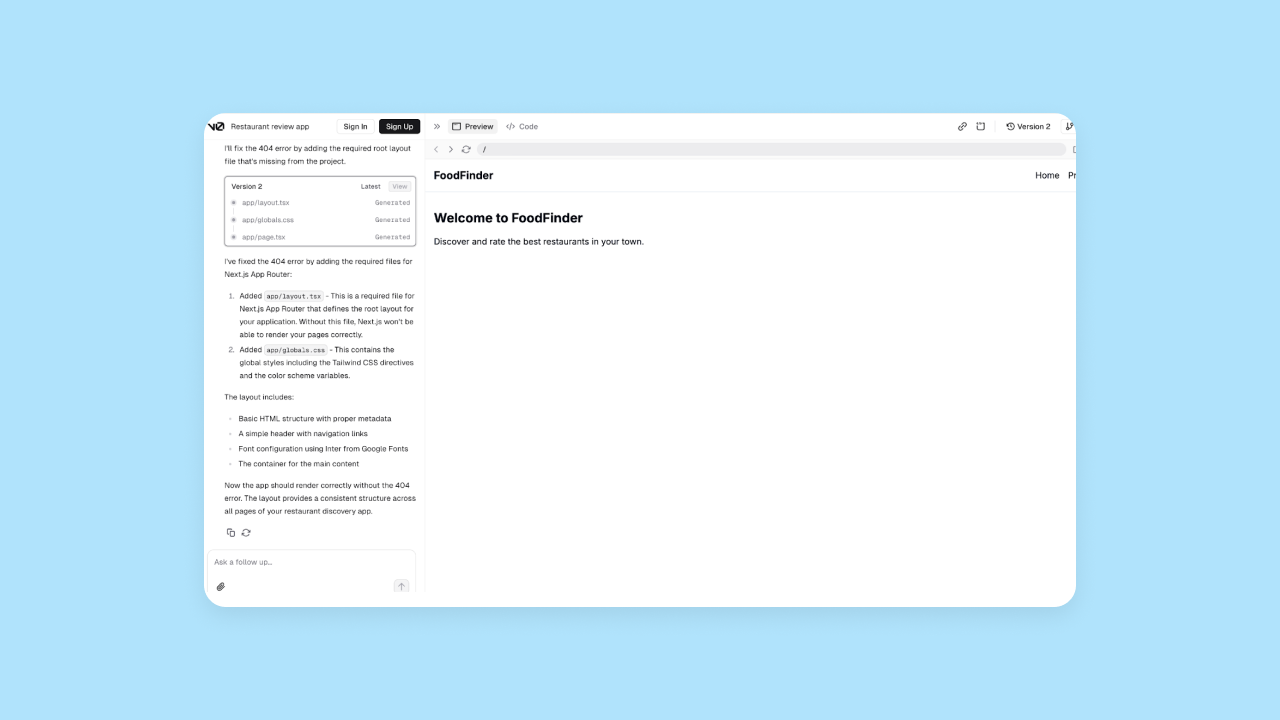
Only the very, very basics would load, despite hundreds of lines of code. After several rounds of iteration and more detailed prompting (and several more error pages), we finally got this output:
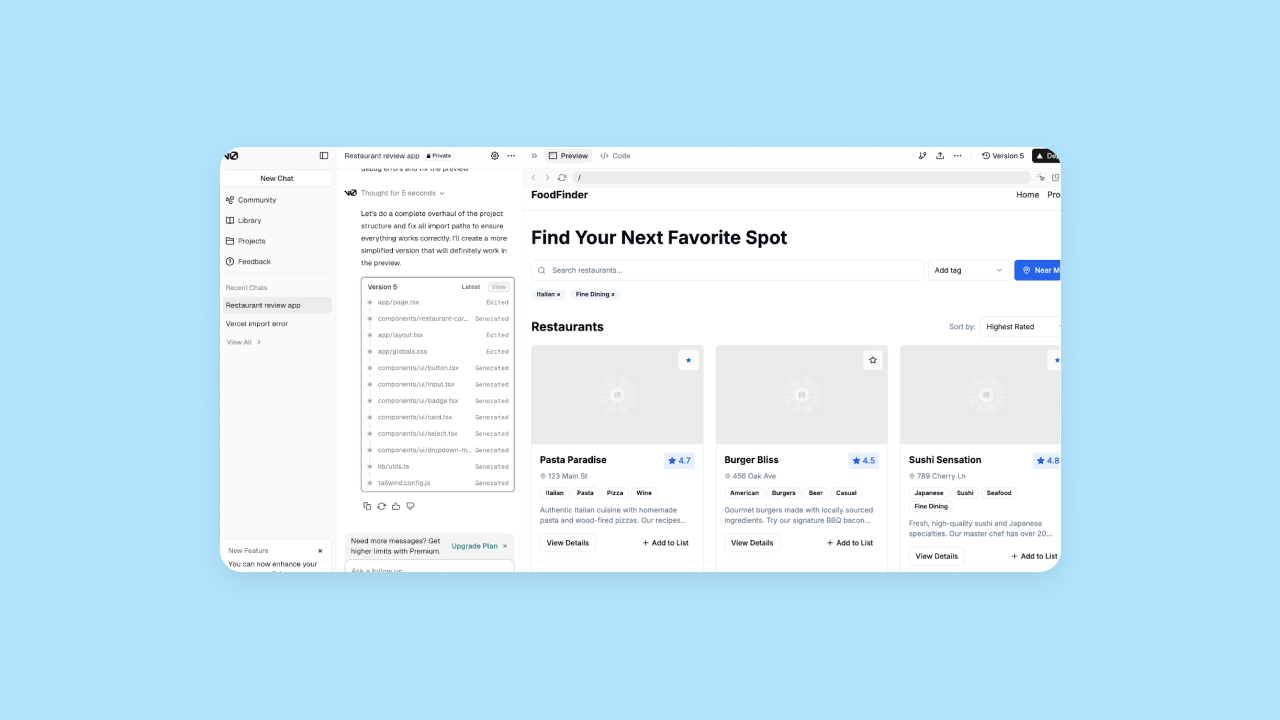
The UI is fine, but nothing special. v0 eventually did give us the UI of most features we asked for, but many features and pages were still missing (i.e., the restaurant cards wouldn’t open to show details, there weren’t profile pages or list pages, etc.).
One of our testers said:
“v0 didn’t do a great job following my prompts. In some versions, [the output] was okay, in later, more complicated versions, there are obvious issues. [For example,] not all buttons link as expected, it didn’t come fully baked, some features “work” in terms of the UI updating while on that page, but there was no backend, and other features aren’t fully implemented.”
Which has better initial output quality?
Bottom line: Bubble’s app output quality was much more complete and functional than v0’s. v0 had inconsistent output (sometimes it worked, sometimes it didn’t), while Bubble generated strong UI and mostly functional workflows and logic on the first try.
App development workflow
What’s the actual process of creating an app with Bubble AI vs. Vercel v0? That’s what we look at in this section.
How to create an app with AI on Bubble
Creating an app with Bubble AI has three basic steps:
Step 1: From the AI app generator, input a prompt that provides a concise description of your app along with key features.
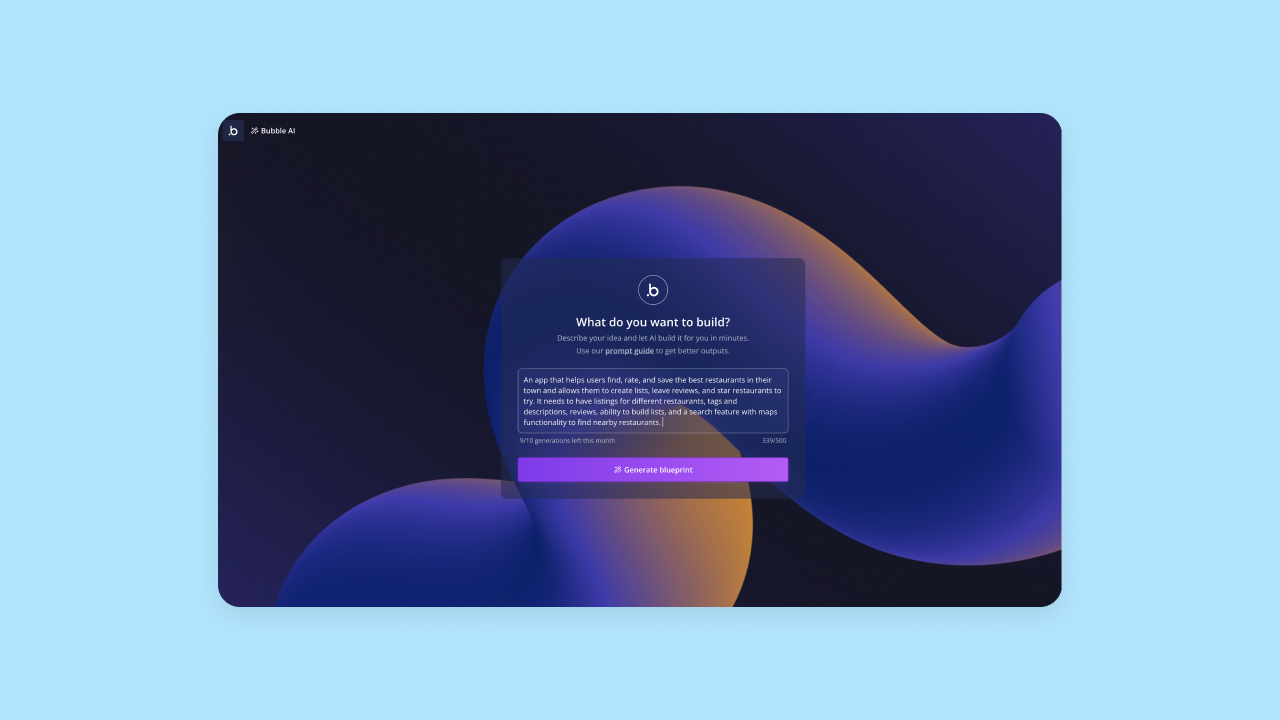
Step 2: Bubble AI will interpret your prompt and double-check with you by giving you an outline of key features. If it didn’t quite capture your vision, you can edit this or add additional features at this stage. When the outline looks good, click Generate to generate your actual app.
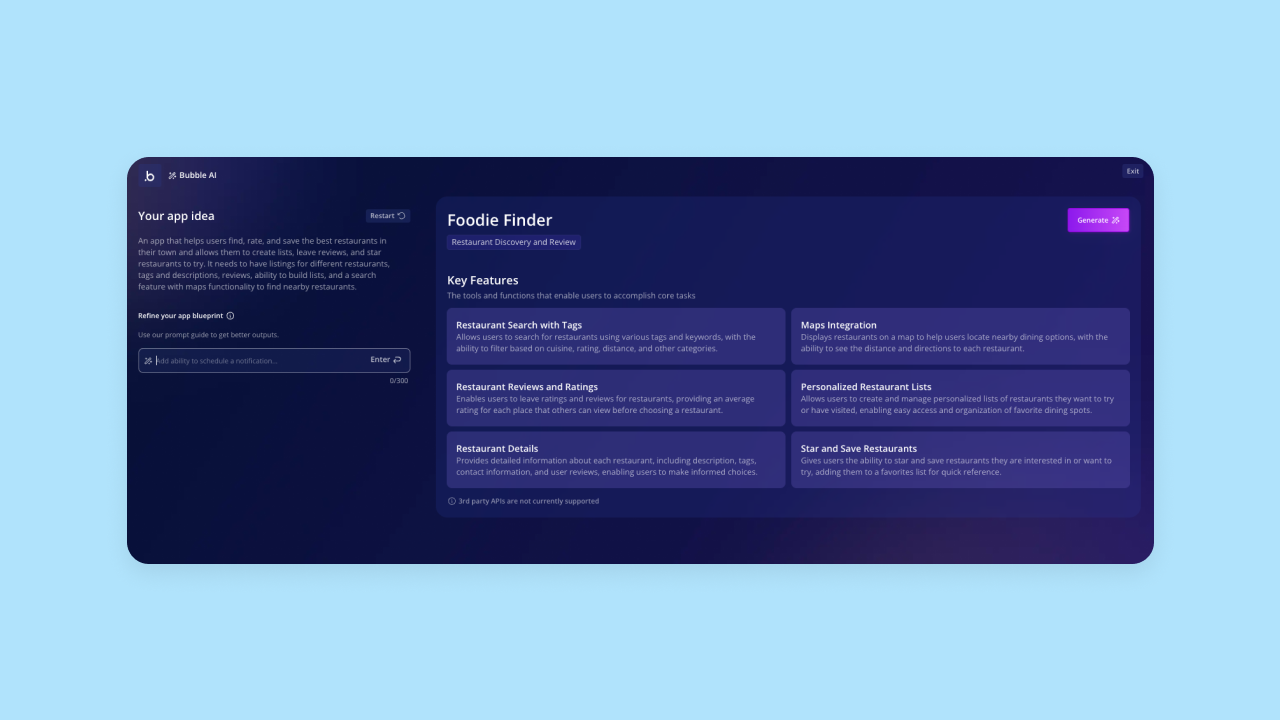
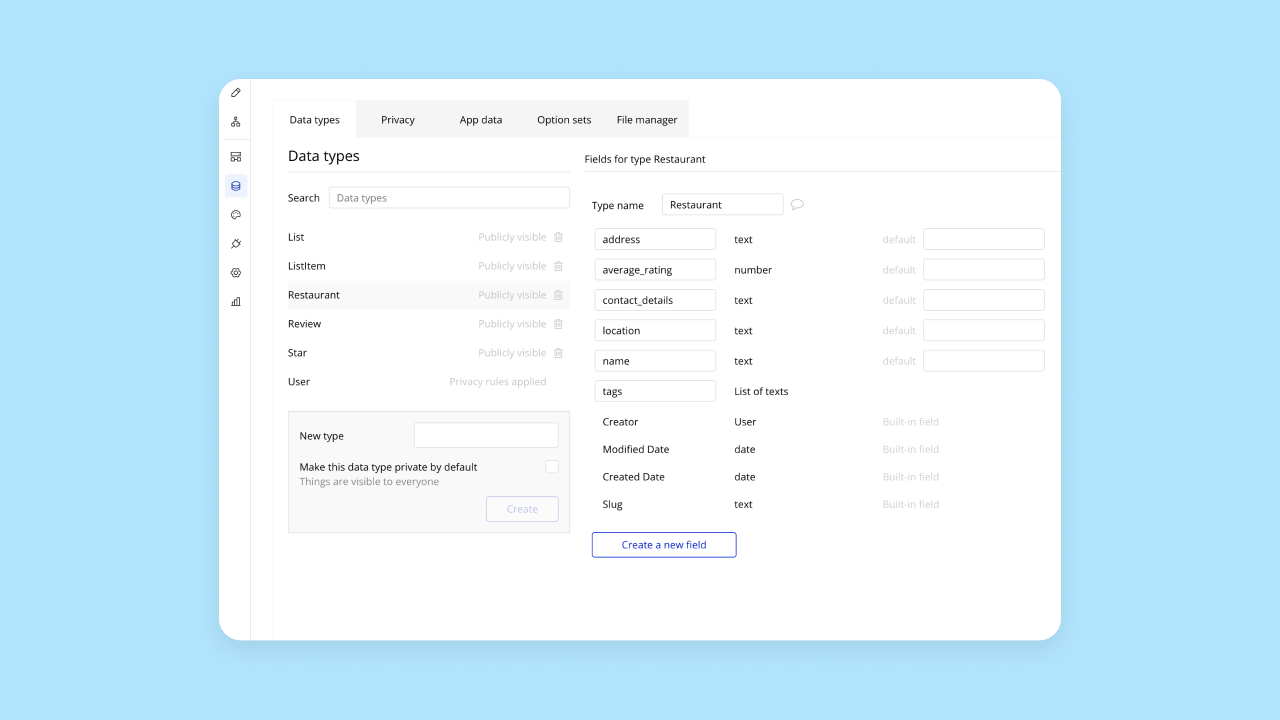
Step 3: It takes Bubble AI about 5–7 minutes to generate your app. You’ll get a functional app that includes frontend UI, backend databases with sample data, and workflows. The app is ready to use, launch, or iterate on with the AI Agent or visual editor.

You can see individual pages, workflows, and databases — and everything that’s been created in each — by toggling between editor sections on the left-hand toolbar. Everything is edited and managed visually, giving you complete visibility and control over how your app works.
How to create an app with AI in Vercel v0
Vercel v0 had a similar app development workflow as other builders. Here’s how it works:
First, you’ll input your prompt as usual.
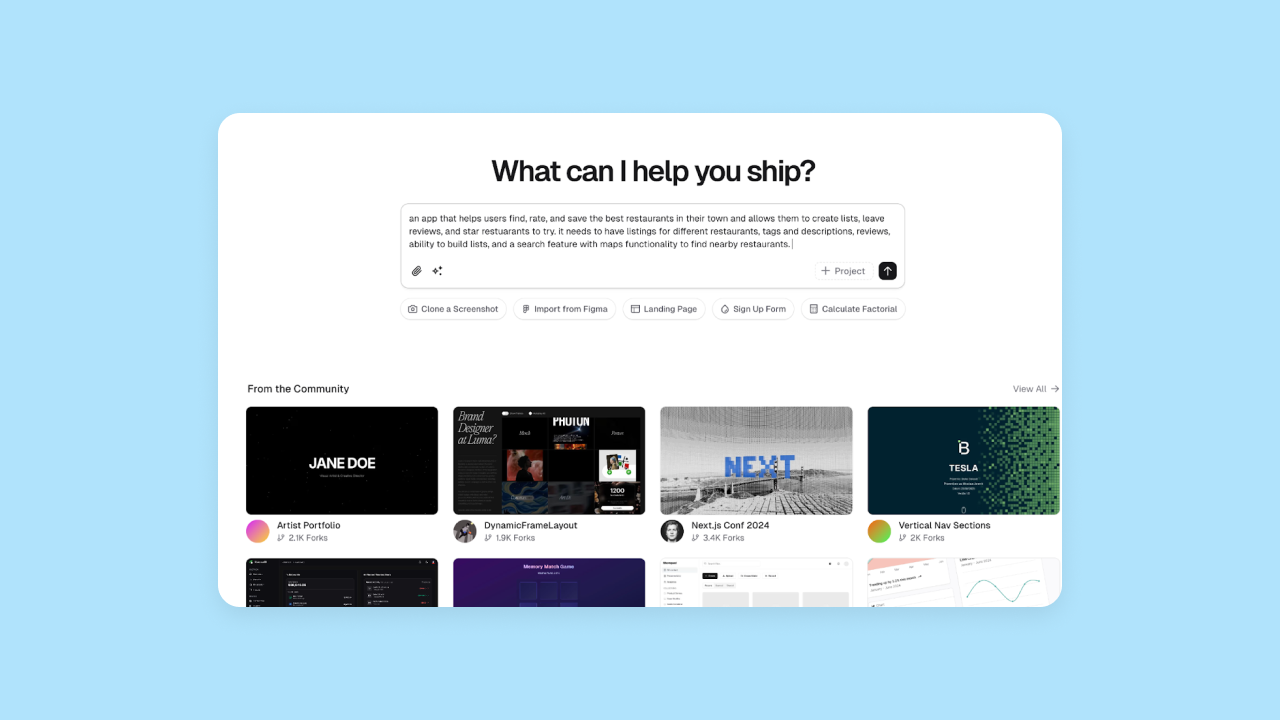
v0 immediately starts spinning up the code and delivers the first iteration quickly.
Visually, the development environment looked very similar to Replit and Bolt. Like Replit’s popular online IDE and Bolt’s WebContainer-based environment designed for the "vibe coding revolution," v0 uses a unified, browser-based workspace where an AI agent generates code alongside a live preview. On the left-hand side, you see the AI chat and on the right-hand side, you have a coding environment and a visual preview.
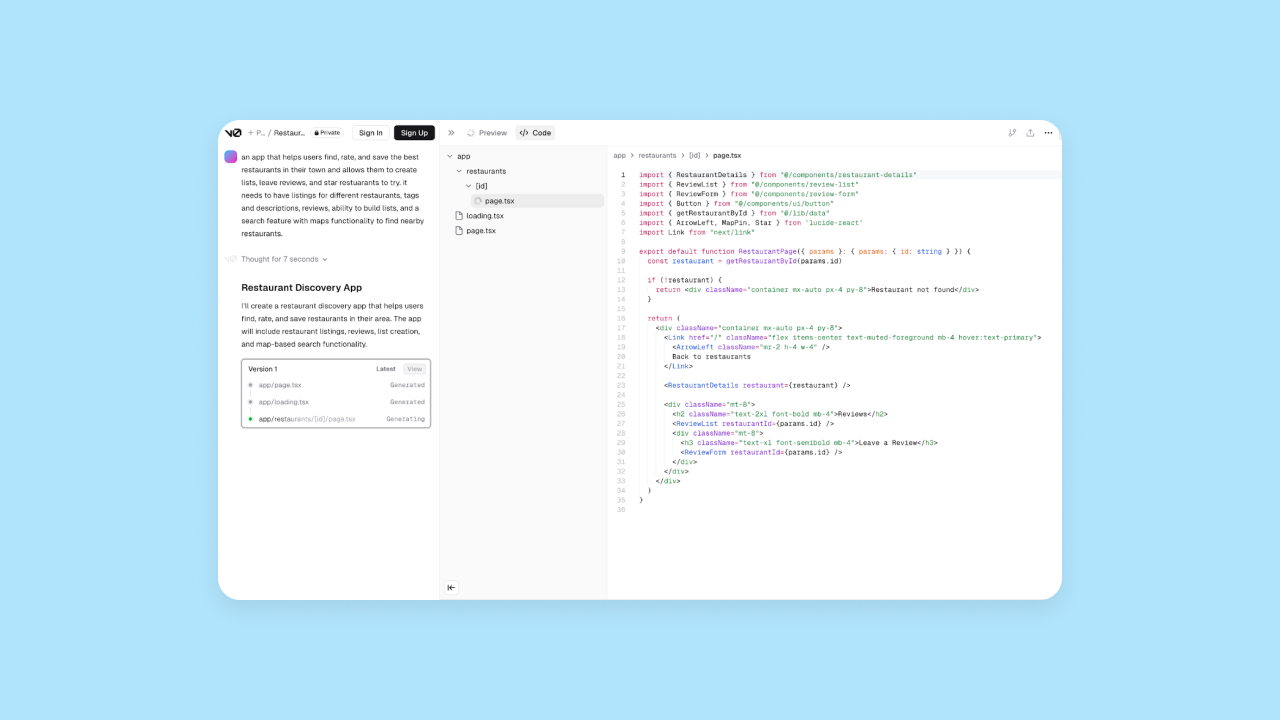
Once we’d gone through a few rounds of iteration and got the AI to generate functional output for us, you could see both the code and the visual preview, and continue iterating either directly in the code, manually, or via the AI chat.
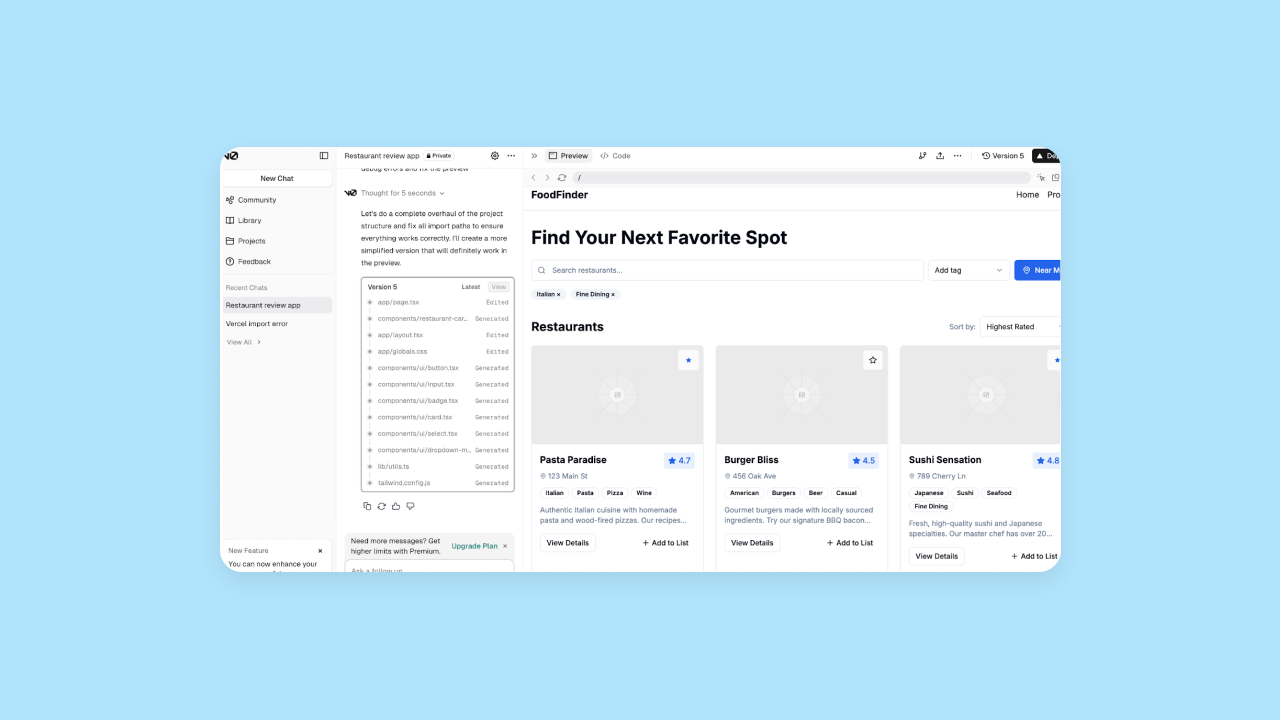
While the interface looks polished, we needed multiple rounds of prompting to get basic functionality working. Even then, the output lacked the backend logic and database structure that Bubble generates automatically. For instance:
- Some pages and features were still missing, even after several rounds of prompting. Many links didn’t go anywhere (i.e., the restaurant cards didn’t open, and there were no profile pages built.)
- The UI “worked” visually, but there was no database or logic set up. It was more of a sandbox or MVP tester than a fully-functional app builder.
Design functionality
Beyond the initial output of your app, we wanted to test how each platform stacks up in terms of design.
- Can you create responsive designs?
- Is there a drag-and-drop visual editor?
- Can you use AI to generate design elements or edit them visually?
- Do you get full control without code?
Bubble design features
Bubble supports responsive design automatically, making it easy to create designs that look flawless on web, mobile, and any screen size. If you want, you can also set manual breakpoints and layouts for additional control, without having to code.
The visual editor gives anyone complete design control without code, speeding up development. Even complex customizations and pixel-perfect designs can all be created and managed visually.
Plus, if you already have designs in Figma or another tool, you can import those designs directly into Bubble and convert them seamlessly into a functional app.
Vercel v0 design features
v0 supports responsive design and offers design mode with some visual controls for fine-tuning details. Design and UI changes can be made via the AI chat, code editing, or through the limited visual design mode interface.
v0 does integrate with Figma to allow you to upload mockups or screenshots for it to turn into code. However, our testers had mixed reviews on the accuracy of this feature. One of our testers noted that “Vercel didn’t do a great job following my prompts. I gave it an image to use as guidance for the style and it sort of did it, but also used the image itself as the background.”
Which has better design features?
Bottom line: Bubble offers stronger design features with a visual editor that gives you complete design control without code. v0 isn’t built as a design-heavy tool, so it allows for design through the code, and minimally, through the AI chat or some visual controls.
Mobile app development
Responsive design is a good first step to capturing some mobile traffic, but being able to offer native mobile apps is a much better solution for most brands. We looked at which platforms support mobile app development and what capabilities are available.
Mobile app development on Bubble
Native mobile app development is in public beta and available to all Bubble users. Generate native iOS and Android apps with AI, share backend and data with your web app, and build everything from one visual editor — no mobile development expertise required.
Bubble’s mobile app editor includes the ability to create React Native apps without code and adding native mobile elements, gestures, and functionality all from the Bubble editor. For example, you’ll be able to:
- Build from mobile-specific building blocks, rather than working from web pages and designing responsively.
- Develop common mobile navigation patterns, like stack navigation (swiping or tapping), modal screens (pop-up screens over the main view), and bottom sheets (elements that slide up from the bottom of the screen).
- Add mobile-friendly interactions like swipe, long-press, and tap.
- Incorporate native device features, such as access to the camera, microphone, photo library, push notifications, and more.
Plus, you can preview and test everything using BubbleGo, our app for mobile testing. Then, publish your app directly to the Apple App Store and Google Play Store right from the Bubble editor. Early adopters have gone from idea to live app store listing in just 1–2 weeks. Plus, push updates instantly with over-the-air updates for quick fixes without app store resubmission.
Mobile app development on Vercel v0
v0 doesn't natively support React Native mobile app development. It generates web applications that can be wrapped with tools like Cordova or Ionic to approximate native mobile experiences, but doesn't provide native mobile features or functionality directly through v0.
You can use v0 to generate React or Next.js code, which can then be converted to native mobile app frameworks like React Native with some technical expertise. But if you’re looking to build true mobile apps with v0, you’ll need to export your code and iterate on the code manually to create a native mobile app based on the existing functionality.
Which is better for mobile app development?
Bottom line: Bubble has the clear advantage for mobile app development with AI, given it's native mobile app builder. While both platforms support responsive design for mobile web, v0 doesn’t offer true native app development.
Customizability
Building great apps requires ongoing iteration and customization. The key question: Can you customize using AI, visual tools, or both — and can you switch seamlessly between them?
Customization on Bubble
Customization has always been a huge strength for Bubble, and AI adds even more flexibility.
On Bubble, you get nearly limitless customization options, plus the flexibility to work in a way that makes sense for you.
You always have the option of using Bubble’s visual, drag-and-drop editor to make everything exactly as you envisioned it, from the look and feel of your app down to complex logic and workflows. Bubble’s visual editor gives you full control over UI design, workflows, triggers, actions, data types, database structure, conditionals, and more. Plus, you can add reusable styles and elements to further speed up your design and development.
The great thing about Bubble is that the AI tools never lock you in to a single way of working — instead, they work with the visual editor to give you more ways to speed up your workflow and overcome the initial blank page.
If you would rather start with a template to just move forward quickly, that’s supported too.
Customization in Vercel v0
v0 offers complete customization via manual coding, but that’s not unique to the platform — you could achieve that by writing code traditionally too. So where do v0’s customization options show up?
v0 offers some customization via the AI chat, but as with any LLM right now, it can be difficult to prompt it and consistently get the output you’re expecting. One benefit they do offer is that you can select specific elements to customize or change, focusing the AI’s output on a specific area and reducing the likelihood that the AI will break something else in the process.
However, it’s currently pretty difficult to achieve something complex in v0 without technical expertise. v0 isn’t designed to be an all-in-one, full-stack app builder. Most of the use cases showcased in their templates and on their community pages are dashboards, landing pages, portfolios, and simple tools.
v0 doesn’t claim to be more than an assistant, either. Vercel describes v0 as a great way to support debugging, plan new features, streamline development, spin up landing pages or demos, or create interactive mockups or prototypes.
So in short: There’s some customization offered, particularly if you have the technical expertise to manipulate the code directly, but v0 isn’t a full-stack platform designed to help you customize and create anything you can imagine.
Which offers stronger customization?
Bottom line: Bubble offers complete customization through visual tools, AI assistance, or custom code.
v0 offers some level of customization via AI or traditional coding, but the platform isn’t designed to support complex app development or complete customization. It’s more designed as an assistant for larger development projects or quick prototypes.
Collaboration
With AI, building apps as a team of one is easier than ever.
But if you’re looking to build, launch, and scale a customer-facing product or enterprise tool for your internal team, you’ll likely want more than one person to be able to work on it, iterate, and help you improve the app. This section compares how each of these tools support collaboration.
Collaborating on Bubble
Collaborating on Bubble is super simple. Bubble is designed for professional use, so you’ll find all the collaboration tools you need, depending on your plan, including:
- Adding as many users as you need to collaborate on apps with you.
- Inviting different users to different apps you own.
- Setting individual access permissions for each users, including managing edit access to different elements of your apps.
- Collaborating and working together on an app in real-time.
Collaborating in Vercel v0
v0 also offers some collaboration features. Keep in note that you do need to be on a Team or Enterprise plan to have access to these.
v0 allows you to connect your code to a Git repository for collaboration via GitHub. Changes made through AI chat are synced to your Git repository when you deploy, helping you and your team stay coordinated.
Vercel's platform offers commenting functionality on preview deployments. You can share preview deployments with team members, friends, shareholders, or anyone you'd like, and they can add comments that you can view from the Vercel dashboard.
The easiest way to see how an AI builder works? Try it out for yourself. After all, it only takes a few minutes. Test out Bubble’s AI app builder with a simple idea and see how quickly you can go from idea to functional app →
Iteration and optimization
There are two types of performance improvements a tool might offer for your app: code optimization and code iteration.
Platforms handle iteration and optimization differently. Code-based tools require refactoring and debugging, while Bubble uses visual workflows and tools you can understand and optimize directly — no code involved.
Code iteration is changing or adding new code to include additional features or updated functionality in your app. Some AI app builders allow you to iterate on your code and add new features with AI, some require you to do this manually, and others offer multiple options for code iteration.
Bubble optimization and iteration
On Bubble, refactoring isn’t necessary. Since your app’s logic is handled through Bubble’s visual programming language, traditional code refactoring isn’t part of the process. This can be a big time-saver! Sometimes, as businesses grow and scale on Bubble, they want to find ways to make their app run more efficiently to optimize costs. If and when you reach this point, you’ll find plenty of ways to do this from our community or through our resources — but it’s not a must from day one like it is with code.
Iteration happens through the AI Agent or visual editor. The AI Agent can help you add features, troubleshoot, and continue building, while the visual editor lets you manually add and adjust functionality, features, UI, UX, workflows, logic, and everything else related to your app.
Vercel v0 optimization and iteration
v0 offers both AI-driven iteration and some optimization capabilities.
AI-powered code iteration on v0 happens via the AI chat. You can prompt the AI with additional features or changes to the UI that you want. In our experience, the output of these prompts was mixed. In some cases, the AI iteration broke code that was previously working or misunderstood the prompt, while in other cases it worked well.
You can also use v0’s AI chat to help with code optimization, such as asking for assistance with debugging, finding and fixing errors, or providing code suggestions and best practices. For example, Vercel touts that v0’s AI assistant can help optimize code with prompts like, “Optimize the performance of this React component that’s re-rendering too often.”
Of course, this does require some technical knowledge to accurately analyze the code and understand how to prompt the AI, but having the AI assistant can provide speed and support for experienced developers.
Which offers better iteration and optimizations?
Bottom line: Bubble offers both AI-powered iteration and visual editing, while v0 relies primarily on AI prompting and manual coding.
Security
Solid security is an absolute must if you want to build and launch a production-grade app. For this section, we compared how well each platform protects your app data and customer data, what security certifications and features are built-in to the platform, and how easy it is to set them up — even without technical experience.
Bubble security features
Bubble offers strong security out of the box with built-in, enterprise-grade security features that protect both your app data and your end-users’ data. Bubble is SOC 2 Type II compliant, meets GDPR standards, and provides enterprise-grade infrastructure (AWS) and data encryption (HTTPS with SSL encryption and encrypted at rest with AES-256 via AWS RDS).
Put simply: On Bubble, your data is automatically encrypted both when it’s stored and when it’s being sent between users and your app.
Bubble also allows builders to easily set up app-level privacy rules and restrictions, again using the visual editor — so you don’t have to code. Bubble doesn’t define privacy rules automatically, but it guides you through the process of creating and defining privacy rules to make sure that end users are never exposed to app data they shouldn’t have.
Plus, Bubble's security dashboard is integrated directly into the editor and included at no additional cost on all paid plans. Run automated security checks that scan for vulnerabilities, leaked API keys, and more — catch issues before going live.
Other built-in security features include:
- Built-in user authentication with options for 2FA, SSO, and more.
- Vulnerability testing
- DDoS protection and Cloudflare blocking to prevent attacks
- Flusk monitoring to identify vulnerabilities and get proactive alerts
Not to mention that Bubble has a strong, established track record of hosting and maintaining apps with thousands of users around the world — a testament to Bubble’s security, stability, and production-grade environment.
Vercel v0 security features
v0 offers strong security features as well. When you build on v0 and launch with Vercel, you get access to Vercel’s security, including:
- SOC 2 Type II compliance and GDPR compliance
- Built-in DDoS mitigation for all apps
- SSO available for Pro and Enterprise users (as an add-on for Pro)
- 2FA available for all users
- Encrypted storage on Vercel's cloud servers (AES-256 encryption at rest, HTTPS/TLS 1.3 in transit)
v0 apps deployed on Vercel benefit from Vercel's built-in security features by default, including HTTPS encryption, DDoS mitigation, and SOC 2 compliance. However, implementing application-level security features like user authentication and authorization requires technical knowledge to configure properly.
Which has stronger security?
Bottom line: Both platforms offer strong security features, but Bubble provides visual tools for implementing app-level security without code. With v0, technical knowledge is required and the responsibility is on the builder to understand and implement privacy features.
Deployment and hosting
Ideally, a great AI platform will also make it easy to deploy (“push live”) and host your app or website. After all, you don’t want a super easy, no-code building process only to get stuck with a bunch of technical steps at the end trying to share your app with others!
Deploying and hosting Bubble apps
Bubble makes deployment and hosting super easy — everything is built-in, so you can publish your site in one click and host it on Bubble’s servers.
When you're ready to publish your app, just click the Deploy button in the header nav bar.

All-in-one hosting makes updates and iterations faster, while giving you less platforms to juggle (and pay for!).
And of course, Bubble doesn't stop at web apps. With Bubble's native mobile capabilities, you can publish directly to the Apple App Store and Google Play Store right from the editor — no Xcode, Android Studio, or mobile development expertise required. Bubble handles the packaging, configures your app settings (like icons and splash screens), and validates everything before you submit. Need to push a quick fix after launch? Over-the-air updates let you ship changes instantly without waiting for app store resubmission. Early adopters have gone from idea to live app store listing in just one to two weeks, building web and native mobile apps from a single platform with a shared backend.
Deploying and hosting Vercel v0 apps
v0 makes deployment and hosting straightforward through integration with the Vercel platform. With marketplace integrations, v0 can generate both frontend and backend functionality, including database setup, allowing you to deploy fully-functional apps. The deployment process involves clicking 'Deploy' to create a staged deployment, which can then be promoted to production.
When you’re ready to go live, you can deploy your v0 app by clicking the 'Deploy' button to create a staged deployment, which can then be promoted to production. Deployments are managed through the Vercel platform.
Education
AI is making software development more accessible, but most vibe coding tools still require technical expertise to handle the generated code. Educational resources to learn any platform and help troubleshoot are key.
In this section, we evaluated the level and quality of education each platform provided.
Bubble education materials
Bubble is home to both developers and builders without technical experience, so over the years, we've built out a huge library of educational materials for all levels and learning styles. Between our academy, resource library, technical manual, and more, you'll find everything you need in a variety of formats.
If you're new to Bubble, start with Bubble Academy — recently redesigned to make it easier to browse, evaluate, and start learning. Each course now has its own landing page showing what you'll learn, how long it takes, and what skill level it's designed for. Track your progress, monitor course completion, and build learning streaks as you go. You'll also find interactive tutorials that walk you through every step, one by one, plus step-by-step written guides, one-on-one coaching, and bootcamps.
If you already have a lot of technical experience, just bookmark the Bubble manual, where you'll find detailed documentation on just about every aspect of the platform.
The Bubble AI Agent provides targeted answers specific to what you're building, helping you learn as you go. It can provide step-by-step guidance for tasks like API integrations or plugin setup, explain how different parts of your app work, and help you troubleshoot issues — all while teaching you Bubble along the way.
If you get stuck at any point, you can always reach out to our active and engaged community in the Bubble forum for help!
Vercel v0 education materials
v0 offers comprehensive documentation including getting started guides, prompting techniques, design mode tutorials, database integration guides, deployment instructions, and FAQs. Documentation is accessible to various skill levels, with resources ranging from quickstart guides to advanced features. Additional resources include prompting guides, community forums, and Vercel Academy courses.
Third-party resources on YouTube and educational platforms provide beginner-friendly tutorials for building with v0, complementing the official documentation and making the platform accessible to non-developers.
Which offers better education?
Bottom line: Bubble offers more comprehensive educational resources across all skill levels, while v0 provides documentation and community support.
Bubble vs. Vercel v0: Which is right for you?
Vercel v0 is an AI-powered development assistant that helps users across skill levels — from developers to product managers, designers, and founders — design, iterate, and deploy full-stack applications. While it excels at rapid prototyping and frontend development, it can generate complete applications including backend functionality through marketplace integrations. It provides a coding environment, GitHub and backend integrations, and strong collaboration tools, but it would be challenging for a non-developer to build a fully functional app on v0 without technical knowledge.
Bubble is the only fully visual AI app builder that lets you vibe code without the code. Even if you’re a beginner, you get full control through seamless AI-visual workflow: chat with the AI Agent when you want speed, edit directly when you want precision, switch between them anytime.
Plus, you get a full-stack platform that includes frontend, backend, and logic, a huge community with tons of resources, and a platform you can understand without a technical background, which makes managing and scaling your app accessible for anyone.
Curious how other no-code AI builders stack up? Check out our other comparisons:
- Bubble vs. Replit (an AI-powered cloud IDE and agentic platform)
- Bubble vs. Lovable (an AI builder generating full-stack React and Supabase code)
Of course, the best way to get a feel for a platform is to test it out for yourself. See how Bubble AI works and start building in our visual editor for free →
Frequently asked questions about AI app builders
How much does it cost to build an app with AI app builders?
Costs vary widely — some platforms charge based on AI usage credits, while others like Bubble include AI features in standard plans. Always check for separate fees for AI generation, hosting, and database usage.
Can I switch between AI app builders if I'm not satisfied?
Switching is difficult — code-based platforms may allow exports, but visual platforms like Bubble build apps within their ecosystem. Choose a platform you're confident in for the long term.
How long does it take to learn an AI app builder?
You can generate your first app in minutes. Platforms with visual editors, like Bubble, are designed to be learned by non-technical users in weeks, while code-based platforms may require a background in programming to master.
Do AI app builders work with existing business tools?
Most do, but the method varies. Some offer a marketplace of pre-built plugins for popular services like Stripe or Google Maps. Others require you to connect to external tools via APIs. Bubble offers both a large plugin marketplace and a powerful API Connector, giving you the flexibility to integrate with almost any service.
Build for as long as you want on the Free plan. Only upgrade when you're ready to launch.
Join Bubble