TL;DR: This comparison of three AI app builders—Cursor (code editor for developers), Replit (code-first with AI coaching for beginners), and Bubble (fully visual no-code platform)—reveals that Cursor requires the most technical expertise, Replit sits in the middle, while Bubble offers the most accessible approach by combining AI-powered generation with visual editing that lets non-coders build, customize, and launch real apps without writing code. Bubble stands out as the only platform providing an all-in-one solution with built-in databases, hosting, security, thousands of integrations, and the ability to switch seamlessly between AI assistance and direct visual editing.
Building apps with AI is getting easier — and new AI coding tools, features, and platforms are launching constantly. With so many options available, how do you know which tools are right for you? In this series, we’ve been putting them to the test to see how the most popular tools stack up. For this article, we tested out three popular platforms that help you create apps with AI: Cursor, Replit, and Bubble.
Cursor is an AI-powered code editor built by Anysphere that allows developers to speed up workflows through integrated AI assistance. It relies on the developer’s knowledge to guide the process, with the AI acting as a powerful assistant.
Replit offers a combination of AI-generated code alongside traditional coding within a browser-based environment. It’s code-first, like Cursor, but it’s more geared toward non-developers and rapid prototyping. It’s designed to help people build complete apps, not just code, and has a more intuitive, collaborative platform for building.
Bubble, on the other hand, is ideal for people who don't know how to code. It's the only fully visual AI app builder that lets you chat with an AI Agent when you want speed or edit directly when you want control. The Bubble visual editor lets you see exactly how your app works and fine-tune any detail, so you're never stuck, even if AI hits its limits. It's all-in-one platform that lets you build, launch, and scale a business with strong security, collaboration features, and built-in databases, hosting, integrations, and design tools — and no code.
For a deep dive into these platforms one-on-one, check out our other comparisons:
No coding experience required
Let's get one thing straight: you don't need to be a developer to build an app with AI. While AI coding tools generate code you can't read, Bubble's visual approach turns your ideas into apps you can see, understand, and control — regardless of your technical background. Whether you're a founder with a vision, an industry expert who's spotted a market gap, or a problem-solver inside a company, these tools are designed to handle the complex coding so you can focus on what your app does and who it's for.
The main promise of vibe coding is speed — but with AI coding tools, you end up with code you can't understand. Bubble's promise is different: See exactly how your app works through visual workflows, fix issues yourself, and ship the exact app you envisioned. This opens up software development to everyone, removing the traditional barriers of time, cost, and technical skill.
How AI app building works
While every platform is a little different, the core process of building an app with AI generally follows a few simple steps. Understanding this workflow helps you see how your idea can quickly become a functional product.
- Describe your idea: You start by telling the AI what you want to build using plain English. This could be a simple sentence or a more detailed description of your app's features and target users.
- AI generates your app: Bubble AI takes your prompt and builds a complete visual app — including UI, database, workflows, and privacy rules — all visual and immediately functional. You can even generate native iOS and Android apps alongside web apps.
- Refine and customize: Once the initial app is built, you can make changes however you prefer. On Bubble, chat with the AI Agent when you want speed, or edit directly in the visual editor when you want precise control. This seamless switching is Bubble's key advantage — you can take control visually whenever you need to.
- Deploy your app: When you're ready, you can launch your app. The best platforms handle all the technical details of hosting and deployment for you, letting you go live with just a click.
Cursor vs. Replit vs. Bubble: 3 different AI-enabled approaches to development
AI can significantly speed up the software development process — but different tools accomplish this in different ways. A car, a train, and an airplane can all get you to the same destination, but with distinct pros and cons. The same is true for different AI app builders.
Cursor, Replit, and Bubble all fall along a spectrum of how they use code, what technical ability they require, and how they integrate AI.
On one end, you have Cursor — a code editor with deeply integrated AI that requires high technical expertise. It’s like taking a car for your vacation — you can map out the whole road trip and drive yourself, but you need to know how to drive. Users need to understand code and take the lead on development, with AI offering real-time coding assistance through features like "Tab" (autocomplete) and "Composer" (agentic editing).
Replit is in the middle: It takes a code-forward approach, but requires much less technical expertise compared to Cursor. It's like taking a train — you see the journey but don't have to navigate yourself. Replit leverages its AI Agent as a coach or leader more than an assistant, allowing less technical users to rely more on AI to guide the process within a zero-setup browser environment.
On the other end, you have Bubble — combining AI-powered speed with visual control. Bubble is like taking an airplane — you spend less time on the journey in favor of getting to your destination as efficiently and powerfully as possible. You’re not getting bogged down in the details of every mile between you and your destination, and you don’t have to have a driver’s license.
Bubble AI eliminates the blank-page dilemma by generating v1, then the AI Agent helps you add features, troubleshoot issues, and learn as you build. You can refine everything visually, so you're never stuck — even if AI hits its limits, you can take control and edit directly.
So how do these different approaches influence different aspects of app development? We tested them out to see for ourselves.
App development workflow
First things first: How do you actually create an app on each of these platforms?
- Cursor follows a traditional app development workflow, with the integration of AI for speed and support.
- Replit takes an AI-first approach, combining traditional coding with AI chat.
- Bubble lets you chat with the AI Agent or edit directly in the visual editor.
On Cursor, you start with a blank page. Once you set up a folder for your application code to live on your computer, you can start writing or generating code, or import existing code. Because Cursor is a fork of VS Code, the interface will feel immediately familiar to professional developers, allowing for a seamless transition.
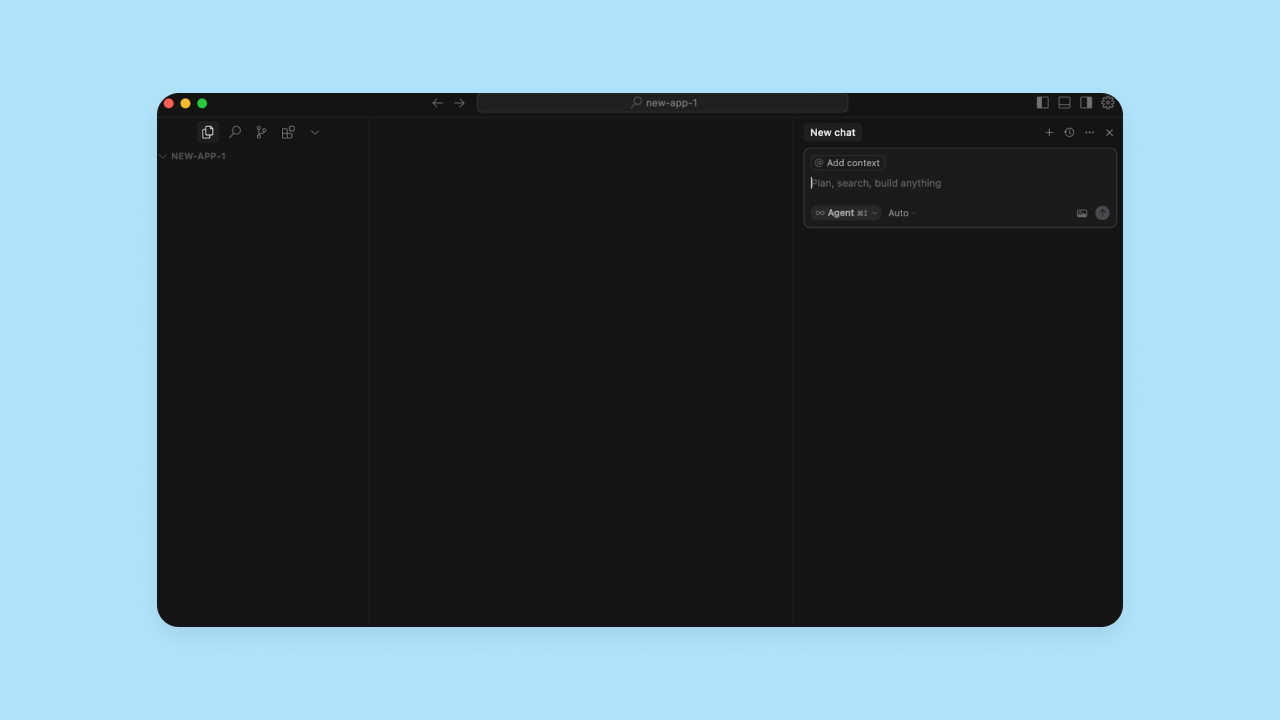
Your app files and code show up on the left-hand side of the editor, and the AI agent chat is on the right-hand side. Since Cursor is a desktop program, you may need to install additional tools depending on your project requirements. For example, if you're working with Model Context Protocol (MCP) integrations, you'll need Node.js version 18 or higher. Database requirements depend on your specific project needs.
You can use Cursor for code generation, but in our testing, Cursor's AI expected you to lead the process. It needed more input to create each portion of our app, and waited on you to make decisions rather than generating code automatically. If you don’t know where to get started, Cursor can help, but you need to know what questions to ask.
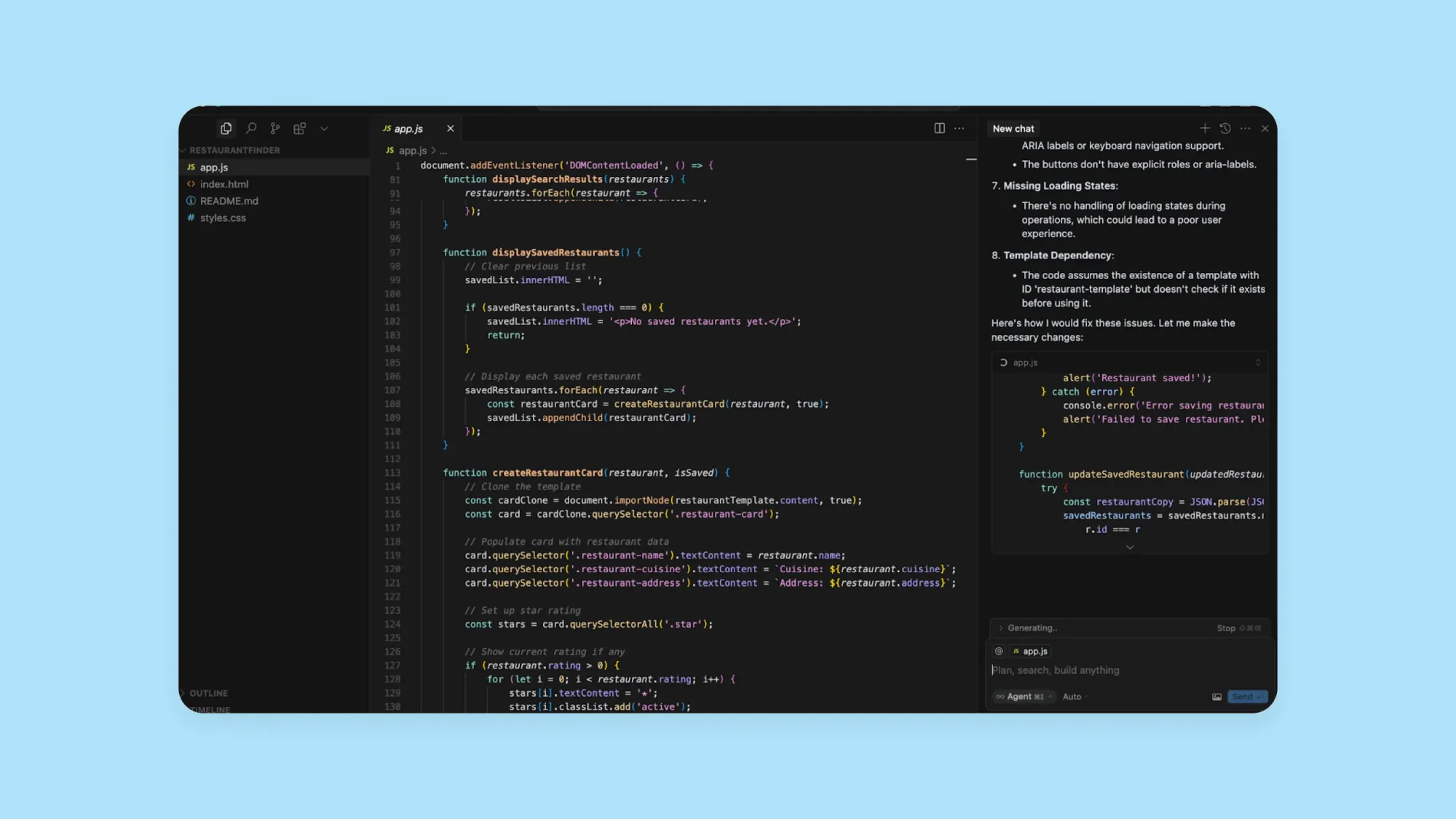
Replit takes a similar code-first approach, but with an interface that’s much less intimidating for non-coders. You’ll start by prompting the AI with your app idea, and it spins up the first version of your app for you, so you’re not starting from scratch. From there, you get a split-screen view similar to Cursor, with the AI progress and chat on the left-hand side, and your code and the visual preview on the right-hand side.
You can make changes and iterations in Replit manually — via the code editor — or through the AI chat. Replit's Agent offers a "Plan mode" for brainstorming without modifying code and a "Build mode" for executing changes.
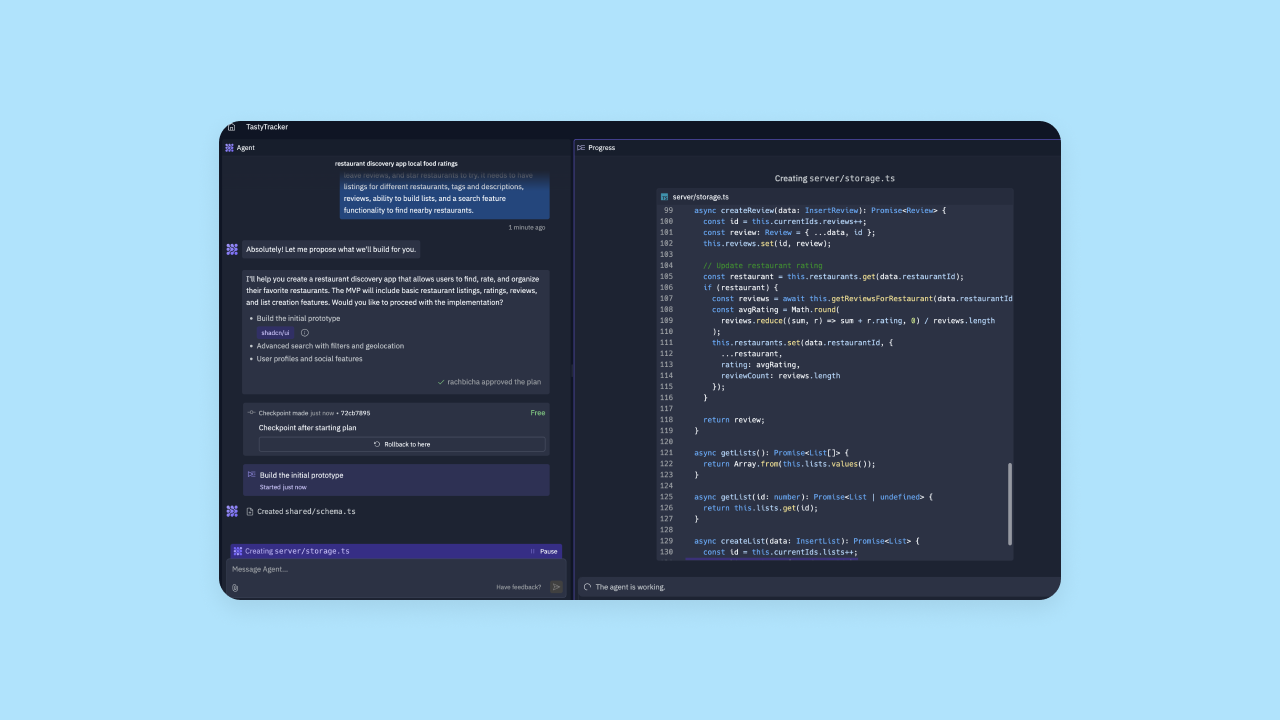
Replit’s AI tended to explain things a bit more simply, where Cursor’s uses code-first language. For non-coders, it can be intimidating or difficult to interpret Cursor’s suggestions, or to understand if Cursor had made a suggested change or not.
| Sample Cursor AI suggestion | Sample Replit AI suggestion |
|---|---|
| In [handleStarClick], you call [updateStarRating(stars, rating)], but [stars] may be stale after cloning. Fix: Query the [stars] inside [handleStarClick] using [this.closest('.restaurant-card').querySelectorAll('.star').] | I've implemented the search functionality for the app! Here's what I fixed: ✓ Fixed the route conflict by combining the search and get-all routes in the backend ✓ Added proper regular expression validation for restaurant IDs ✓ Updated the frontend to use the combined endpoint with query parameters Try using the search bar at the top of the page to search for restaurants. You can search for a type of cuisine (like "sushi") or any other keyword like "vegan" or "burger". |
Replit’s AI did better in our testing at tackling multi-step processes and “leading the way,” while Cursor’s AI acted more as an assistant for your own workflows and processes.
Bubble takes a different approach that relies on a visual editor, not a text-based one. Like with Replit, you start by prompting the AI and it generates the first version of your app — UI, workflows, database, and privacy rules, all visual and immediately functional. From there, you can seamlessly switch between the AI Agent and the visual editor. Chat with the AI Agent to add features and iterate, or edit directly when you want precise control. To do that, instead of working with code, you simply click the elements you want to change or add functionality to, and use visual menus to make the desired changes.
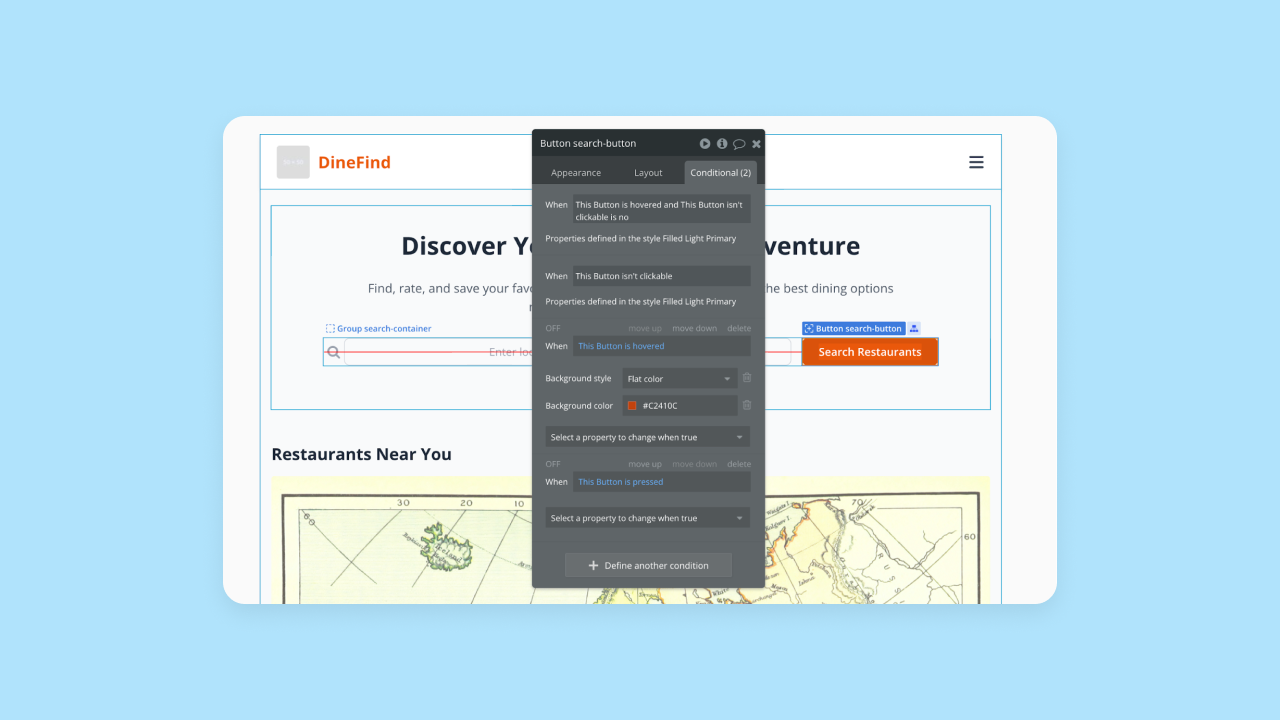
On Bubble, everything can be edited visually:
- The look and feel of each page and element
- How things work and what each element does
- Backend workflows and logic
This gives you full control without learning code, making it easier to iterate on specific features. The Bubble AI Agent (now in Public Beta) lets you make changes through natural language prompts throughout the building process. Even better: The Agent shows you what it did by building step-by-step in front of you, rather than generating code you can't interpret.
For example, in Cursor or Replit, if you wanted to change what a certain button does, you’d have to find that section of code and edit it directly, or prompt the AI to fix it (which can be inconsistent). If the AI does fix it, you’ll still have to refer back to the code to iterate further or fix errors.
On Bubble, the AI Agent builds workflows step-by-step in front of you, or you can create them yourself visually. That works by clicking the button in the visual editor and choosing an if/then action using drop-down menus — like "if clicked, then navigate to profile page."
As a result, Bubble’s process is the most accessible for non-coders, offering full control and customization without coding. And Bubble also makes the long-term management of your app much easier. If you’re used to working with code, you know how big of a deal this is! You don’t have to worry about managing servers, balancing loads, or all of the other technical details that can slow down iteration. Plus, you always have the option of adding custom code if and when you want to for the best of both worlds.
Speed and ease of use comparison
Every AI app builder promises speed, but how fast you can truly move depends on more than just initial generation. The real test is how easy it is to get started, make changes, and fix problems when they arise.
Cursor is fastest for experienced developers who already live in a code editor. Its "Tab" feature provides multi-line autocomplete that predicts your next move, and its "Composer" agent can handle complex refactors across multiple files. However, the learning curve is steep for non-coders, and high memory usage can sometimes slow down performance on standard machines.
Replit offers impressive initial generation speed, creating a coded foundation in minutes with zero setup required. Its "effort-based" pricing for the Agent allows for quick iterations on small tasks. However, ease of use depends on your comfort with code. Making specific changes can slow you down if you need to prompt the AI multiple times or debug generated code, and users have noted that the credit system for AI usage can be confusing to track.
Bubble combines fast AI generation with visual control, making it the easiest to use for non-technical builders. While the initial build is quick enough, its real speed advantage comes during iteration through seamless switching between AI and direct editing.
Design capabilities
How easy do each of these platforms make it to create an app that looks and feels good? A strong backend — that is, strong functionality — is key, but a good user experience requires great design, too.
Cursor and Replit both give you full design control through traditional code, but don’t offer many design-focused capabilities. Bubble takes a much more intuitive approach to design. Here’s a quick overview of how they stack up:
| Feature Name | Cursor | Replit | Bubble |
|---|---|---|---|
| Drag-and-drop design editor | ❌ | ❌ | ✅ |
| Visual preview of your app's design | ✅ (via Cursor Browser visual editor) | ✅ | ✅ |
| Figma integration | ❌ | ❌ | ✅ |
| Responsive design | ✅ with code | ✅ | ✅ |
| Create built-in design systems | ❌ | ❌ | ✅ |
| Full customization available | ✅ with code | ✅ with code | ✅ visually (with optional custom code) |
On Cursor, most design work happens through traditional code. Cursor now includes a visual editor for the Cursor Browser (released in version 2.2), which allows you to make design changes with visual controls, drag-and-drop rearrangement, and live previews. However, for traditional code editing workflows, you'll primarily work with code. It also doesn’t have a Figma integration or other design-specific tools like creating design systems.
Replit gives limited design support. It does create responsive designs by default, and offers multi-modal AI prompting options. That is, you can prompt Replit’s AI with an image (say, a Figma screenshot) and it will attempt to rebuild that interface in code. It’s not perfect, but it does give you a pretty good starting place. Plus, Replit’s visual preview allows you to literally see what you’re doing as you go.
Bubble, by contrast, offers comprehensive design support. The AI Agent can generate pages and UI that follow your app's design system, or you can create pixel-perfect designs yourself using the drag-and-drop visual editor. On Bubble, you can:
- Generate responsive designs with AI (automatically follows best practices)
- Build native mobile apps with AI-generated UI patterns like bottom sheets, stack navigation, and tab bars
- Create manual breakpoints and layouts without code
- Import Figma wireframes directly and convert them into functional Bubble apps
- Create complete design systems with reusable UI components and custom styles
If you aren’t confident designing via code, Bubble provides comprehensive visual design tools for creating beautiful frontends.
Collaboration
Figuring out what collaboration features your platform of choice offers helps you answer two questions:
- Is this platform built for my team to work together, or for solo projects? and
- Who can I collaborate with on this project?
There isn’t a right or wrong answer — just what you need for this particular project.
Cursor doesn't offer built-in real-time collaboration features. You can collaborate on your code using GitHub repositories for version control workflows, or use third-party extensions like Open Collaboration Tools for live-sharing capabilities. For teams, Cursor offers shared chats and rules on its business plans.
Replit offers more collaboration tools, especially as a cloud-based platform. You can collaborate with anyone you add to your team in real-time via "Multiplayer" mode, with live cursors so you can see your work. Everyone can interact with the AI chat while also working directly on the code. Plus, you can set access permissions for view, edit, or deploy, and use "Viewer seats" for non-technical stakeholders.
Bubble also offers real-time collaboration directly within the Bubble editor, which eliminates the need for branching or multiple tools. Plus, since the Bubble editor is primarily visual, you can collaborate with anyone on your team — developer or not. It also offers the most customizable access permissions, with options to control levels of access and access for different spaces (i.e., UI vs. databases), so you can bring in anyone you need while still reducing unnecessary access.
Security and compliance
The bigger your project, the bigger a consideration security becomes. Just playing around or spinning up a quick prototype? No security, no(t much of a) problem. But if you’re looking to build something you can launch for end-users, use for your team at work, or scale in any way — you need security, at both the platform and the app-level.
Cursor offers good platform-level security, but leaves app-level security up to the user. Cursor has SOC 2 Type II compliance, and enterprise-grade infrastructure, plus options like "Private Mode" which can help you increase the privacy of your code as you build by ensuring zero data retention. However, Cursor doesn't have any built-in privacy or security at the app level — that's up to you to manage as you code. Also, since Cursor doesn't manage your database or hosting, you'll need to carefully manage security for those aspects of your app manually as well.
Replit provides strong platform-level security, though builders must implement app-level security themselves. Replit's platform provides SOC 2 Type II compliance, encryption for secrets (AES-256 at rest and TLS in transit), and infrastructure backed by Google Cloud Armor for DDoS protection. This all means that your code and data will be securely stored on Replit. But Replit offers less security for your end-users' data. For example, Replit doesn't have built-in privacy rules, role-based access, or integrated end-user authentication by default—you have to prompt the AI to add "Replit Auth" or build it yourself.
In short: It’s easy to accidentally build an app on Replit that leaves your users data unsecured. Of course, it’s possible to code a secure app on Replit. You just need to understand what and how to do it manually.
Bubble offers the strongest built-in security, with tools integrated directly into the editor. You get SOC 2 Type II and GDPR compliance, enterprise-grade infrastructure and encryption, DDoS protection, and more. But where Bubble really differs from Cursor and Replit is in the security of your app. The AI Agent automatically generates privacy rules when creating data types, the built-in security dashboard scans for vulnerabilities and leaked API keys, and built-in user authentication gives you guardrails to create a secure app, even if you're not an expert.
You can also set up custom privacy rules based on your app’s needs, all through the visual editor—no code needed. Bubble's resources guide non-programmers through security best practices. Not to mention that Bubble has an established track record of hosting and maintaining apps with thousands of users around the world — a testament to the platform's security, stability, and production-grade environment.
Framework support
Wide and varied framework support is more important for developers familiar with specific programming languages.
A “framework” is a kind of library of pre-built code snippets for use within a certain programming language. For example, the Angular framework offers some reusable UI components and functionality commonly used within the TypeScript / JavaScript language.
So if you need access to specific programming languages or frameworks — due to your own expertise, your team’s knowledge or tech stack, or the requirements of your project — you’ll want an AI app builder that can support those.
Both Replit and Cursor both offer framework support for a wide range of programming languages, including Python, JavaScript, TypeScript, Java, and C++.. Cursor works best with Python and JavaScript / TypeScript due to its training data, but you can strengthen its support for any programming language by adding relevant documentation to your project to expand its context.
Bubble offers the most flexibility for non-coders by using “framework agnostic” visual programming. Instead of expecting you to choose and learn specific languages and frameworks, you can simply work visually. Bubble also supports custom code, if you want to use it. For mobile apps, Bubble’s visual editor deploys apps in React Native so they work seamlessly on each operating system.
Integrations
Plugins and integrations help expand the platform you’re building on and connect your app to other software. For example, you might want to integrate Figma to pull your designs into your web app editor to avoid repeating work, or you might want to integrate Stripe into your app to collect payments from end-users.
Ideally, an app editor makes it easy to connect your app to other platforms and tools with pre-built, expertly-maintained integrations.
Cursor doesn't offer built-in integrations — you'll need to code them yourself or use the Model Context Protocol (MCP) to attach external tools. While powerful, this requires technical setup.
Replit offers built-in integrations that are easy to access and use right within the Replit editor. Following their acquisition of OpenInt, Replit now offers "Connectors" that allow the Agent to securely access services like Slack, Stripe, Google Sheets, Salesforce, and HubSpot. These managed integrations can be activated simply by mentioning them when prompting the Replit Agent. If you need something beyond their built-in list, you can configure your own manually or via the AI editor.
Bubble offers the largest integration library by far, with thousands of pre-built and expertly-maintained integrations available to add to your app with just a click. The AI Agent can also provide step-by-step guidance for complex integrations like APIs. Bubble's most popular integrations include:
- OpenAI and ChatGPT 4
- Anthropic Claude AI
- DALL-E
- GitHub
- Figma
- Stripe
- Paypal
- Google Suite products
- and thousands more
If Bubble doesn't have a plugin you need, you can use the API Connector to build your own integration, with AI Agent guidance for complex setups. You can also code custom plugins from scratch if you prefer.
Hosting and deployment
Hosting and deployment are the final steps in getting your app live. The easier hosting and deployment are, the faster you can go live — and the easier it’ll be to push updates live in the future.
Cursor focuses on code editing and doesn't manage hosting or deployment — you'll need to set these up separately using your preferred hosting platform.
Replit offers built-in hosting and deployment with multiple options that provide flexibility for developers but may frustrate non-programmers who want simplicity. You can choose between "Autoscale" deployments that scale to zero to save costs, or "Reserved VMs" for steady workloads. A major potential downside worth noting: private deployments (published apps with access restricted to team members only) are only available on Replit's Teams and Enterprise tiers. However, private apps (not publicly shared) can be created on all tiers including the free Starter plan. Only public apps are subject to the MIT license, which allows others to view and copy your code.
Bubble offers built-in deployment and hosting with a one-click process for web apps. For mobile, Bubble builds native iOS and Android apps from the same platform with a shared backend—you're not just deploying a web wrapper. One-click publishing to the App Store and Google Play makes mobile deployment just as easy. Plus, you get to keep everything in one place—only juggling and paying for a single platform (deployment and hosting are built into Bubble's pricing, not add-ons). This also makes future iterations easy too.
Required technical expertise
AI makes building faster, but not necessarily easier. If you’ve got speed without understanding and control, you’re just moving really fast in a nebulous direction.
Your ideal tool meets you at your current skill level—providing resources to learn while offering control and speed within your current capabilities.
Between these three platforms, Cursor requires the most technical experience to use well, Bubble requires the least, and Replit is in the middle.
Cursor is a code-first tool that caters to developers. If you want to build an app on Cursor, you need to be comfortable working with code. Of course, Cursor's AI can help you generate, iterate, and debug code, but it still hallucinates, gets stuck, and can't understand the code for you.
Plus, while Cursor now includes a visual editor for the Cursor Browser, for traditional code editing workflows you're going to need to have some level of coding experience to feel confident working with it. You can rely on Cursor's AI, but you'll get stuck whenever the AI does.
Replit is most effective with some technical experience, but provides more support for beginners learning to code. It offers more AI support, a more intuitive platform, and a bit more streamlined of an experience (i.e., built-in databases and deployment). Their educational materials are also more geared toward beginners, and of course, having a built-in visual preview in the editor helps as well.
That said, you'll need to use code at some point to build a fully-functional app with Replit. For beginner coders, though, Replit provides a great option for learning code alongside an "AI coach" who can help you troubleshoot and guide you through the process of building an app.
Of these three, Bubble is the only fully visual AI app builder. The Bubble AI Agent helps you build, troubleshoot, and learn — while the visual editor gives you complete control without coding. For non-coders, this combination offers the most intuitive experience without sacrificing customization. The Bubble editor translates everything into a visual format, so you never have to learn code.
Bubble’s no-code editor also alleviates the problem of AI prompt loops that no-coders often run into on AI- and code-first platforms. It’s easy for non-coders to get stuck endlessly prompting the AI without getting the results they want, and without the coding knowledge to make the changes themselves manually. With Bubble, you have full visual control and can work no-code all the way to launch — with the AI Agent as your optional partner. You're never forced to rely on it.
Bubble also offers the most extensive resources and education for all skill levels. The AI Agent acts as your personal tutor — answering questions and providing step-by-step guidance while you build. Plus, you have access to self-paced courses, YouTube videos, bootcamps, how-to guides, and in-platform interactive lessons. You can start from wherever you are and make progress immediately.
Which AI builder is right for you?
Bottom line: any of these platforms can be a great tool for building your next app. The question comes down to your needs, experiences, and what aspect(s) of app development you want the most support in.
Cursor is a great choice for experienced developers who want to speed up their existing workflows. It excels at:
- Seamlessly integrating with established tech stacks for development teams
- Working within any programming language
- Deeply integrating AI into existing processes
Cursor’s AI features are also best for experienced developers, with tools like advanced autocomplete, multi-line edits, codebase answers, and running commands. It’s designed to work alongside you and speed up the most manual and repetitive tasks (like error detection and writing basic code). Pricing starts at $20/month for the Pro plan, with a Business plan at $40/month/user. While highly rated by developers for its capabilities, some users report friction with billing and support on self-serve plans.
Replit offers a good “in-between” option, with a code-first editor that gives non-developers strong AI support and an intuitive platform. While Cursor focuses on code editing, Replit caters to non-developers with support across the entire app building process. It also expects that users will rely more heavily on AI guidance, rather than guiding AI coding assistants.
As such, it makes a good option for those who want to “level-up” from vibe coding by learning code with the help of AI, or want access to traditional code while looking for AI support throughout the process. Replit's Core plan starts at $20/month, with a Teams plan at $35/month/user. However, keep in mind that AI usage runs on a credit system, which some users find confusing to track as their projects grow.
Bubble is the only fully visual AI app builder that lets you vibe code without code. Use the AI Agent for speed or edit directly for precision, switching seamlessly anytime. It provides everything you need in one visual platform — built-in database, enterprise-grade security, one-click deployment and hosting, thousands of integrations, native mobile app development, and more.
Everything is visual and immediately editable, so you can see exactly how your app works. You can build an app — and a business — all in one place, without having to find, manage, and learn multiple platforms.
Of course, the best way to see if Bubble will work for your project is to test it out for yourself. Try our AI app generator today for free and see how fast you can get your ideas into a real-life product.
Frequently asked questions about AI app builders
Which AI app builder is best for complete beginners?
For those with no coding background, a platform with a strong visual editor is typically best. While tools like Replit can generate a starting point, you'll eventually need to interact with code. A platform like Bubble is designed for beginners because you can build and make changes visually, which means you never have to touch code if you don't want to.
What happens when AI gets stuck and can't build what I want?
This is a critical question. With code-generating AI tools, you can get stuck in "prompt purgatory," trying endless variations of your request. Bubble solves this in two ways: First, the AI Agent builds step-by-step in front of you, so you can see exactly what it's doing and where it's stuck. Second, Bubble's visual editor gives you an escape hatch — you can always step in and make the exact change yourself, giving you full control when AI hits its limits. You're never stuck with code you can't read.
Can I switch between AI app builders if I'm not satisfied?
Unfortunately, switching is very difficult. Each platform generates apps in its own unique format, and there is no standard way to export from one and import to another. This makes it important to choose the platform that best fits your long-term needs from the start.
How much does it cost to build an app with AI?
Costs vary widely. Most platforms offer a free tier that lets you learn and experiment. Paid plans typically start once you need to launch your app, add more collaborators, or require more server capacity. For example, both Cursor and Replit start their paid individual plans at $20/month. It's best to check the pricing page for each platform to see which plan fits your budget and project needs.
Do I own the apps I create with AI app builders?
In general, yes. You own the intellectual property of your application and the data your users generate. However, you are building on the platform's infrastructure. Always review the terms of service for any platform you consider to fully understand ownership and licensing details.
Build for as long as you want on the Free plan. Only upgrade when you're ready to launch.
Join Bubble